
fbaifpppndnlbbjcbjdfgbdkoibnipjb


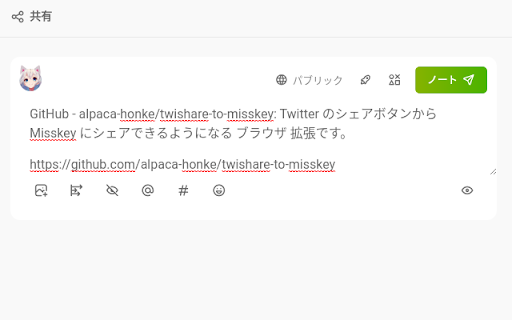

There are many websites out there that have share buttons for Twitter, Facebook, LINE, and so on. However, Misskey users may be thinking, "Why can't I share to Misskey with those buttons? You may be thinking, "But that doesn't mean I can't share to Misskey! With this extension, you can share to Misskey using Twitter's share button! Features: - When you click the share button for Twitter, a confirmation screen appears and you can choose whether you want to share to Misskey (not Twitter) or not. - Of course, you can also share to Twitter if you cancel. - If there's no Twitter share button, you can still share to Misskey by clicking the share button in the lower right corner. - Can be moved and moved out of the way - You can hide it. - It will be hidden when there are some full-screend something such as videos. - A share button in the extension popup - Almost all Misskey (v12 or later) and Firefish (formerly Calckey) are supported - When sharing a tweet, the content of the tweet can be pasted as a quote in the note - Remove unnecessary information attached to URLs on certain sites before sharing - YouTube: remove IDs that may be involved in tracking - Twitter: Delete 2 types of unnecessary information - Avoid unexpected mention on shared post from Threads - Secure because it does not store authentication information - Distribute bookmarklets that have the same functionality as some of the extensions Usage: 1. go to chrome://extensions and grant various permissions. (First time only) 2.Click the Twishare to Misskey for Firefox icon from the list of extensions in the upper left corner, and enter the server you want to share to. (If you are sharing via Misskey Hub or after the second time, you do not need to do this.) Also, select the toggle switch below the icon. 3. When you click the "Share to Twitter" button and go to the next page, you will be asked if you want to share to Misskey. If you turned on the toggle switch in step 2, a green button will appear in the lower right corner of the screen. Pressing this will allow you to share pages that do not have a Twitter share button. Repository: https://github.com/alpaca-honke/twishare-to-misskey Please use the contact information listed in the URL above to ask questions or report problems. This extension is distributed under MIT LICENSE.

ShareSwitch - Redirect Twitter share buttons to Bluesky, Mastodon, and more
Redirect X (Twitter) share buttons to your favorite microblogging platforms ShareSwitch is a browser extension that changes the destination of X (formerly Twitter) share buttons. - Redirect X's share button to open a posting page on Bluesky, mastodon.social, or Misskey.io. - Easy to use with simple click and toggle functionality. ShareSwitch currently supports redirection from X to the following platforms:

Share to Mastodon
Share to Mastodon is a browser extension for quickly sharing links and tabs to the Mastodon social network. You can click the Mastodon button in the top bar (or the keyboard shortcut) to share the current tab, or right-click a link on any page. You can also select text and pick Mastodon in the context (right-click) menu to share a snippet. The browser extension can store multiple server options, and synchronize them with your browser's settings. It uses the share dialog hosted by the selected server, so no API access or account permissions are required. Share to Mastodon is compatible with any Mastodon server, as well as platforms that have implemented Mastodon's share URL scheme, such as Calckey and Misskey. It also works with the Elk Mastodon web client. This project is not affiliated with the Mastodon project or Mastodon gGmbH. The code is open-source on GitHub: https://github.com/corbindavenport/share-to-mastodon

twitter画像原寸ボタン
This extension adds "Original" button on the image-embedded tweet in Twitter. Click the "Original" button to open image(s) in original size. [注 / Note] この拡張機能は、譲渡・売却の予定はありません。そのような連絡はお断りします。 I WILL NOT transfer/sell this extension under any condition. I REFUSE such requests.

Twitter to Misskey
"Twitter to… "Twitter to Misskey"は、あなたのTwitterでのつぶやきを簡単にMisskeyにも同時に投稿することを可能にするChrome拡張機能です。この拡張機能により、Twitterのホームタイムラインで新たにツイートを作成するたびに、あなたはそのツイートをMisskeyにも投稿することを選択できます。これにより、あなたはTwitterとMisskeyの両方のフォロワーと効率的にコミュニケーションを取ることができます。 特長: トグルボタン: あなたのツイートをMisskeyにも投稿するかどうかを制御するための一発ボタン。緑色はMisskeyへの投稿が有効、灰色は無効を意味します。 カスタム可視性: Misskeyの投稿の公開範囲を、'public'(公開), 'home'(ホーム), 'followers'(フォロワー限定)から選択可能。 ユーザー固有の設定: 各TwitterアカウントごとにMisskeyのURLとアクセストークンを設定できます。 簡単なリセット: 必要に応じてMisskeyのURLとアクセストークンをリセットできます。設定はツイートボタンを有効化した際に自動的に求められます。 "Twitter to Misskey" は、あなたがTwitterとMisskeyの両方のプラットフォームで同時に活動することを簡単にします。これにより、あなたは二つのプラットフォームにまたがって自分自身を表現することができます。
