
fahlhbnmejghggofalihblnbhljohomn
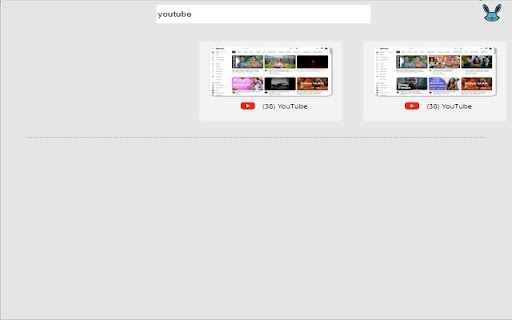

Now search for a tab in a simplified separate view of opened tabs Separate view for all opened tabs. Ability to search for a tab by its title. Prioritizes frequently used tabs at the top of the list. Use the shortcut key Alt+T to navigate through tabs using arrow keys. 🌟

Simplest Tabs
Streamline Your Tab Management. Save, search, and navigate with ease using Simplest Tabs. Simplest Tabs: Effortlessly Save, Organize, and Manage Your Browser Tabs With Simplest Tabs, you can take control of your browsing experience by seamlessly saving, organizing, and managing your browser tabs. This powerful Chrome extension empowers you to save the current tab or all open tabs with a single click, ensuring you never lose important content again. Discover enhanced productivity as your saved tabs are conveniently displayed in a well-organized list, complete with tab titles, favicons, and direct links. Effortlessly search and filter through your saved tabs, enabling quick access to the information you need. Customize your tab organization with intuitive arrow icons, allowing you to easily reorder tabs based on priority or relevance. Take advantage of the tab editing feature to personalize titles and further enhance your organization. When it's time to declutter, deleting unwanted tabs is a breeze, giving you a clean and focused browsing environment. Enhance your browsing experience with Simplest Tabs and regain control over your workflow. Stay organized, boost productivity, and never miss a beat with this indispensable tab management tool.

Super Tab Manager
Lightweight, performant tab manager that declutter your messy tabs and improve your productivity by 200%. Also respect your privacy. 🏆 Features - Group Tabs By Domains: instantly tidy your messy tabs by grouping them into Domains. - Close Duplicated: clean up your tabs by removing unnecessary duplicates. - Close NSFW: remove unsafe tabs from your browser, saves you from trouble. - Close Social: remove all social media tabs from your browser, allows you to focus on your work. - List/Search tabs: find your lost tab by typing its title, then bookmark or close it. - Memory Tracking: show you how much memory you have left in your system. - ⭐NEW: Pin tab - ⭐NEW: Open current tab in incognito - ⭐NEW: Activate Picture-in-Picture mode for media (music/video). 📱 UI - Dark and Light mode based on user's system settings. - Sleek, minimal design.

Chrome Palette
Command Palette for Chrome Open source tool to access all internal chrome commands without using the mouse or remembering hotkeys. Does not upload data to any server, and it will never do (not even telemetry) Start by setting up the shortcut: 1. Click on the extension icon 2. Click the cog icon at the right of the search field 3. The chrome hotkeys page will open, the pencil to edit the shortcut 4. Then set your key combination by pressing it (recommended: cmd+shift+p) - Search tabs - Search history - Search bookmarks - Search installed extensions - Add to bookmarks - Split screen - New Tab - New Window - Open History Page - Open Passwords Page - Open Downloads - Open Extensions - Open Extension Shortcuts - Open Bookmark Manager - Show/hide Bookmarks Bar - Open Settings - Close Current Tab - Terminate Current Tab - Reload Tab - Reload All Tabs - Clear Cache and Reload Tab - Toggle Pin - Duplicate Tab - New Incognito Window - Close Other Tabs - Close Tabs To Right - Close Tabs To Left - Mute/Unmute Tab - Move Tab To Start - Move Tab To End - Move Tab Left - Move Tab Right - Reopen/Unclose Tab - Deattach Tab (Move to New Window) - Reattach Tab (Move Tab to Previous Window) - Split screen (vertical or horizontal) - Toggle full screen - Clear browsing history, cookies and cache - Open Chrome SignIn internals - Open Chrome Apps - Configure Chrome internal flags - Configure Third-party Cookies - Configure Ad privacy - Configure Sync and Google Services - Configure Chrome Profile - Import Bookmarks & Settings - Configure Addresses - Configure Autofill & Passwords - Configure Payment Methods - Configure Site Settings & Permissions - Configure Security - Configure Privacy and security - Configure Search engine - Configure Default browser - Configure on Start-up - Configure Languages - Configure Accessibility - Configure System & Proxy - Reset chrome settings - About chrome - Print page - Reset command history # Changelog * v2.2.0 Added split screen * v2.1.0 Added search installed extensions * v2.0.0 Full rewrite, smaller, faster, new features and more modern look * v1.2.3 Improved search performance * v1.2.2 Added shortcuts for sub-palettes (edit from the shortcuts editor. The popup needs to be open before using the secondary shortcut) * v1.2.1 Reduced load time by 50% (ported to Preact) * v1.2.0 Added "Bookmark this tab" * v1.1.0 Added Bookmark, Audio Tabs and History search support

Tab Manager & Sessions with Screenshots – Tabzy
Stay focused: auto-capture Chrome tab screenshots, clear duplicates and save sessions designed for ADHD minds. Don’t be afraid: once you install the extension, feel free to click the extension icon—without your actions, it will not do anything to your tabs and will not close them. Tabzy is a powerful tab manager and session manager for Chrome that helps you organize, save, and restore tabs using tags, dates, and screenshots. With remote storage, Tabzy ensures your tabs are always at your fingertips. Perfect for boosting productivity, reducing tab clutter, and quickly finding the pages you need. 1. Tag-Based Organization - Assign custom tags (e.g., “Work,” “Research,” “Shopping”) to any group of tabs. - Easily filter and view tabs by tag. 2. Tab Screenshots (Visual Previews) - Automatically or manually capture screenshots of open tabs for quick visual reference. - Browse thumbnail previews of each saved tab to instantly recognize content. 3. Session Management - Save complete sessions (all open tabs in a window) and restore them with one click (save session, restore session). - Import/export sessions as local files (JSON) and reopen them later (local export/import). 4. Duplicate Tab Detection - The built-in duplicate finder instantly identifies tabs with the same URL. - Preview grouped duplicates and close excess tabs to reduce memory and CPU usage. 5. Restore Tabs (History & Last closed tabs) - The History section tracks every tab by date. - Powerful search by title or URL—search among open tabs or saved sessions. - “Last Closed Tabs” view shows your most recently closed pages so you can restore them quickly. - People with ADHD or anyone who constantly has many open tabs—Tabzy is a lifesaver for those who juggle dozens (or hundreds) of tabs at once. - Professionals & Freelancers. - Students & Researchers gathering resources from various websites (research organization). - Marketers & SMM Specialists analyzing competitors and trends (tabs audit). - Anyone who loves clarity and wants to find information quickly (tab organizer). - Tag & Organize: Assign custom tags to tabs (tagged tabs). - Visual Previews: Capture and view tab screenshots (thumbnail previews). - Session Save & Restore: Save tab sessions and restore (save sessions, restore sessions). - Duplicate Detector: Identify and close duplicate tabs (duplicate tab finder). - History & Last Closed Tabs: Browse tab history by date and view recently closed tabs (tab history, last closed tabs). - Cloud Sync: Store data remotely for access across devices (remote storage). - Quick Search: Instant tab search across open or saved tabs (instant tab search). - Move Tabs Between Tags: Easily reassign tabs to different tags. - Optimize Productivity: Free up browser memory by closing inactive tabs without losing them. - Instant Access: Find tabs by screenshot or keyword in seconds. - Maximum Flexibility: Save any tabs — from work projects to entertainment. - Full Control: Custom tags, manual saving, session backups, and cloud storage. - Privacy First: No third-party trackers, no hidden data collection. It’s just you and your tabs. If you encounter any issues, have ideas, or questions about Tabzy, please reach out: Install Tabzy today and say goodbye to “lost” tabs—transform your browser from a chaotic workspace into an organized productivity hub. Tabzy – Organize tabs, manage sessions, and supercharge your efficiency!
