
fafieejgefmpclgpcemnnfmmcjglbnbl
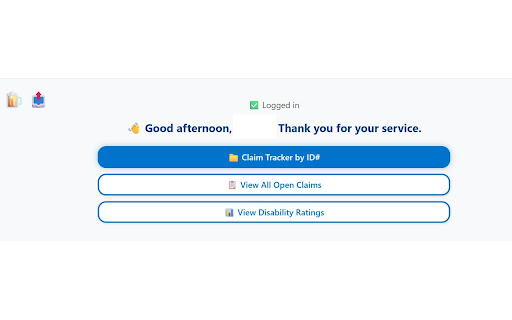

Track and summarize your VA claims Disability What This Extension Does Track Claims by ID: Instantly look up any VA claim by its 9-digit ID. View a detailed, step-by-step timeline and current status—including progress bar, estimated completion, and decision letters. View All Claims: See a summarized list of all your open and closed VA claims. Sort by year, type, or status, and quickly jump to full details for any claim. Disability Ratings Breakdown: See all your current VA disability ratings, with an automatic calculation of your combined rating (“VA math”), including static and protected status, effective dates, and not-service-connected ratings. Rich Visuals & Tooltips: Each claim step, rating, and condition comes with plain-English explanations and tooltips to help you understand VA language and what each status means. Privacy Friendly: No data is stored or sent anywhere except securely connecting to your own VA.gov account. Key Features Clean, readable interface with tabbed navigation Combined rating progress bar and suggestions Track claim documents, supporting evidence, and required letters Blur-to-reveal Claim ID for privacy Requirements VA.gov Login Required: You must be logged in to VA.gov for the extension to access your claim data. Official VA API: All data is retrieved directly and securely from VA’s official API. Disclaimer: This extension is not affiliated with or endorsed by the U.S. Department of Veterans Affairs. It is an open-source tool to help veterans better understand and manage their VA disability claims.

VA Benefits Dashboard
Enhanced dashboard with VA disability ratings, claims, appeals, and letters with automatic refresh and better data management. VA Benefits Dashboard (formerly CodeTracker) helps veterans track their VA disability ratings and claims status through a clean and intuitive interface. Now you can also see your appeals as well as a list of letters the VA has sent to you ... and you can download them directly from the link on the extension without digging through the VA site to find it. How easy is it to use VA Benefits Dashboard? Step 1. Log into VA.gov Step 2. Open the VA Benefits Dashboard extension Step 3. Select "Disability Ratings", "Claims", "Appeals", or "Letters" ✅ View your combined VA disability rating ✅ See your full list of service-connected conditions ✅ Obtain your Diagnostic Codes used to rate the disabilities ✅ Monitor claim progress and decision dates ✅ View a list of any appeals you've filed ✅ View and Download your decision letters (and others) ✅ Refresh your data instantly ✅ 100% client-side, no data tracking Whether you're managing benefits or monitoring claim decisions, VA Benefits Dashboard puts clarity at your fingertips. 🔒 No data ever leaves your browser (unless YOU export it). 🆓 Always free to use. ❤️ If this extension helps you, please leave a positive review and feedback UPDATE (11/24/2025): I just added sorting to the disabilities rating. Developed by a veteran for veterans.

VA Claim Tracker
Extension to help veterans review data related to their disability claim. Most veterans filing for disability claims with the VA find it hard to obtain a complete overview of their claim progress. This extension provides more details on the veterans claim status by using data already provided by the claim detail page in an easy to understand format. NOTE: This extension does NOT change anything on your claim page or any other page and only can interact with VA.gov claim pages. Features - Claims data is structured in an easy to digest format - Review Standard claims - Review HLR (Higher Level Review) claims - Review Supplemental Claims - Review Appeal claims - Field description tool tips for Appeal type claims - Standard claim show current phase and not just overall status - Review Internally Tracked Items - Clear locally saved claim data - Refresh Claim Data - Dark / Light Theme - Resources DISCLAIMER: VA Claim Tracker is licensed under CC BY-NC-ND 4.0 and has no affiliation with VA.gov or it's entities, and is FREE to use. This extension does NOT use cookies, track or transmit user data outside of extension.

ID.me Shop: Discover Community Discounts
Let the ID.me Shop browser extension find Military, Nurse, Teacher, Responder discounts and more while you shop. Unlock savings with ID.me Shop. The ID.me Shop browser extension automatically surfaces discounts and cash back offers from more than 5,000 top brands. Verified communities — like Military, Veterans, Students, Teachers, First Responders, and more — will see deals made just for you. All ID.me members can earn cash back while shopping — the extension instantly alerts you when it’s available at participating stores. ✔️ Discounts for service communities ✔️ Cash back offers for all ID.me members Add ID.me Shop to Chrome and start unlocking savings today. When you use ID.me Shop, retailers may pay us a fee or affiliate commission.

VA Assistant
Extension to help Veterans review VA data. Inspired by the fantastic work of the *VA Claims Tracker*, this extension provides a tabbed interface into different portions of the VA website, leverage API calls to pull your information. This extension only queries and displays data. No personal data is stored in the extension, only the settings shown on the "Settings Tab". No data is collected or analyzed by the extension author. No authentication data is stored. * Added a button to check for `Claims` between 2022 and 2024 that match `phil` for either `jurisdiction` or `tempJurisdiction` * Added `ID` column to `Appeals` tab * Shows the VA Appeal ID for reference * Added better icons for `Appointments` * Added `Reset Settings` button in the `Settings` section. * Published Firefox Version * Re-organized tabs to have sub-tabs for certain data structures. * Added section to `VA Payments` * `Travel Pay` * Added sections to `VA Health` * `Vaccines` * `Prescriptions` * `Allergies` * `Imaging and Radiology` * `Labs and Tests` * Added sections to `VA Profile` * `Overview` * `Health Care Overview` * `GI Bill Overview` * `VA Home Loan` * `Service History`
