
epoggeaemnkacpinjfgccbjakglngkpb


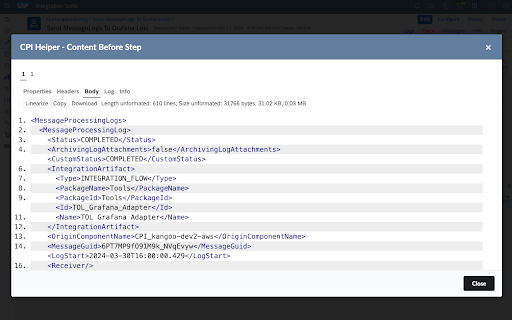

Extends the SAP Cloud Platform Integration with some useful features to improve usability. This Chrome Plugin extends the SAP Cloud Platform Integration with some useful features. For more information please visit our GitHub Page https://github.com/dbeck121/CPI-Helper-Chrome-Extension Integration Flow Designer Improvements - Sidebar with processed messages - Activate InlineTrace to see message route in integration flow designer - Directly see trace messages in integration flow designer - Pretty print for trace messages in integration flow designer -Button to switch trace -Directly go to traces of specific message -Directly go to logs and attachments of specific message -Pop-up with error-message when hovering message in sidebar -Pop-up with deployment info -View and delete variables in info pop-up -General CPI Improvements -Useful links in browser-bar-popup -Last visited iflows in browser-bar-popup

SAP CX AI Toolkit
Work faster with an AI copilot that truly understands your business The only extension for licensed SAP CX AI Toolkit users. Transform how you work with your AI copilot. Access in-depth customer profiles, answer questions with intelligent Q&A, and use powerful AI tools, all within your usual online workspace. Perfect for SAP users needing quick, AI-driven insights and tools to improve customer engagement and decision-making.

SAP Cloud Integration Iflow Customizing Tool
This Chrome extension enhances SAP's Integration Suite Iflows (SAP CPI) by allowing the user to select the desired colours for the different integration flow steps. This Chrome extension is a simple yet powerful tool for iflow customization that allows you to set the colour of the different steps. This will help you to find and identify the different step types, give some colours to your iflows. It will be also possible to change the colours as your requirements allowing you to select a specific colour for a specific step type. Why installing this chrome extension? 1. When you look at a complex SAP Cloud Integration all integration step boxes look the same, only a small icon in the top-left corner identifies the type of step. So, you must zoom in 200x to be able to find the steps you are searching for. 2. There is no way to highlight the steps I want, i.e If I want to check all scripts in an integration iflow I must review all of them one by one. 3. There is no way to customize the look of the User Interface which is boring and does not catch user’s attention. This chrome extension will help you identify patterns in the iflows, will speed up the comprehension of the behaviour and will make you happier while working in SAP Cloud Integration (SAP CPI).

UI5 Deprecated Control Checker
Scan SAP UI5 pages for deprecated controls. Quickly detect deprecated SAP UI5 controls in any web application with a single click. This extension helps developers and SAP consultants identify outdated UI5 components when reviewing, debugging, or upgrading SAP Fiori apps. Highlights deprecated UI5 controls directly on the page. Compatible with the latest UI5 versions. Built on Manifest V3 for improved performance and security. Simple, lightweight, and non-intrusive. 🚀 Why install it? Upgrading SAP UI5 versions? This tool saves hours of manual inspection by instantly flagging deprecated controls during runtime. Perfect for clean-up tasks, audits, or migration planning.

UI5 Inspector
With the UI5 Inspector, you can easily debug and support your OpenUI5 or SAPUI5-based apps. With the UI5 Inspector extension for Chrome DevTools, you can inspect, analyze, and support OpenUI5 and SAPUI5-based apps. Key features: • Inspect UI5 controls and review their properties, bindings, and data model • Modify control properties on the fly and see how this affects the rendering and behavior • Find relevant framework information for your OpenUI5/SAPUI5 app
