
epkclcbkefpikbpopcpjjlbajhnglged
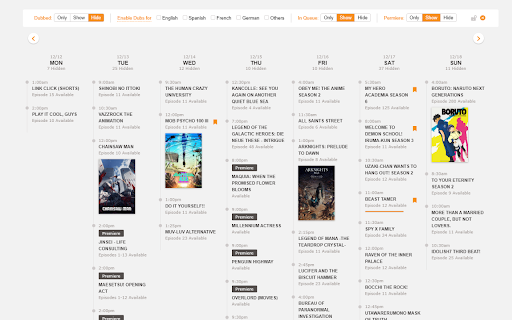

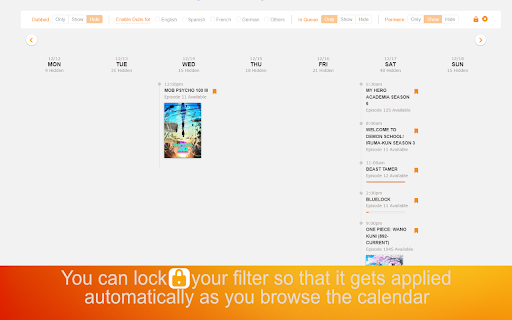
A filter for the Release/Simulcast Calendar on Crunchyroll. Do you use Crunchyroll’s Release/Simulcast Calendar to find shows to watch? With their ever growing catalog and the increasing number of dubs, the calendar can feel overwhelming! The Release Calendar Filter for Crunchyroll can help with that!! You can: ✅ ❎ Toggle visibility for all dubbed episodes on the calendar. ✅ ❎ Toggle visibility for all subbed episodes on the calendar. ✅ ❎ Toggle visibility for dubbed episodes in a specific language. ✅ ❎ Include, show only, or hide episodes that are 'In Queue' (if logged in) ✅ ❎ Include, show only, or hide episodes that are premiering. 👀 See your watch progress on episodes for non active days. 🔒 You can also lock filters! So, your choices are applied automatically when you go back to the release calendar or browse another week. The filters work in combination with each other!! For example, you can choose to: 👀 See only episodes that are not dubbed and 'In Queue'. 👀 See only episodes that are dubbed and premiering. 👀 See only subbed and English dubbed episodes that are 'In Queue'. 👀 and more. 📃Be sure to check out the options page of this extension!! If you find any issues feel free to create an issue at https://github.com/roshinc/release-calendar-filter-for-crunchyroll/issues - Fix for some dub showing up in different format in the title. - Season title handling improvements for the when CR set title as Season 1 on non English pages. - Handle filtering on non English pages. - Fix the bug for getting the icons and checkmark. - Fix the example filter in the options page. - Fixed the parsing breaking on the presence of test series. - Fixed reported typo. - Support for release calendar urls of other languages. - Handle new dubs: European Portuguese, Thai, Polish, Mandarin, Catalan, and Tamil. You should be able to add any of these to the Quick Select Dub section in the options page. - Fixed visual bug when restoring "In Queue" option. - Handle titles where Crunchyroll forgets to put a space before the dub parentheses - Handle Generic '(Dub)' as English dubs - Handle the '2023 Crunchyroll Anime Awards' - Dub only view! You can now hide all subbed episodes to have a dubbed episodes only view. - New section in the options page that lets you pick the quick switch languages shown on the UI. - Better filter logic that prevented some episodes from being hidden or shown when it should have been. - Better parsing to fix some languages not being recognized.

Crunchyroll Sub Only Extension
Remove all subs new release on Crunchyroll Simulcast Calendar. Enjoy the now more accessible newest episodes! Remove all subs new release on Crunchyroll Simulcast Calendar. Enjoy the now more accessible newest episodes!

Crunchyroll Filler Labeler
Watch anime on Crunchyroll while knowing which episodes are fillers. Supports the new design! Watch anime on Crunchyroll while knowing which episodes are fillers. Supports the new design! SUPPORT THE DEVELOPER: https://www.buymeacoffee.com/lisachan

Voice Control for Crunchyroll
🔊Voice Control for Crunchyroll 🚀 Play, pause, fast-forward, and more, all without lifting a finger! 🙌🎬 Revitalize your Crunchyroll with 'Voice Control for Crunchyroll', an innovative Chrome extension that allows you to control Crunchyroll using voice commands. Play, pause, scroll, and more without lifting a finger! 🙌🎬 Main Features: 🗣️ Voice Control for Crunchyroll: Control Crunchyroll with simple voice commands. With the voice control extension, watching your favorite anime and shows becomes even easier! 🌍 Support for Voice Commands in 8 Languages: Whether you speak English, Spanish, French, German, Polish, Japanese, Korean, or Thai, our extension will understand your commands. 👤 Customization of Commands: Customize voice commands to your preferences. Instead of the standard 'Crunchyroll play', set your own phrases to activate specific functions. 🔌 Easy Installation and Use: Just install the extension and start watching any anime or show on Crunchyroll. Your streaming experience will be transformed. 🖥️ Compatibility with Chrome Devices: Works perfectly with any device using the Chrome browser. Supported Commands: ⏯️ Pause / Play: Easily manage video playback. ⏩⏪ Fast Forward / Rewind: Effortlessly scroll through episodes forward or backward. 🔇🔊 Mute / Volume Up / Volume Down: Control the volume without needing a remote or keyboard. 📺 Next Episode: Automatically switch to the next episode of your favorite anime. ⚙️ The pop-up Control Panel window allows access to settings and customization of commands. For Whom: 👨👩👧👦 Perfect for any Crunchyroll fan looking for a more convenient and modern way to control their favorite anime and shows. Whether you have limited mobility or simply value convenience and modern solutions, our extension is for you. Get Started: 🌟 Change the way you watch Crunchyroll today. Install 'Voice Control for Crunchyroll' and enjoy the freedom that voice commands offer! 💬🎉 ❗**Disclaimer: All product and company names are trademarks or registered trademarks of their respective holders. This extension has no affiliation or connection with them or any third parties.**❗

Crunchyroll Simple Custom Simulcast Calendar
Add dark mode, hide DUBs from Crunchyroll's simulcast calendar and redirect home to calendar. Custom toggle buttons for Crunchyroll’s simulcast calendar, all in one click: - Dark mode - DUBs filter (Hide Dubbed repeated Animes from calendar list) - Homepage skip - Playback speed button v1.6 improved hide DUB v1.5 Improved home skip + dark popup theme. v1.4 Improved Playback speed button + fixed home skip. v1.3 Improved Dark mode. v1.2 Improved playback speed button. v1.1 Fixed dub for DE and added beta playback speed button. v1.0 First release.
