
epjbmmchkjlgmogfoamcleeikmfaffjm
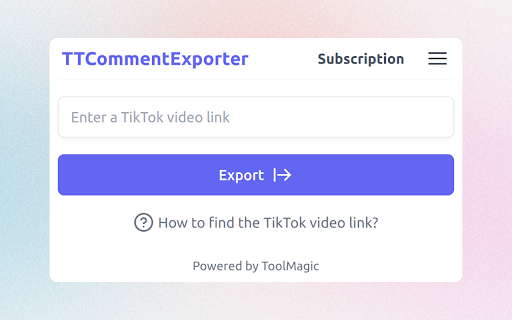
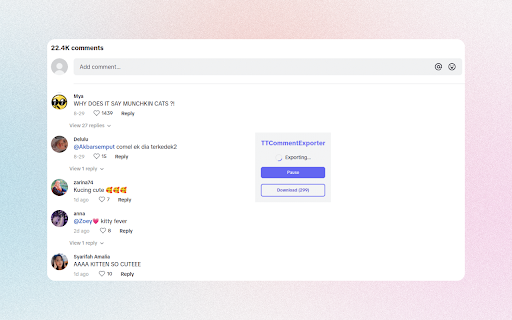
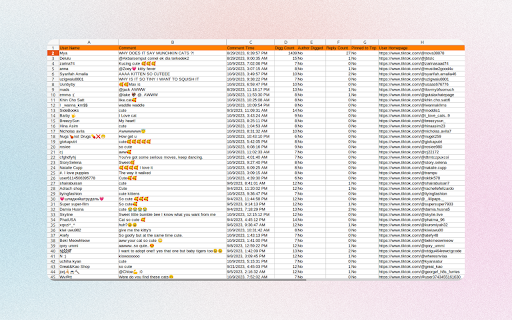
Export TikTok comments to Excel in CSV for analysis. Extract and save TikTok video comments with ease, exporting them in CSV or Excel format, enabling comprehensive analysis and valuable insights for your TikTok content strategy. Features - Save all comments including replies from a TikTok video - Export TikTok comments in CSV/Excel - Export comments from multiple videos at the same time What type of data can you export? - Comment ID - Reply to Which Comment - User ID - Username - Nick Name - Comment - Comment Time - Digg Count - Author Digged - Reply Count - Pinned to Top - User Homepage Note: - TTCommentExporter follows a freemium model, enabling you to export up to 200 comments at no cost. If additional exports are required, consider upgrading to our premium version. How to use TikTok Comment Exporter? To use TikTok Comment Exporter, simply add our extension to browser and create an account. Once you have signed in, you can input the video link whose comments you want to export and click the "Export" button. Your comments will be exported to a CSV or Excel file, which you can then download to your computer. Data Privacy All data is processed on your local computer, never passing through our web servers. Your exports are confidential. FAQ https://ttcommentexporter.toolmagic.app/#faqs Feel free to contact us if you have any other questions. Disclaimer TikTok is a trademark of TikTok, LLC. This extension is not affiliated with or endorsed by TikTok, Inc.

IGCommentsExport - Export Comment for IG
Comment Export Tool for IG to Extract Instagram Comments and export to CSV with one click With IGCommentsExport - Export Instagram Comment, you can extract comments from Instagram and export them to CSV. Enhance your giveaways by effortlessly exporting Instagram comments - start now! # Features ✓ Export Instagram Post Comments ✓ Extract User Profile, including comment text, follower and following count, posts count, biography, public Email, Phone Number, external URL, Address, etc. ✓ Save extracted data to local storage, download data anytime # How to get started? 1. Enter a link to an Instagram post 2. Select Include user profile in the Extension Setting if you want to export user profile. This feature will take longer, as data needs to be requested for each user. 2. Click EXPORT Button # FAQ https://igcommentsexport.converts.cc/#faq If you have any questions, please feel free to contact us at convertscc@gmail.com. # Data Privacy All the data you process is on your local computer and never passes through our servers. Read our Privacy Policy: https://igcommentsexport.converts.cc/privacy. # Statement There is a risk that your account may be deactivated or blocked by IG when using the extension and you should control the frequency of use at your own risk. # About Pro It's a paid extension, you can export the first 100 profiles of each extraction for free trial. # Change Logs New Update v2.5.0 ✓ Support Limit per Export Mode and Skip Current Request For Detail Fetching ✓ Support Pause Mode ✓ Support to delete and clear history ✓ Fix some issues.

Instagram Comments Scraper - IG Comment Export Tool
Export IG comments to Excel/CSV in one click! IG comment export tool, a reliable instagram comments scraper for fast, accurate data. ▬▬▬▬▬▬▬ Description Step by Step ▬▬▬▬▬▬▬ 1. Click Extension icon, which is on browser toolbar, then open a popup page. 2. Click "Export Instagram Data" button, an IGTools option page will be opened. 3. Input a valid IG post URL. 4. Click "Start parsing" button, and our Tools will run automatically. After this processing is finished, you can download IG comments to CSV or Excel. ▬▬▬▬▬▬▬ Features ▬▬▬▬▬▬▬ ● One-Click Export: Extract data using the best ig comment exporter. ● Format Freedom: Fully supports CSV and Excel downloads. ● Smart Recovery: Automatically bypasses IG rate limit errors. ● High Speed: Fast processing via our optimized ig comment export tool. ● No Login Required: We never ask for your password. ▬▬▬▬▬▬▬ Supported columns ▬▬▬▬▬▬▬ ● id ● text ● username ● profile url ● profile pic url ● date ▬▬▬▬▬▬▬▬ Security ▬▬▬▬▬▬ ● No Password Required: This ig comment exporter never requests your Instagram password or accesses any personal data — including user info, stories, visit history, posts, or social relationships. ● Smart Rate Management: Instagram comments scraper intelligently manages IG rate limits, which vary by IP address and are not publicly disclosed. ● Local Processing: All data handled by this ig comment export tool is processed entirely within your browser. No personal account details are ever stored or transmitted. ● Account Safety: A built-in "Human-Like" delay system keeps your activity within safe boundaries, helping you avoid account flags or restrictions. ● Transparent Operation: We only access the public comment data you explicitly choose to export — nothing more. ▬▬▬▬▬▬▬▬ How it works ▬▬▬▬▬▬ ● If you export a huge list of data, you can experience a rate limit error. ● The extension goes into “Cooldown” mode. The timer shows the time remaining. ● If the limit error persist, the cooldown period increases 2x. ● Once the cooldown period ends and the subsequent request is successful, the IGTools switches to the Normal mode. ▬▬▬▬▬▬▬▬ Statement ▬▬▬▬▬▬ INSTAGRAM is a trademark of Instagram, LLC. This instagram comments scraper is not affiliated with, endorsed, sponsored, or otherwise related to Instagram, LLC. or any of its affiliates or subsidiaries.

ICommentExporter - Export Comments
One click to export Instagram Comments to Excel in CSV for analysis. ICommentExporter (previously known as "IGCommentExporter") is a powerful Instagram comment export tool that helps you export Instagram comments to a CSV file. The tool can also extract email addresses and phone numbers (if available) from the user who posted the comment, allowing you to identify potential leads, tailor your marketing campaigns, and gain deeper insights into your audience. Features: - Export comments and replies - Extract email and phone number if available - Save as CSV / Excel - Automatic and customizable handling of rate limits and challenges Note: - This tool follows a freemium model, enabling you to export up to 100 comments per post at no cost. If additional exports are required, consider upgrading to our premium version. - To protect your primary Instagram account from temporary restrictions, we highly recommend creating a separate account specifically for data exports. By keeping your data export activities separate from your main account, you can significantly reduce the chances of encountering any interruptions to your regular Instagram usage. What type of data can you export? - User ID - Username - Full Name - Comment ID - Comment - Comment Time - Followers - Following - Posts - Email - Phone - Is Verified - Is Private - Is Business - Is Creator - Category - Biography - External URL - User Homepage - Avatar URL How to use it? To use our Comment Export tool, simply add our extension to browser and create an account. Once you have signed in, you can input the post link and click the "Export" button. Your comments data will be exported to a CSV or Excel file, which you can then download to your computer. Data Privacy: All data is processed on your local computer, never passing through our web servers. Your exports are confidential. Frequently Asked Questions: https://igcommentexporter.toolmagic.app/#faqs Feel free to contact us if you have any other questions. Disclaimer: This tool is a third-party extension designed to facilitate the export of Instagram comments, along with associated data, for enhanced analytics and management. This extension is not developed, endorsed, or officially affiliated with Instagram, Inc.

Comment Exporter - Extract Comments
Scrape, extract comments including Nested Comments from facebook and export to CSV/Excel with one click With Comment Exporter, you can extract comments from Facebook Post Page and export them to CSV, Excel, JSON or Google Sheet. If there are replies to the comment, you can export nested comments. Comment Exporter provides user-friendly interface and simplifies the process of extracting comments, requiring no coding expertise. # Features ✓ EXPORT COMMENTS from Facebook Post Page ✓ Export Nesting Comments ✓ Copy to Clipboard (Paste to Google Sheet) ✓ Export as Excel, CSV, and JSON # Supported fields: - User Id - Username - Comment Id - Comment Text - Comment attachment (photo、video) - Reply Count - Reply Count Total - Reactions Count - Comment Depth - Created Date - Permalink URL (Link to the comment) - Profile URL - etc. With the Pro version and Check 'Includes Nesting Comments', you can get additional fields for Replied Comment such as: Parent Comment Id and Parent Comment Author. # How to get started? 1. Visit the Facebook post page, click on the download icon next to the number of comments. 2. Click Fetch button, then just wait to scrape complete. 3. Once extraction is done, click 'Export'. If it keeps failing, please send us the corresponding link, and we will do some troubleshooting and compatibility. For perfect use, it is recommended to set the Facebook language to English. In the popup, we offer these extra features: Relevant-Ext: Brief recommendations and introductions to related extensions. # Data Privacy Your data's security is our top priority. Rest assured, all data remains on your device, ensuring 100% privacy and trustworthiness. # About Pro Comment Exporter is a paid extension, you can get basic functionality and upgrade to get more functionality.
