
epgilldoipfbdlneomlmegekaoonchcj
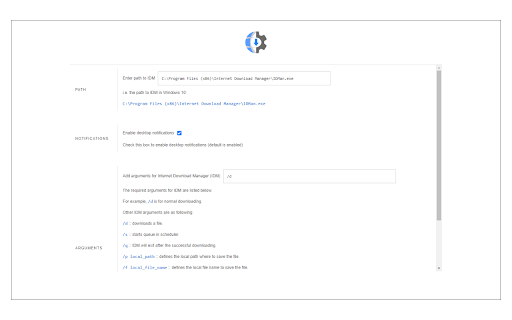
Open and download desired links with internet download manager. Open With Download Manager is a browser extension that enables you to open and download a desired item with the Internet Download Manager application. Important note: Open With Download Manager extension does NOT belong or relate to IDM and has NO affiliations with Internet Download Manager or IDM at all. It is an unofficial extension that is developed and maintained independently by its author. To operate with this addon you need a native-client patch to connect your browser with the native IDM application in your OS. Please read the following to get more info on how to install native-client and operate with this add-on. 1) after installing the add-on, you need to connect it with native applications (i.e. IDM) on your machine. If you do not have IDM, please head to (internetdownloadmanager.com/download.html) and install IDM on your machine. Once you have IDM, you need to make the connection between IDM and your browser. 2) to make this connection, a separate patch is provided on GitHub. Please download and install this patch from: https://github.com/alexmarcoo/open-in-native-client/releases Follow the instruction in the above GitHub repo to download and install the related patch to your system. After installing, the "Open With Download Manager" add-on, your browser can communicate with IDM on your machine (i.e. Windows OS). 3) before using the add-on, please open the option's page and make sure the path to IDM is correct based on your operating system. For example, the path to IDM in Windows 10 is: C:\Program Files (x86)\Internet Download Manager\IDMan.exe Next, please follow the below steps to open and download desired links in IDM. a. Right-click on a download link and then click on the - Download With IDM - from the context menu. b. IDM has several input arguments to enhance downloading desired files. The default argument for downloading is: /d. To get more info about other arguments please open the add-on option's page and read section arguments. Please note that you need to add parameters comma separated, for example, to automatically download a file write: "/d,/n" in the designated area. c. you can set the IDM path in your machine from the options page. To report any bug, please fill out the bug report form on the add-on's homepage (https://mybrowseraddon.com/open-with-dm.html).

Online Download Manager
Easily manage and accelerate your downloads up to 5 times! Online Download Manager will enable you to download all types of files without any hassle at the maximum speed. Download Accelerator is an application that enables you to download large files with multi-threaded method. You can easily download any url on the web and save files on your PC or right on your Google Drive without saving it on your side. How to use internet download manager for chrome - select image, voice, video - click right then click download with ODM - click start download - Our software will split your download into multiple files All the features are available right in your browser! This software is 100% free and does not require you to pay.

IDM - URL shortener and QR code generator
URL shortener to create short links and generate QR code with custom domain, reporting, analytics, team collaboration and API access IDM - A URL shortening tool to create short links to enhance the user experience, link sharing, and enabling efficient tracking of link performance. 🎯 Features - Easily shorten any link - Set link expiration date - Add UTM parameters - See click reports and all your links history in extension - Automatically copies URL to clipboard - Automatically create a short link by clicking the extension button in the browser header - Good alternative of Bitly, Rebrandly, TinyUrl, short.io and many more link shortener services - Shareable QR code 📈 Analytics - Short link analytics with click reports, traffic source, country, referral etc. to analyze the effectiveness of your links, giving you valuable insights into your marketing campaigns. 📱QR Codes - Free QR code generator to creating QR codes for each link to redirect on mobile scan. ** December, 28 2023 - Added sign in with Google - Added reports feature to track short link click IP, country, city etc.

Download with Free Download Manager (FDM)
Sends your downloading jobs to the Free Download Manager by pausing the built-in download manager Send your downloading job requests to the well-known Free Download Manager (FDM) to take advantage of the following features: 1. BitTorrent support 2. Enhanced audio/video files support 3. Download acceleration 4. Resuming broken downloads 5. Smart file management and powerful scheduler 6. Adjusting traffic usage 7. Remote Control 8. HTML Spider This extension offers two levels of integration. The simple one is the right-click context menu items for video, audio, and image file types. The second level is an observer for downloading requests that are sent to the built-in download manager. The extension pauses each download when a new request is submitted. Then sends the actual downloadable URL to your Free Download Manager. This mode is more aggressive and can simply toggle on and off from the browser action. Notes: 1. For the extension to work you need to have Free Download Manager (FDM) installed; http://www.freedownloadmanager.org/ 2. For the extension to be able to communicate with FDM, a small native client is required. This native client can be found at https://github.com/belaviyo/native-client/releases. You will get the instruction on how to install this native client when the extension tries to communicate for the first time. 3. This extension can extract links from selected text. Use the right-click context menu over selected text to access this tool. Web Components: This extension uses "notification-view" web component: https://webextension.org/custom-component/notification-view/index.html

Reminders for Google Calendar™
Send reminders by SMS/Text from your Google Calendar™. Use it for your customers or your own appointments. Send reminders by SMS/text from your Google Calendar™ to customers (or yourself) all over the world. We support sending reminders to the US, Canada, the UK, Australia and all European countries + many more. How Does it Work? The extension adds custom fields to your Google calendar™ appointment editor so you can set SMS reminders while you're creating or editing appointments. Setting reminders is quick with our Message Templates that’ll let you use standardized messages & reminder schedules. Your template lets you populate data directly from your appointment and insert the Title, Date, Time and Location in your reminder message automatically. Try it for Free You can send up to 25 reminders for free before you need to pay.
