
epdamcbbkljmnhgajeiplpfgppaldppf
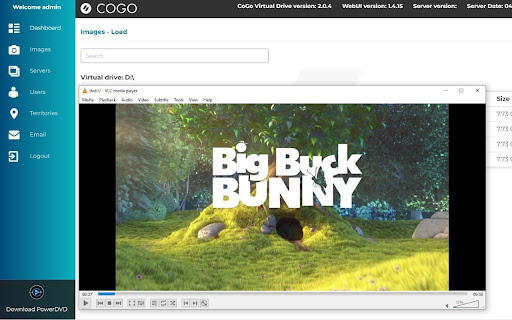
CoGo Virtual Drive is a virtual disc delivery system to allow remote preview of Blu-Ray and DVD discs. The Chrome extension enables communication with the native host that is installed as part of the CoGo Virtual Drive software. Disc images can be loaded into the CoGo DVD-ROM/BD-ROM virtual drive and previewed as if the disc is present on the local machine.

Open in VLC Media Player™
Easily open desired links in the VLC (VideoLAN) media player! Open your video files or Youtube/Twitch Streams using VLC Media Player now. Want to open video files using your favorite video player software VLC Media Player? You can do so now after you install our software extension. To begin using our software extension, here are the steps you need to do. Ensure you have VLC Media Player installed on your computer. Watch your favorite video files with VLC Media Player now. Install our software extension "Open with VLC Media Player" Once you install our software, please refresh all your existing Chrome Tabs/close Chrome browser and restart Chrome browser to let the extension load. Choose the video file you wish to watch with VLC Media Player via the right click context menu button. Its that simple, just use the right click context menu to choose VLC Media Player when you want to watch your videos. You can open all types of audio files or video files, it does not have to be .mp4 format. It can be also .mp3 and AAC file format. Another cool feature of our software is you can open your audio/video files with PotPlayer as well, if you have Potplayer installed on your computer. Need to convert your videos/songs into different formats? Our software extension allows you to convert your videos into the most common audio formats such as MP3/AAC Disclaimer: Please note this extension is NOT made by VLC and is made by an independent development team. All copyrights belong to their respective owners. Google doesn’t endorse or sponsor this Chrome extension. This extension is not owned by, it is not licensed by and is not a subsidiary of Google Inc.

DVDify - Image to DVD Screensaver
Right-click any image to turn it into a bouncing DVD screensaver and export as GIF, MP4, or WebM on Dvdify. DVDify turns any image into the classic bouncing DVD screensaver. This extension makes it instant: right-click any image on any website and choose “Use with DVDify” to open that image in DVDify and start creating your screensaver. One click from the context menu -- no copying URLs or saving files. Perfect for turning logos, photos, or memes into shareable bouncing animations. Install to send any image straight to DVDify.com and create your custom DVD screensaver in seconds.

Video Player
Video and audio player with speed control, playlist, shuffle, and volume-boosting This is a simple, yet powerful media player that supports audio boosting to 300% and playback rate speed up to 8 times. It has a minimal interface and only appends controls that are not provided by default by the VIDEO element. This extension offers to play media files from a local disk or a remote resource. It uses the standard caching method to play remote sources with minimal interruption. Features: 1. This player can increase volume up to 300% similar to the VLC media player 2. This player can increase the video playback rate up to 8 times 3. It supports repeating one song or an entire album 4. Can extract media sources from a destination directory and all its children's directories. 5. You can take screenshots of the video with a button or with a keyboard command. 6. Can play video formats that your browser does not support (using FFmpeg transcoding) (FLV, AVI, WMV, ...) Usage Sample 1: 1. Open "https://www.w3schools.com/html/html5_video.asp" in a browser tab 2. Right-click on the player 3. Use "Play with Video Player" Usage Sample 2: 1. Open "https://www.w3schools.com/html/html5_video.asp" in a browser tab 3. Right-click and save the video to the disk 4. Open the player and drop the video to the player's interface

Software Downloader for Windows & Linux
Software & program downloader to search & download applications integrated with OnWorks. This extension is a software and program downloader to search, download and run Windows and Linux applications. It is mainly design to facilitate the development of any app. When the extension is clicked, it opens a window where users can search for its desired program for Windows and Linux. After that, our internal engine searches for the best apps that match the keywords entered. These programs appear in a list where the users can click from to initiate the download having as a reference the OnWorks.net search engine. * Search for Windows programs. * Search for Linux programs. * Download Windows programs. * Download Linux programs. * Can use our onworks.net to run any online Windows and online Linux applications.
