
eoponiimbhcmaenjpdedhfknijgjcjcf
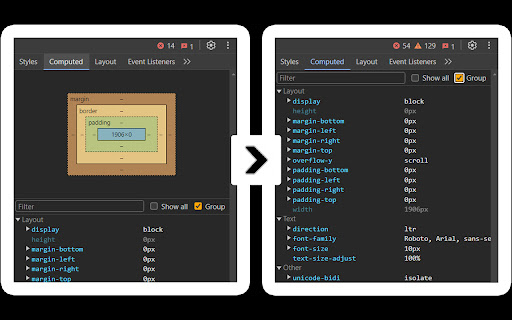
Hides the metrics-/box-model-pane from DevTools. Usage: 'Allow extensions to load custom stylesheets' in DevTools > Experiments. Slimmer DevTools hides the "Metrics" panel in DevTools. For many developers, this box is rarely useful but takes up valuable space, allowing only a few CSS properties to be visible at a time. Slimmer DevTools removes it, letting you see more properties at once and work more efficiently. ### Enable/Disable To enable, open `DevTools (F12) > Experiments` and activate "Allow extensions to load custom stylesheets," then restart DevTools. To toggle Slimmer DevTools on or off, go to Chrome extensions and adjust as needed. ### Built for Simplicity Designed to reduce clutter in DevTools – inspired by this [StackOverflow thread](https://stackoverflow.com/questions/66691662/is-there-a-way-to-hide-the-box-model-graphic-in-chrome-developer-tools).

Rent Offers: Renter Calculator
Calculate your move-in, monthly costs, and keep notes on the rentals you've run calculations on. The Rent Offers Renter Calculator will allow renters to calculate and estimate how much money they'll need to move into a rental property. It also helps calculate how much how money they'll pay each month and the percentage of their overall income it'll be. The calculator will work on many of the real estate listings sights you already know and love.

TestFiltering+
TestFiltering+ automatically monitors your internet connection to ensure your filter is correctly blocking illegal/harmful content We work with specific partners to host test URL's on various lists and have test pages hosted where they will be blocked. This service was setup in response to the introduction of statutory guidance for schools in the UK about appropriate levels of filtering and monitoring of school internet connections. The UK Safer Internet Centre first published its filtering and monitoring definitions in 2016 to help both schools and providers understand what should be considered as ‘appropriate’.

VOXC: Instant AI Accesss
Voxc is a voice controlled extension that allows you to control your browser with your voice for intant AI conversation. 🧠 Voxc: Your Voice-Powered AI Assistant for the Web Tired of switching tabs just to ask your AI something? Meet Voxc—your personal AI that lives right inside your browser. Whether you're working, studying, or just browsing, Voxc helps you scroll, click, and ask questions—all by speaking naturally. No distractions. No typing. ⚡ What Voxc Can Do: 🎤 Talk to browse – Scroll, click, and search using just your voice 🧠 Unlimited AI chats – Built-in Gemini AI with your own key (free forever) 🗂️ Highlight anything – Instantly select and interact with content 🎨 Customize your style – Light, dark, or your own theme 🚀 Super lightweight – Fast, quiet, and works everywhere Why Voxc? It’s simple: you talk, it listens. No tab-switching. No breaking flow. Just you, the web, and smart help when you need it.

Uzera
Empower users with Uzera. Integrate tours and demos seamlessly. Design interactive tours, record engaging DemoX. Uzera: Elevate User Experience with Product Tours and DemoX 🚀 Welcome to Uzera, the ultimate Chrome extension designed to revolutionize user engagement on your website or application. With two powerful features – Product Tours 🎯 and DemoX 🎬 – Uzera empowers you to provide an immersive and user-friendly experience for your audience. 1. Product Tours 🌐: Easily create interactive product tours that guide users through the essential features of your website or application. The intuitive design interface allows you to define step-by-step instructions, ensuring users grasp the full potential of your product. 2. DemoX - Video Guides 📹: Take user guidance to the next level with DemoX. Record step-by-step actions within your website or application, transforming them into captivating video guides. Share these DemoX videos to enhance user understanding and streamline the onboarding process. - Product Tours: - Design Engaging Steps 🎨: Craft visually appealing and informative steps for your product tour. Customize each step to showcase specific features or actions. - Seamless Integration 🚀: Integrate product tours effortlessly into your website or application, enhancing user onboarding and feature discovery. - DemoX - Video Guides: - Effortless Recording 🎥: Capture user interactions and workflows within your website or application effortlessly. - Shareable Video Guides 🌐: Generate shareable DemoX videos to provide users with a dynamic visual guide for using your product. - Enhanced User Engagement 🤝: Keep users engaged and informed with interactive product tours and video guides that cater to different learning preferences. - Simplified Onboarding 🛤️: Streamline the onboarding process for new users by providing them with comprehensive product tours and step-by-step video guides. - Versatility 💼: Whether you're a developer, marketer, or product manager, Uzera Toolbox is a versatile tool that adapts to your needs, enhancing user engagement across the board. 1. Install the Uzera Chrome extension. 2. Access the intuitive design interface for Product Tours or start recording with DemoX. 3. Elevate your user engagement and provide an unparalleled experience for your audience. Transform user engagement today with Uzera – Your Gateway to Intuitive Product Tours and Dynamic DemoX Video Guides! 🚀
