
eoigapjpfjgioclmomohpfjlnlbkipje

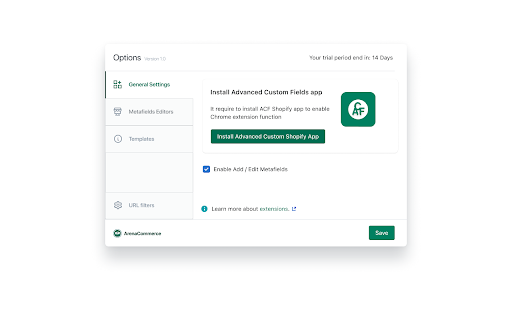


Quickly and easily modify your Custom Fields within the Shopify admin interface! Add new features to the Shopify Dashboard To use this extension you must install the "Custom Fields" app on your Shopify store: https://apps.shopify.com/advanced-custom-field. Use this awesome combination to extend the standard Shopify functionality and edit metafields for your products and collections directly in your Shopify admin panel. Quickly create, update or delete metafields for your products and collections without leaving their pages or go to an advanced editor with just one click!

Shopify Theme Detector
Are you Shopify users? Have you ever seen a really well designed Shopify website and wonder how it was built? Well, now you can.… Are you Shopify users? Have you ever seen a really well designed Shopify website and wonder how it was built? Well, now you can. Just find a site you like, click on the "Shopify Detector" tool icon and you will get your answer within seconds. Now go build your own beautiful website. * Note that this extension gets its information from a remote server and if for any reason the server is busy or down, the extension will not give you any indication of this. So if for any reason it seems to be taking too long, that means it's stuck and you should try again a little bit later. ** This is very unlikely, however, In some cases we may not be able to detect the Shopify theme being used on a Shopify website. If you encounter such a case, we would appreciate it if you could let us know about this so we can make sure the extension is up to date and works the best possible. This extension is part of the Shopify Theme Detector website where you can detect the Shopify theme used on a Shopify website and get even more interesting information about the website you are interested in. On the website you can also get a whole lot of information about Shopify, such as the best Shopify themes for specific types of shops, best Shopify apps for whatever you need done on your site, hundreds of FAQs that we answer for you, so you can spend all your time building your brand instead of searching for informations online. For any questions about the extension or anything else, we would be happy to help you out. Just send us a message from our website and we will get back to you.

Pinterest Tag Helper
A tool to help you build, troubleshoot and test your Pinterest Tags. For more details on how to use the extension, visit our Developer Center. https://developers.pinterest.com/docs/conversions/pinterest-tag-helper-chrome/ Release note for version 0.1.19: Display event type when POST requests are detected

UET Tag Helper (by Microsoft Advertising)
This extension helps to identify issues in Microsoft Advertising UET tags • Navigate to any page of your website and the tag helper will tell you which UET tags are on the page and if they are working correctly. • Find out if your conversion goals or Dynamic Remarketing lists have been set up correctly on your website. • Learn about the issues that are encountered and how to fix them.

Arena Shopify Admin Extension
Lets you replace the default Shopify Theme Editor dashboard with a new UI to easily manage the Shopify Theme. Arena Shopify Admin Extension lets you replace the default Shopify Theme Editor dashboard with new UI to easy manage the Shopify Theme. - Admin Quick Links show in your Shopify website. This function will give you a board of shortcuts, each shortcut will lead you to editor page that you will use regularly, this function will help you save a lot of time. + Shortcut Section Contents : Go to Section Editors in Theme Customization. It's useful in Shopify theme with multi-page templates. + Shortcut Edit Content: Go to your Product, Pages Editors + Shortcut Edit Custom Field: Go to Edit your Shopify page, product meta fields if you are using Advanced Custom Fields App. + Shortcut General, Custom, Discount, Install Apps, Menu, Product, Code Edit, Sections: Go to Shopify General Setting - Advanced Theme Editor: Extended your Shopify Theme Editor, give you six addition tool for you to improve the way you configure Shopify theme: + Icon picker + Date picker + Header collapsed + Responsive spacing settings + Responsive carousel column settings + Advanced Text Editor - Content Editor: allows customers to easily add columns, buttons with the click of a button. - URL Filter: Filter your domain running Extension. - Import sample menus data by ArenaComemrce from Shopify Arena Dashboard app to your Shopify store. How to use : https://help.arenacommerce.com/admin-extension/ More detail about Arena Dashboard: https://help.arenacommerce.com/installation/dashboard.html Arena Shopify Admin Extension DOES NOT collect any of your data or your browsing activity on any websites. We are pretty fanatical about privacy ourselves, and your privacy is extremely important to us. Please visit this page for more info - When installing Arena Shopify Admin Extension for Chrome, you might see the following prompt: Install Arena Shopify Extension Extension? - It can access: + Your tabs and browsing activity to turn on & off depend on your settings with Domain Filter + Your Shopify store Menus to import sample menus from ArenaCommerce by Arena Dashboard Shopify app. Get in touch: privacy@arenacommerce.com Extension privacy: https://help.arenacommerce.com/admin-extension/privacy.html For more information on privacy and the security of your data visit https://www.arenacommerce.com/pages/privacy-policy
