
eoejlghklgeemmfigmiobghnahahonde
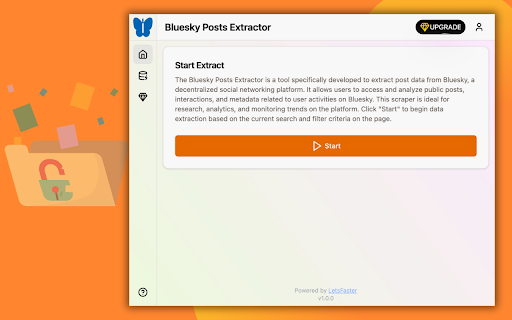


One-click extract Bluesky posts data from the search result page as Excel/CSV/JSON/HTML/XML file. 🚀 Effortlessly extract Bluesky posts data from the search page to a Excel/CSV/JSON/HTML/XML file. 🔧 How it Works: 1️⃣ Go to the bluesky search page. 2️⃣ Perform a search, then click the "Start" button on extension popup. 3️⃣ Choose to download from the data scraping pop-up or the task list on extension. 🔥 The Bluesky Posts Extractor is a tool specifically developed to extract post data from Bluesky, a decentralized social networking platform. It allows users to access and analyze public posts, interactions, and metadata related to user activities on Bluesky. This scraper is ideal for research, analytics, and monitoring trends on the platform. Note: This extension is an independent creation and is not affiliated with or endorsed by bluesky❗️🔒

Linkedin Sales Navigator Email Finder & Lead Scraper – Scrupp
The application extracts, cleans & enriches data by emails in one click to CSV/XLSX. Scrupp is a LinkedIn lead generation tool that helps you find leads, reveal business emails, scrape Sales Navigator and LinkedIn search results, and export clean prospect lists for outreach. Built for sales teams, recruiters, agencies, and founders, Scrupp combines LinkedIn scraping, email finding, lead enrichment, and list export in one workflow. You can extract leads from LinkedIn Sales Navigator, LinkedIn search, posts, jobs, and Apollo, then enrich them with company data and export everything to CSV or XLSX. Scrupp helps you: Scrape leads from LinkedIn Sales Navigator Extract people from LinkedIn search results Find business emails from LinkedIn profiles Collect leads from LinkedIn posts and jobs Import and extract leads from Apollo Enrich contacts with company data Export lead lists to CSV or XLSX Core features LinkedIn Sales Navigator Scraper Extract leads from Sales Navigator searches in bulk and build prospect lists faster. LinkedIn Search Scraper Scrape LinkedIn search results and collect people without manual copy-paste. LinkedIn Email Finder Find verified business emails for leads discovered on LinkedIn. LinkedIn Post and Job Scraper Extract leads from LinkedIn posts, commenters, likers, and job-based workflows. Apollo Lead Extractor Pull leads from Apollo and bring them into the same prospecting workflow. Lead Enrichment and Export Enrich contacts with company data and export clean lead lists for CRM and outreach tools. Why teams use Scrupp Build lead lists faster Reduce manual prospect research Find business emails from LinkedIn Keep prospecting and export in one workflow Prepare outreach-ready data for CRM, cold email, and recruiting workflows Use cases B2B lead generation Sales prospecting Cold outreach Recruiting and talent sourcing Agency list building CRM enrichment Market research Scrupp helps you turn LinkedIn, Sales Navigator, and Apollo into a faster lead generation workflow.

Table Exporter - Scrape & Extract Data to Excel, Sheet, CSV & JSON
Automatically detect and extract tables data from any website. Export HTML tables to Excel, CSV, JSON, or Clipboard in one click. Table Exporter is a fast and easy browser extension that lets you extract and export any HTML table from any webpage in just one click. Perfect for anyone working with data from dashboards, reports, analytics tools, research pages, admin systems, or business reports. No manual copying, no formatting issues, and no extra tools required. The extension automatically detects all tables on the page and allows you to export them as CSV, XLS, or Copy. If a webpage has multiple tables, you can choose which one you want. For users working with complete datasets, Table Exporter can also **extract and keep hyperlinks inside table cells**, ensuring you don’t lose important reference URLs such as product pages, document links, resource pages, or tracking information. 📍Export Any Webpage Table ✅ Automatically detects and extracts data from HTML tables. 📍 Export to CSV, XLS, JSON or Copy & Past ✅Compatible with Excel, Google Sheets, BI tools, and reporting systems. 🧩 Works with Multiple Tables on a Page ✅Export one table or all tables with a single click. 🔗 Extract Hyperlinks from Table Cells ✅Preserve important URLs and references in your exported data. ⚡ No Copy-Paste Needed ✅Clean and structured data without manual work or formatting. 👨🎓 Ideal for All Types of Users Great for students, researchers, data analysts, SEO specialists, developers, testers, and business professionals. 🧠 Simple and Easy to Use Lightweight interface with instant one-click exporting. 🎯 Who Is Table Exporter For? Students gathering research data Data analysts extracting online reports SEO professionals collecting SERP or competitor tables Developers testing content or UI output Business users preparing spreadsheets or presentations Content creators organizing online information Anyone who needs fast and accurate data extraction 🚀 So what are you waiting for? Install it now and start exporting tables in seconds!

Web Data Scraper - Extract & Export to CSV/Excel/JSON
Web Data Scraper - no-code internet scraping. Extract and export to CSV, Excel, JSON, Google Sheets, and Webhook. Web Data Scraper is a premium no-code Chrome extension built for professionals who need reliable web data extraction without complex setup. Detect repeating data blocks, run high-quality extraction, and deliver results instantly to CSV, Excel, JSON, Google Sheets, or Webhook. Whether you are building lead lists, tracking competitors, monitoring catalogs, or collecting research data, Web Data Scraper gives you a clean workflow from page to dataset. What makes it premium - Fast setup: start scraping in a few clicks, no coding required. - Production-ready outputs: clean rows, usable columns, export-friendly formats. - Flexible delivery: one-click export or auto-delivery after run completion. - Reusable workflows: save templates and run repeat tasks consistently. - Designed for scale: pagination support and multi-page workflows out of the box. Extraction modes - List Extractor: extract cards, listings, and table-like blocks into structured rows. - Page Detail Extractor: open each URL and capture selected fields from detail pages. - Email Extractor: collect and normalize email addresses. - Phone Number Extractor: collect phone numbers with country context. - Page Text Extractor: capture useful on-page text for research and content workflows. - Image Downloader: collect and export image assets from pages. Built for real-world operations - Pagination options: Next button, Load More button, URL pattern. - Google Sheets delivery with append or upsert-by-key logic. - Optional row update controls for safer sync workflows. - Webhook delivery for automation pipelines. - History and templates for repeatable team processes. Typical use cases - Sales and lead generation - E-commerce and price/catalog monitoring - Marketplace and directory scraping - SEO and SERP research - Content intelligence and market analysis - Operations reporting and data enrichment Why teams choose Web Data Scraper - No-code, but not toy-level. - Simple for first-time users, powerful enough for recurring workflows. - Built to reduce manual copy-paste and speed up data operations. - Works directly where data lives: inside your browser. How it works 1. Open a target page in Chrome. 2. Choose a scraping mode. 3. Preview and verify columns. 4. Start scraping. 5. Export instantly or auto-send to your destination. If your workflow depends on getting structured web data quickly and reliably, Web Data Scraper is the practical, professional solution.

Ultra Data Scraper Pro
Ultra Data Scraper Pro: Extract data from web pages with advanced AI-powered table detection. Export as CSV/XLSX/JSON/XML. Ultra Data Scraper Pro: Advanced AI-powered web scraping with intelligent data classification. Extract video bulk, photo bulk, emails, phone numbers, and more, all in one place with our cutting-edge machine learning technology. • Click photo downloader with type selection (JPG/PNG/WEBP) before saving • Cleaner media UI for images and videos • Smarter video capture for more reliable downloads • Performance and safety improvements and reducion of page lag 🔍 FEATURES: • AI-Powered Data Recognition: Automatically identifies prices, emails, phone numbers, dates, addresses, and more • Context-Aware Classification: Analyzes surrounding text for 90%+ accuracy • Advanced Table Extraction: Intelligent table detection with automatic column classification • Media Download: Extract and download images, videos, and multimedia content • Batch Processing: Handle large datasets efficiently with optimized performance • Learning Capabilities: Continuously improves accuracy through machine learning 💼 PERFECT FOR: • Data Analysts & Researchers • Business Intelligence Teams • E-commerce Price Monitoring • Lead Generation & Salesa • Market Research & Competitive Analysis • Academic Research & Data Collection • Content Creators & Media Collectors • Social Media Analysts 🎯 WHY CHOOSE ULTRA DATA SCRAPER PRO: • Professional-grade data quality with automatic validation • Seamless integration with existing workflows • Export to CSV, Excel, JSON, or XML formats • Advanced anti-obfuscation technology • Enterprise-ready performance and reliability • Complete media extraction: images, videos files • Bulk download capabilities for media content 📱 MEDIA EXTRACTION CAPABILITIES: • Image Download: Extract high-resolution images, product photos, and graphics • Video Download: Download videos, tutorials, and multimedia content • Batch Media Processing: Download multiple files simultaneously • Format Support: JPG, PNG, GIF, MP4, AVI, and more • Quality Preservation: Maintain original file quality and resolution 🚀 Transform your web scraping from basic extraction to intelligent data intelligence. Get clean, structured data that's ready for analysis, reporting, and business decisions. Experience the future of data extraction with AI-powered classification that understands your data, not just extracts it.
