
ennfiiedhgpkgfknpaggcammgfohgfap

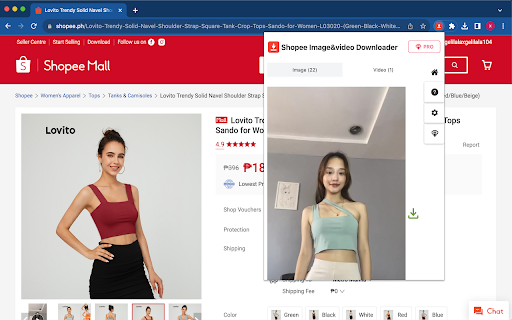
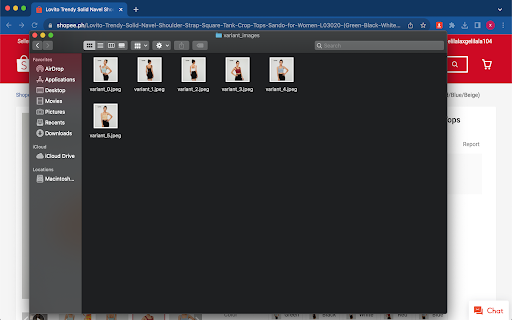
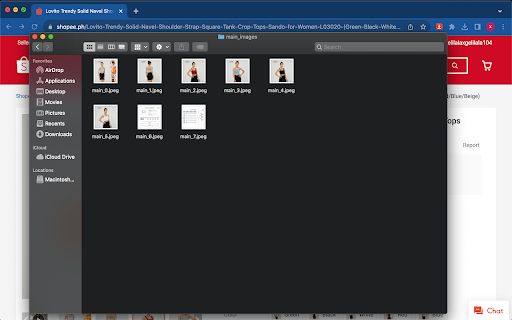
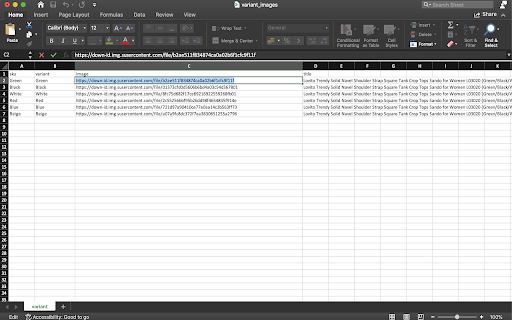
Download Shopee product images and videos easily with this popular tool! 📥 **Shopee Image Downloader** - The #1 tool to download Shopee product images and videos instantly! 📸 **Download Shopee Images in Seconds!** Easily save high-resolution Shopee product images with just one click! This powerful Shopee downloader helps you collect and organize Shopee product media instantly. Perfect for Shopee sellers, researchers, and shoppers looking for the best image download solution. 🔍 **Why Choose Our Shopee Image Downloader?** Unlike other image tools, our Shopee Image Downloader is specifically designed for Shopee platform, ensuring the highest quality images from Shopee product pages every time. Save time and effort with the most efficient Shopee product image download solution available! ✅ One-Click Shopee Downloads - Save all Shopee product images instantly ✅ High-Resolution Shopee Images - Get the best quality Shopee photos ✅ Shopee Variant Images - Download images for all Shopee product variants ✅ Shopee Video Download - Save Shopee product videos directly (Pro) ✅ Shopee Data Export - Export Shopee product details to Excel including titles, SKUs, and URLs ✅ Batch Shopee Processing - Download multiple Shopee images as zip files (Pro) ✅ Easy Shopee Interface - Simple design for downloading Shopee content 1. Install the Shopee Image Downloader extension 2. Visit any Shopee product page on shopee.com 3. Click our Shopee downloader icon in your browser 4. Select your preferred Shopee download options 5. Get your Shopee images and data instantly! 👥 **Perfect for Shopee Users:** • Shopee Sellers comparing competitor products • Shopee Researchers collecting product information • Shopee Shoppers saving product images for reference • Designers needing Shopee product images • Social media managers creating Shopee product posts **Shopee Downloader:** • Batch download all Shopee images as ZIP files • Download Shopee product videos in MP4 format • Advanced Excel export with complete Shopee product details • Priority Shopee downloader support 🔒 **Secure Shopee Downloading:** No ads, no tracking - Our Shopee Image Downloader respects your privacy and never collects personal data while you download from Shopee. ⬇️ Download our Shopee Image Downloader today and transform how you save and organize Shopee product media! The best tool for downloading Shopee product images and videos!

Shopee Save - Download Product Images & Video
Download Shopee Product Images & Videos. The most popular tool for Shopee! Save Shopee product images in one click! This extension allows you to easily save Shopee images and videos to your computer. You will be able to download product images in one click with the best quality possible! ----- GETTING STARTED ----- 1. Install the extension by clicking the "Add to chrome" button. 2. Open an Shopee product page. 3. Click on the download buttons next to the product images. ----- FEATURES ----- - Download images one by one (right click). - Download main product images & video. - Get the best quality image download. [ ___ HOT ___ FEATURES] - Download as .ZIP. - Watermark: Automatically adding watermark on image download. - Compress images with the best quality and compression. . . If you have any questions, or suggestions to improve the app, please let us know at spcpapps@gmail.com!

Download Shopee pictures-shopee picture downloader
A one-click download tool for Shopee high-definition pictures, supporting deduplication and batch saving. Shopee Image Downloader is a lightweight and efficient Chrome extension that can download high-definition images from Shopee product pages with one click. It automatically removes duplicates and supports multiple image selection and batch saving. It helps sellers, content creators, and buyers quickly obtain e-commerce materials and improve product selection and operational efficiency. ✅Feature Highlights 🖱️ One-click Download: Extract product main and detail images in batches with a single click 🧠 Smart Deduplication: Automatically exclude duplicate images to avoid redundancy 🎯 Selective Download: Manually select images to be saved 📷 Watermark-free Original Images: Get high-quality original product images 🌍 Multi-site Compatibility: Supports Shopee's multiple country sites (MY, TH, PH, VN, etc.) 🎯Applicable People and Scenarios E-commerce Sellers: Analyze competitors and quickly save product images for listing or design Buyer Collection: Save and compare images of favorite products Content Creators: Collect high-quality materials for reviews/short videos Designers: Obtain visual reference images Data Analysts: Collect images in batches for analysis and model training 📘How to Use (Simplified Steps) ① Install the extension Add and enable the Shopee Image Downloader extension from the Chrome App Store. ② Open the product page. Visit any Shopee product link (supports .my/.th/.vn/.ph sites). ③ Automatically load images. Click the plugin icon to automatically display all available images. ④ Select and download. Check the desired images or click "Select All." Click "Download Images" to save them in batches. 🛡️ Permission Description (Simple and transparent, meets audit requirements) This plugin only runs when users visit Shopee product pages. It does not collect any user data, does not upload image content, and complies with the Chrome App Store privacy policy.

Shopee Images Downloader
Scrape and download high-resolution images of Shopee product listings in bulk or one by one from any listing with just a click. The Shopee Images Downloader Browser extension is here to revolutionize the way you download images. Effortlessly download high-resolution images from product listings with just a single click. This extension is the perfect tool for anyone looking to quickly and easily gather images for design projects, printing, archiving, or even casual browsing. Key Features: - One-Click Download: You can obtain all the images associated with a product instantly. - Bulk Download Options: Choose to download images individually or zip them together for a convenient bulk download. - User-Friendly: No technical or coding skills are needed to use this extension. It’s designed to be intuitive and straightforward for all users. - High-Quality Images: The extension ensures that you get the best quality product photos for your needs. How It Works: 1. Navigate to your desired product page on Shopee.com. 2. Locate the “download icon” positioned at the top right of the product listing images. 3. Click on the icon, and a popup window will appear, showcasing all the product listing images. 4. You can then proceed to download the images either one by one or in a zip file for bulk saving. Who Can Benefit from Shopee Images Downloader? Whether you're a casual shopper, a shop owner, or a power user, this Browser extension is crafted to enhance your experience. It's a simple yet powerful tool that brings Shopee images to your desktop with unparalleled ease. Get Started Now Embrace the simplicity of downloading product images. Add this extension to your browser today and start downloading what you need without the hassle. Data Privacy Your data stays on your device and is not stored or transmitted to our servers. We prioritize keeping your information secure and confidential. Disclaimer This independent project was developed by ExtensionBox and has no relationship to Shopee Inc.

Shopee Images & Videos Downloader
Download product images and videos from any Shopee listing with a single click. No coding needed, fast download. Stop wasting hours manually saving images and videos! Our enhanced tool empowers you to: ✅ One-click to get images and videos from any Shopee product page ✅ Bulk saving of images in seconds - no more saving one by one ✅ Preserve Original Quality - Get images exactly as displayed (No compressed files) ✅ 100% Private - Zero servers involved, Shopee-compliant ✅ Install now and streamline your image-scraping process! Perfect For: 🛒 Sellers creating cross-platform listings 📊 Marketing teams designing print/web campaigns 📦 Suppliers building visual product databases 🔍 Researchers analyzing packaging trends Download and bulk save product images and videos can be done quickly with our tool, without any need for coding. Simply follow these steps: - Click "Add" to install the extension. - Open any product on Shopee.com. - Click the “download icon” on the top right of the product listings images. - All the product pics should be displayed on the popup window. You can save them one by one individually or as a bundled zip file. Is it free? Yes, it's free! You can access the basic features or upgrade to get more features. - All data is processed in your local computer, it is never passing through our web server, no one knows what you exported. - Shopee and all related marks are trademarks of Shopee.com, Inc. or its affiliates. This independent project was developed by ExtensionGod and has no relationship with Shopee Inc.
