
enmeegingoekbnecjoaogdebdpcmfnff


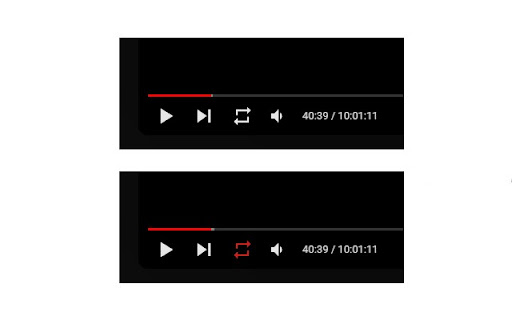
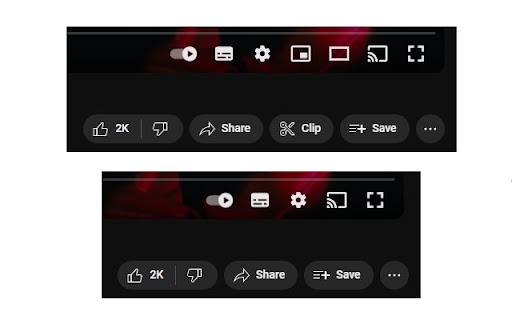
Works even after YouTubes new changes for handling AdBlockers. (June 2024) Easier Volume Control: - Adjust video volume by scrolling the mouse wheel up or down while hovering over the video. Replay Button: - Seamlessly replay videos with a single click. Use the keyboard shortcut "r" for quick replays. Ad Skip/Closure: - Automatically skip or close ads to reduce interruptions. - Remove ad banners and promotional videos from the homepage. Improved Autoplay: - Faster autoplay due to the removal of the short countdown-delays between videos. - Autoplay continues working in playlists beyond 100 videos. Autostop Disabler: - Prevent YouTube from stopping videos after periods of idle playback. - Removes the "AdBlocker not allowed" popup. Cleanup Layout: - Hide unnecessary buttons like miniplayer. - Conceal the subtitles button when no subtitles are available. - Remove action buttons like "Download" and "Clip", while ensuring the "Save" button is always visible. Play All Button (*NEW FEATURE*): - Adds a button next to the subscribe button on the channel homepage that starts a playlist of all the channel's uploads. All these features are customizable through the extension's own menu, allowing you to tailor your YouTube experience according to your preferences. Report Issues: Encountered any issues, problems, or bugs? Your feedback is valued! Please report them to ytu.feedback@outlook.com.

YouTube Detoxifier: Delay Shorts & Hide Recommendations
Do you want to block or disable YouTube Shorts to stop Doomscrolling, but still catch the important ones? This extension lets you do just that with a customizable timeout feature. Set a delay (like 10 seconds or any value you prefer) before a Short plays, helping you avoid distractions while still being able to watch what matters. Remove Recommendations and Comments: The extension provides a distraction-free browsing experience by allowing you to remove YouTube recommendations and comments. Timeout Feature: To reduce the addictive nature of YouTube videos and shorts, the extension provides a timeout feature. It also helps in preventing you from endlessly scrolling YouTube shorts. Break Feature: Need a break from the distraction blocker? The extension includes a break feature that allows you to temporarily disable the settings. During this break, you can study or simply chill out without the restrictions. You can also set custom break durations and configurations.

NonStop Youtube
Chrome Extension: NonStop Youtube Tired of YouTube's & YouTube Music's "Video Paused. Continue Watching?" popup interrupting your viewing experience? NonStop Youtube automatically handles these prompts, ensuring your videos and songs play continuously without any manual intervention. Perfect for: • Long viewing sessions • Background music and podcasts • Playlist binging • Ambient sounds and playlists Key Features: • Now supports YouTube Music — keep your songs playing non-stop • Smart Per-Tab Control: - Enable auto-resume for specific tabs only - Perfect for keeping music playing in background tabs - Disable for tabs where you want manual control - Each tab remembers its own setting • Automatic handling of "Continue Watching" prompts • Works seamlessly in the background • No setup required - just install and enjoy • Clean, modern interface with easy toggle control • Tested for 5+ days of continuous background music playback Unlike other extensions that break with YouTube updates, NonStop Youtube is actively maintained to ensure reliable performance. Need help? Found a bug? Don't leave a bad rating! Contact me at ritwikchakraborty.ritwik@gmail.com I'll fix any issues within 2 days to keep your videos playing smoothly. Enjoy truly uninterrupted YouTube & YouTube Music viewing with NonStop Youtube!

YouTube No-Pause
Enjoy YouTube without the pause. YouTube No-Pause elegantly dismisses the annoying "Still watching?" and "Video paused" popups, ensuring your videos play continuously in the background. With a sleek toggle integrated directly into the YouTube settings menu, you can take control of your viewing experience effortlessly. No distractions, just seamless entertainment. PERFECT FOR: ► Focus & Productivity: Uninterrupted lo-fi beats or classical music for deep work and late-night study sessions. ► Background Listening: Keeps podcasts and video essays playing in background tabs without pausing. ► Sleep & Relaxation: Let your 10-hour white noise or rain sounds run all night without stopping. KEY FEATURES: ✔ Auto-Resume & Dismiss: Instantly blocks the "Continue watching" prompt. ✔ Lightweight & Silent: Runs efficiently in the background. ✔ Privacy First: It requires no unnecessary permissions, contains zero tracking, and never collects your personal data. Try it now, disable the auto-pause, and keep the play button rolling!

AutoTube - YouTube nonstop v2
Bypass the annoying 'you still there?' popup message and keep YouTube running nonstop! (NEW UPDATED) 🎉 AutoTube V2 🎉 AutoTube keeps YouTube running and auto-skip to the next video on the list 🔥 🔥Version 2 - major update to the UI and core package **NEW UPDATES** 🔥Version 1.7.2 - Fixed a minor bug for auto-skip 🔥Version 1.7.1 - Added back the auto shuffle/loop and implemented a custom functionality to fix and override the default YouTube shuffle/loop buttons. Check out the extensions popup window for more info. 🔥Version 1.7.0 - Disabled auto-loop and auto-shuffle until YouTube fixes their APIs 🔥Version 1.6.5 - Fixes for auto-loop and auto-shuffle 🔥Version 1.6.0 - Added Auto-click feature for the loop & shuffle buttons (only works in a playlist) - minor bug fixes and improvements 🔥Version 1.5.7 - Auto-skip feature improvement - When Auto-skip is disabled, it will disable the default YouTube auto-play feature and will NOT skip to the next video. - When Auto-skip is enabled, it will automatically skip to the next video right away. - minor bug fixes 🔥Version 1.5.5 - minor bug fixes - Live updates/messages section - fixed auto-skip minor toggle bug - No need to close all YouTube tabs anymore before installing the extension 🔥Version 1.5.2 - various bug fixes and improvements - added an option to toggle on/off the auto-skip feature - fixed random confirmation toast that appears on the bottom left - fixed the random pause bug - works on YouTube and YouTube Music - refactored 75% of the code - videos will play forever 🏃♂️ **SUPPORT** If you have any questions, feedback, ideas and suggestions, please reach out to: ✅ admin@moekanan.com If you enjoy using this extension, you can help keep it running nonstop :) 💖 https://paypal.me/moekanan **hash tags** #YouTube #video #player #running #nonstop #music #stream #skip #screen #free
