
enichikjaocbomajlidhphmocmlnjcai

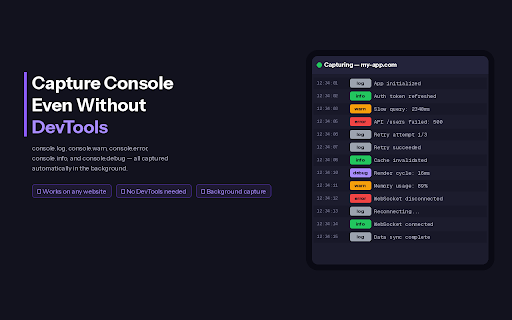


Never miss a console log again. Record, search, and filter console output even when DevTools is closed. Console Viewer - Never Miss a Console Log Again Ever closed DevTools and missed that crucial error? Console Viewer captures all console output even when DevTools is closed, so you never lose important debugging information. FEATURES Record Console Output Capture console.log, console.warn, console.error, console.info, and console.debug automatically. Works on any website without keeping DevTools open. Tab-Specific Capture Enable capture for specific tabs only. Each tab maintains its own capture state - monitor only what you need. Preserve Logs Across Refreshes Keep your logs even when the page reloads. No more losing that error message because someone refreshed the page. Search & Filter Quickly find what you're looking for with instant search. Filter by log level - errors, warnings, info, or debug messages. Run JavaScript Execute JavaScript directly from the extension popup. Test code snippets on any page without opening DevTools. Light & Dark Mode Automatically matches your system theme, with manual toggle available. Keyboard Shortcuts / - Focus search Esc - Clear search Ctrl+L - Clear logs Ctrl+Enter - Run JavaScript PERFECT FOR - Developers debugging production issues - QA teams capturing error logs during testing - Anyone who wants to monitor console output without DevTools PRIVACY All data stays local. Console logs are stored only in your browser. No data is sent to external

Linkooo
Free From Platform Dependency. You just need 1 URL to access your link anywhere. Ever closed a tab and immediately regretted it? Spent 10 minutes digging through browser history trying to find that one article? Linkooo fixes that. Linkooo automatically preserves every link that matters to you — organized by date, easy to search, and accessible from any device. HOW IT WORKS Click the Linkooo icon to save the current page instantly Turn on Quick Save to capture links automatically — no clicks needed View all your saved links at linkooo.com, sorted by date Each link shows the page title, favicon, and full URL for easy recognition One-click save — Save any webpage with a single click Quick Save mode — Links saved instantly without opening the popup Date-wise organization — Links grouped by day so you can find anything fast Favicon detection — Visual cues to quickly identify saved links Cross-device access — View your saved links from any browser at linkooo.com Compact URL sharing — Share your saved links with a short, clean URL Free to use — No hidden limits, no premium walls PERFECT FOR Researchers collecting reference links across sessions Developers bookmarking Stack Overflow threads and docs Job seekers tracking application pages and company research Students organizing study materials and sources Anyone who opens too many tabs and loses track Your links. Organized. Always findable. That's Linkooo.

SafeBrowz
Real-time AI scam & phishing detector - protects you from fraudulent websites Real-time protection against phishing websites, scams, brand impersonation, and crypto wallet drainers. SafeBrowz runs a 3-layer detection engine and works on every website you visit. • Phishing websites impersonating banks, exchanges, government agencies, and major consumer brands • Brand-clone scams targeting tech platforms, payment processors, streaming services, and crypto wallet providers • Typosquat and Punycode lookalike domains • Wallet drainer scripts and Permit2 signature traps • Phishing pages hosted on free website-hosting platforms • Fake captchas, ClickFix, hidden text traps • 60+ tracked scam categories (airdrops, fake delivery notifications, tax refund phishing, tech support scams, romance scams, and more) • 3-layer URL detection (local + threat-intel APIs + community) • 550+ brand impersonation database • Free-hosting phishing detection • Wallet drainer signature warnings (Permit2, setApprovalForAll, eth_sign) • On-page shield indicator • UI in English, Arabic, Spanish, and Chinese Everything in Free, plus: • AI deep content scan (100+ languages) • Clickjacking and overlay-attack protection • Pastejacking guard (clipboard hijack prevention) • Hidden-text stripping • Password breach check via k-anonymity hash API • Link hover scanner with verdict tooltip • Desktop notifications for dangerous sites • Scan history and weekly stats For Web3 and crypto users, SafeBrowz includes a wallet-drainer signature interceptor. When a website requests a Permit2 approval, setApprovalForAll, or eth_sign / personal_sign action that matches known drainer patterns, SafeBrowz displays a warning modal explaining the risk. The warning is dismissable and never blocks legitimate transactions. If you do not use a crypto wallet, this feature remains dormant. The user interface is available in: • English • Arabic • Spanish • Chinese Threat-data updates are fetched every 6 hours. URLs submitted for AI analysis are not linked to your identity.

Open Graph Devtools
This browser extension adds a new DevTools panel specifically designed to debug and analyze Open Graph (OG) tags on the currently… This browser extension adds a new DevTools panel specifically designed to debug and analyze Open Graph (OG) tags on the currently active tab. Open Graph tags are crucial for controlling how web pages are displayed when shared on social media platforms. Key Features: 1. Dedicated DevTools Panel: Seamlessly integrates into your browser's developer tools, providing easy access to OG tag information. 2. Tag Visualization: Presents OG tags in a clear, hierarchical structure for easy comprehension. It automatically displays the og:image when one is present.

Controls for YouTube Shorts and Instagram Reels
A modern control bar for YouTube Shorts and Instagram Reels — playback speed, scrubbing, volume, fullscreen and keyboard shortcuts. Bring back what's missing from YouTube Shorts and Instagram Reels. A polished, lightweight control bar appears below every Short and Reel — with a scrubber you can actually drag, a speed pill that cycles 0.25× to 2×, real keyboard shortcuts that work even when the page steals focus, and a volume slider that finally stays in sync. Same UI, same shortcuts across both platforms. • Works on YouTube Shorts AND Instagram Reels — same control bar, same keyboard shortcuts. • Scrubber — drag to seek, big hit area, smooth red thumb on hover. • Speed control — click the pill to cycle 0.25× → 2×, right-click to reset, or use on the keyboard. Optionally remembers your last speed. • Volume — hover to expand, scroll to nudge, arrow keys to step, M to mute. Stays in sync with YouTube's native control. • Time display — current and total, in tabular numbers so it never jitters. • Fullscreen — uses YouTube's button when available, falls back to the standard Fullscreen API. • Auto-jump to next — skip to the next Short the moment one ends. • Stop looping — pause at the end instead of replaying. • Hide YouTube's stock controls and metadata for a clean view. • 12 built-in languages — English, Türkçe, Deutsch, Español, Français, Italiano, Português (BR), Русский, 日本語, 한국어, 中文 (简体), العربية. Pick yours from the popup. Space / K play / pause ← / → seek 5 seconds J / L seek 5 seconds ↑ / ↓ volume (or hold Shift, your choice) M mute playback speed -/+ This extension does not collect data, does not track you, does not phone home. It only runs on youtube.com and instagram.com pages and only reads the DOM to overlay the player bar. Settings are stored in your Chrome sync so they follow you between devices — nothing leaves Google. The previous versions were brittle: detection broke on YouTube's layout updates, listeners leaked between videos, the auto-scroll was unreliable, and the popup shipped a 280 KB CSS framework just for six checkboxes. 3.0 is a full rewrite with a tight player core, an AbortController-scoped lifecycle, robust DOM detection, a hand-rolled modern popup, multi-language UI and a real speed control. Open-source and MIT-licensed.
