
enfgmbhdgelbkmhhhdiljfimmcghnalc
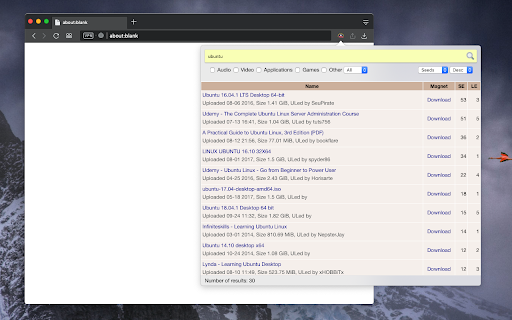
Search for torrents using the official "The Pirate Bay" engine on a live ProxyBay mirror without visiting its page. This extension facilitates searching on "The Pirate Bay" by using an active proxy and presenting the results directly in the popup window. You can click on the download link to transfer magnet links to your preferred torrent downloader application or use the right-click context menu to copy the link to the clipboard. Key Features: 1. Automatically finds the fastest proxy server for each search. 2. If the first search engine returns no results, the extension switches to other torrent search engines. 3. The extension avoids loading scripts from the engines and only parses the HTML content for safety. Furthermore, the extension allows you to filter search results by selecting specific categories, and you can sort the results by name, date, number of leechers, or number of seeders. GitHub page: https://github.com/balvin-perrie/the-pirate-bay-torrent-search -- User Data Privacy When you enter a search query in the extension's popup, it is sent to one of the mirror pages provided by "https://proxybay.page/" (the server name is displayed in the log section of the popup). The results are then extracted from the destination page and shown exclusively by parsing the HTML content. Additionally, if the mirror supports the standard JSON API communication, the extension may bypass HTML parsing and internally generate magnet links using the provided HASH. This extension does not engage in any other server-side activities.

TorrentSafe
Anonymous bit downloads, just right click the magnet link Easily add torrent and magnet links to your TorrentSafe.com "My Downloads" torrent cloud storage area. Fast, anonymous, and secure downloads without storage or transfer rate limits. Free users limited to 5 downloads per month. 1. Visit your favorite torrent provider 2. Right click magnet link and select "Download with TorrentSafe" 3. Visit TorrentSafe.com and select "My Downloads" to view and download your torrent files.

Download with Transmission
Easily download torrents via transmission client from your browser Download with Transmission extension lets you easily send torrent links (magnets or hash codes) from your browser to the transmission client on your machine. Transmission is a software that enables you to download torrents to your machine (PC, Mac, or Linux). This add-on simply connects your browser to the transmission client. To work with this addon, simply right-click on a torrent link and then click on the - Download with Transmission - from context-menu. Please note that to work with this add-on you need to have transmission software installed on your machine. There are also several settings in the add-on's options page that you can adjust. Note 1: Download with Transmission extension, does NOT belong or relate to the Transmission software or website at all. It is an unofficial add-on that is developed and maintained independently by its author. Note 2: if you do not have Transmission software please visit this (https://transmissionbt.com/download/) page to download the software. Note 3: to read the privacy policy for this addon, please follow this link: https://mybrowseraddon.com/privacy-policy/developer/sevina.html Note 4: if you found a bug to report or have a feature request in mind, please fill out the bug report form on the add-on's homepage (https://mybrowseraddon.com/download-with-transmission.html).

Shake Torrent
Are you tired of the hassle of downloading separate software to manage your torrents? Say goodbye to the old ways and embrace the future with Shake Torrent, the cutting-edge WebTorrent client designed to revolutionize your file-sharing experience right within your web browser! 1. Seamlessly Seed and Download Files: Shake Torrent allows you to effortlessly seed and download torrents directly from your browser. No more cumbersome installations or resource-heavy applications. Enjoy the simplicity and convenience of accessing your favorite content without leaving your browser window. 2. Lightning-Fast Streaming: Experience lightning-fast streaming of videos and audio files with Shake Torrent's advanced WebTorrent technology. Say goodbye to buffering issues and enjoy uninterrupted entertainment without any delays. 3. User-Friendly Interface: Our intuitive and user-friendly interface makes managing torrents a breeze. Whether you're a seasoned torrent enthusiast or a newcomer, Shake Torrent welcomes users of all levels, offering a smooth and delightful experience. 4. Robust File Management: Shake Torrent empowers you to efficiently organize and manage your downloaded files. Easily categorize, search, and sort your content, making it a breeze to find what you need when you need it. 5. Instant Preview: Preview your files before downloading them with Shake Torrent's instant preview feature. No more wasting time on unwanted downloads - ensure you get exactly what you're looking for! 6. Secure and Private: Your privacy matters to us. Shake Torrent ensures your data remains secure and private during the entire torrenting process. Rest easy knowing your personal information is in safe hands. 7. Cross-Platform Compatibility: Access Shake Torrent from any device with a web browser. Whether you're using a desktop computer, laptop, tablet, or smartphone, enjoy seamless cross-platform compatibility. Install Shake Torrent from the Chrome Web Store. Open the Shake Torrent extension within your Chrome browser. Search for torrents or add magnet links. Enjoy fast and reliable downloads or stream media files on the go. Seamlessly manage your torrents and files with our easy-to-use interface. Embrace the Future of Torrenting: Shake Torrent brings a new era of torrent management, merging the power of WebTorrent technology with the convenience of browser-based access. Embrace the future of file-sharing and take control of your torrenting experience like never before. Note: Shake Torrent is intended for legal and authorized use only. Respect copyright laws and abide by the terms of service of the content you access through the application.

Add Torrent To
Add Torrent To is a minimalist browser extension that allows to instantly begin a download of the torrent content into a configurable set of directories available from the browser context menu. It is useful for preventing clutter in the download directory.
