
enfdhkjncgjefhenimgmfacnceagccfd

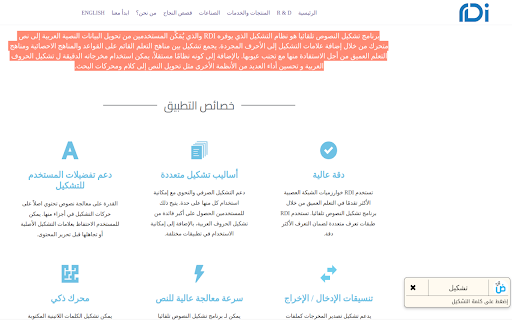

Diacritic for arabic text RDI's Arabic diacritic extension helps you add diacritic to any Arabic text while browsing the web using latest AI technologies. Our Arabic diacritic technology can work on any highlighted text on most of the websites, also on any form.

Qalam
As we all know, writing new content, reviewing it for grammatical errors and maintaining the writing style across the article is not an easy task, especially when the content is large and comes in different styles, such as: • Books and magazines • Websites • Reports • Technical and financial offers • Speeches and letters. • Emails • Advertisements and promotional materials 🔔 That is why Qalam is the right assistant for you when drafting or writing different materials in Arabic. It will help its users and your employees to develop richer content that is free of grammatical mistakes with better writing quality in Arabic. 🖊 How Qalam Works? The tool highlights the wrong words or suggested improvements, when you click on them, it will display the suggested words that suits your content. You can also ignore the error by pressing the "Ignore" button, or add it to the personal dictionary by clicking "Add to Dictionary". Highlighting the words are also colored according to the type of correction or suggestion as follows: 🔴 Red indicates spelling errors. 🔵 Blue color for grammatical errors. 🟡 Yellow for improving Terms. 🟣 Purple for Dictionary suggestions. For formation and Quran Documentation service, all you have to do is highlight the text you wish to document or form, and then click on the option: "Tashkeel" or "Tawtheeq". 📝 Qalam is mostly know for: • Correction of Spelling and grammatical mistakes Qalam uses autocorrect features to identify spelling or grammatical mistakes and suggests the most suitable correction according to the syntax (missing a comma or a quotation mark, grammatically error or misspelling a word…etc). • Setup your Customized Dictionary What are your favorite Phrases? Do you have specific terms that you prefer to use? How to write the translation of foreign words with the same spelling? Now you can manage all these preferences and other through your company's or own dictionary • Artificial intelligence serving Arabic language Qalam uses artificial intelligence techniques and harnesses them to serve Arabic writing. We are constantly working on improving and developing machine learning models, to offer users the greatest possible benefit from integrating the Arabic Proofreading with the auto proofreading. • Automatic configuration with Qalam: Automatic formation service with the ability to choose the formation density, such as full character or end of words or specific formations. • To enable all services, subscribe though our pricing page: https://qalam.ai/pricing 💡 Why Qalam? Do you have a trouble in writing an error-free text with no spelling or grammatical errors? Are you having difficulty strengthening and improving your text? Qalam will help you perform several tasks consistently and accurately. The main tasks of Qalam are: • Checking common spelling mistakes. • Grammatical mistakes • Typos. • Suggests alternative words to enrich your text. • Auto Tashkeel of the text • Quran Documentation. ⭐ What distinguishes Qalam? Qalam is an Arabic proofreading tool that was built using automated proofreading in order to help the user have Correct & powerful Arabic texts on sites that allow the user to write texts in them.

Add Arabic Text RTL support
This extension applies some modification in websites in order to add bidirectional support to them. As the result, text (both LTR… This extension applies some modification in websites in order to add bidirectional support to them. As the result, text (both LTR and RTL) would virtually appear in correct direction. This extension does not collect any information from your activities

رفيق الرقمنة - متوسط - النسخة المكتبية
الإضافة الخاصة بموقع رفيق الرقمنة - الطور المتوسط الإضافة الخاصة بموقع رفيق الرقمنة، تسمح لك بتحميل بيانات بطريقة سهلة و سريعة

Nekudot
If you're learning Hebrew and don't know how to pronounce new words without nekudot, this tool is for you. With this extension, just highlight the Hebrew text and then click the extension's icon. The Hebrew text will be replaced to include nekudot. It is not perfect, but it performs really well especially if you are looking to pronounce Sephardi, or Israeli, Hebrew where Kamatz and Pataḥ sound the same. Known issues: * "I'm not seeing a Nekudot icon where the extensions are" This is likely because chrome has elected not to show it. You can change this by clicking on the puzzle-piece shaped icon on the top right and pinning the Nekudot icon to the toolbar. * This does not work on Google Docs. This would require making a Google Workspace addon (or require logins and require unreasonable permissions) in addition to this chrome extension and well, nope. Please support further development and show your appreciation at paypal.me/GiladAmar. If not, no worries, it's free and will always be. This extension is open-source at github.com/GiladAmar/Nekudot. So if you're looking to learn how to build a Chrome extension, or use TensorFlow.js in one, please take a peak. This wouldn't be possible without the work done by Elazar Gershuni and Yuval Pinter in arxiv.org/abs/2105.05209 who graciously let me use their LSTM model. Thank you, it's a really cool and original use of machine learning.
