
emnjhmmlbiiioondginejlfdmiemflbn

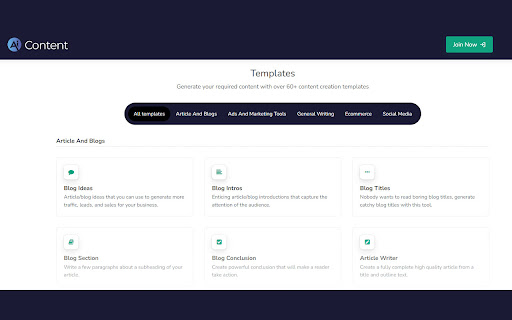
Generate high-quality, unique essays and articles with free AI writer and text generator. Free AI Writer and Text Generator The Future of Content Writing is Here Generate high-quality, unique essays and articles with free AI writer and text generator. Go from a few phrases to surprisingly great essays and articles with AI copywriting. * Article And Blogs * Ads And Marketing Tools * General Writing * Social Media * Ecommerce

WriteMe.ai - AI powered writing assistant
Prepare to witness the next big transformation in your writing experience on your favorite Browser, using WriteMe.Ai Google Chrome Extension. WriteMe.Ai’s Google Chrome Extension Features: We have got some amazing features in WriteMe.Ai Google Chrome Extension for a better, smoother and more streamlined writing experience using AI. Next Line Suggestions to incorporate fresh, new ideas in your text Built-in Grammar Checker to edit, polish and perfect your text Write Complete Article to create long form content in a jiffy Popular Use Cases to write unique content for certain use cases in minutes How to Setup WriteMe.Ai’s Google Chrome Extension: All you will need to do is: Download the WriteMe.Ai Google Chrome Extension Pin the WriteMe.Ai Google Chrome Extension to Your browser Launch the WriteMe.Ai Google Chrome Extension and Log In After Downloading Here are the next steps you need to follow to use WriteMe across all websites to use WriteMe.ai’s extension Step 1: Once you have successfully installed the extension, go to your extensions settings Pin WriteMe.Ai extension on your browser. Create a new document to start using WriteMe.Ai or go straight to the web app. You can also set your preferences for using WriteMe.Ai on different websites by going to the Extensions Settings page. Step 2: Move your cursor over the text and select any text between 30 to 300 characters length. WriteMe.Ai icon will appear under the highlighted text. Click on the WriteMe.Ai icon to open the toolbar (ribbon). Step 3: The ribbon will show you available actions you can take. Choose any option to get Next Line Suggestions, view Use Cases, use Grammar Tools, or Write Complete Article using WriteMe.Ai. Chrome Extension Launched Access 40+ use cases & templates Supports 30+ languages and 20+ tones Write sales & marketing emails that get replies Discover ideas & write engaging content for blog Generate creative, catchy copies for social media Write product, job, profile, video descriptions Generate interesting caption ideas for Instagram post In-built native plagiarism checker (powered by Copyscape) Workflow and team management features WriteMe Extension is now Draggable New “WriteMe” Button to get text answers for anything Now Data is copied auto on Click Using Append Function* Input Unlimited Text Utilize the capabilities of GPT-3.5 and GPT-4 now. Drag and Drop Extension: Take the extension anywhere with you! Drag and drop the extension anywhere on the page and continue making edits. Enjoy more writing freedom! "WriteMe" button can help you with emails, social media posts, ad copies, and more! You don't have to waste time searching for the right use case; just use the WriteMe option to get something written for you. Use the new WriteMe button to find text-based.

AI Text Generator
Improve your text with cutting-edge AI Text Generator Free & Unlimited! Write your next masterpiece in one click in any text field! 🚀 Are you looking for an easy and convenient way to generate high-quality content in any text field using artificial intelligence? Look no further than the free AI Text Generator! This powerful tool uses the latest in GPT writer technology to help you create top-notch content in a matter of seconds. HOW TO USE: 1. Click the content generator extension button 2. Enter command to AI Text Gen 3. Press “Copy&Close” button 4. Paste (Ctrl + V) to any text field QUICK USE: 1. Enter a text to any text box (Gmail, Twitter, Reddit etc) 2. Click the AI Text icon (right to your text field) 3. Or use HotKey: Ctrl + Shift + Z 4. Or Right Click on your text field and click “GPT Text Generator” icon 5. You’ll get ChatGPT answer right in the text box REPLY/TRANSLATE 1. Select any text with your mouse, click the AI Writing Generator extension button. 2. Enter what should GPT writer do with the content: “translate to spanish”, “write funny answer”, “rewrite it”, “check grammar” etc 3. Press “Copy&Close” 4. Paste (Ctrl + V) to any text field USE 1-CLICK TEMPLATES 1. Press Right Click and Select Fast text processingTemplate 2. To translate the selected text to English, Spanish, Deutch, French etc 3. To rewrite it, check spelling, correct grammar or summarize a selected text 4. To change the tone to more official or otherwise make the text more funny 💡 Here are just a few of the many ways you can use the AI Text Generator Free & Uncensored: 1. 💼 Business: Use Message Generator to help write business proposals, reports, and other documents. The message writer can help you generate ideas, create outlines, and even write entire sections of your document for you. 2. 🖊️ Writing: If you're a writer, AI Text Writer can be a valuable tool for helping you overcome writer's block and generate new ideas. Use it to create outlines, generate character descriptions, or even write entire scenes or chapters. 3. 💬 Conversations: ChatGPT Writer can also be used to help you write more engaging and natural-sounding conversations 4. 🔑 Any texts: Our belief is that unfiltered, unlimited, uncensored text generation, and also safe for work AI interactions between users and GPT chatbot are more valuable. 🤖 ChatGPT Writing Extension is a free, uncensored text tool that uses the latest Mistral language model to generate text. It's a sentence writer and email generator all in one! You can use it to create artificial intelligence sentences. Plus, it's an AI text generator free, so you can use it as much as you want without worrying about costs. 🖊️ AI Text Chatbot is based on the latest Mistral model, a neutral & uncensored AI designed for our core language model.. Private use of our AI is intended to align with the user's intentions, rather than being filtered by third parties. 🔒 It’s Safe for All. This means our GPT model will not generate unethical content on its own. However, it is important to note that the outputs of our AI are entirely dependent on what you input. 📝 AI Text Generator GPT is perfect for a wide range of tasks. Whether you need to write a blog post, create content for your website, or just come up with some ideas for your next writing project, this ChatGPT text generator online free has got you covered. It's also an ai letter generator, so you can use it to write letters, emails, and other types of correspondence. You’ve unlimited creativity as an AI Writer... * 1️⃣ Articles and blog posts * 2️⃣ Product descriptions * 3️⃣ Social media posts * 4️⃣ Marketing copy * 5️⃣ And much more! 💡 One of the best things about the Text Generator is its simplicity. All you have to do is open the extension, enter a prompt, and let the content writer do the rest. It will generate a variety of different text options for you to choose from, so you can find the one that best fits your needs. Plus, it's an AI text generator online, so you can use it from anywhere with an internet connection (like ChatGPT, Gemini, Copilot, Claude and others). 🔑 Here are just a few of the many ways you can use the ChatGPT writing generator free: 1. Create website content: Use the messages generator to write AI content for your website, including product descriptions, about pages, and more. 2. Generate ideas: Use the GPT text writer to come up with ideas for your next writing project, whether it's a novel, a screenplay, or something else. 3. Write letters and emails: Use the ai letter generator to write professional-sounding letters and emails. 📈 AI Writer is also a great tool for businesses and organizations. It can be used as an ai content generator, and ai content writer to create fun Chat GPT writer content for your website, social media, and other marketing materials. Plus, it's an ai writing bot, so you can use it to generate text automatically, saving you time and effort. 🔒 AI Text Writer is safe and secure to use. It does not collect or store any personal information, and all text generated by the ai word generator extension is private and confidential. Plus, it's an open letter writer, so you can trust that it's using the latest and most advanced ai copy generator technology (like GPT-3, Llama, GPT-4 etc) 💻 So why wait? Try the sentence writer today and see how it can help you create Chat GPT content maker using the power of artificial intelligence! Whether you're a professional writer, a business owner, or just someone looking to improve their writing skills, this sentence writer online free is the perfect tool for you. Try it out now and see the difference it can make in your writing! 🚀 In conclusion, sentence generator is a must-have tool for anyone looking to create high-quality text using artificial intelligence. It's a content creator, and ai writing generator all in one, and it's free, open-source, and easy to use. 🚀 Whether you're a professional writer, a business owner, or just someone looking to improve their writing skills, this ai text generator online free is the perfect writer tool for you. Best of all, our extension is completely free to use! 🚀 That's right, access the full capabilities of our ChatGPT text generator analog without any limitations or hidden fees. Say goodbye to costly subscriptions and hello to unlimited creativity. So why wait? Try the AI Text Generator out now!

AI Writing Generator: AIFreeBox
Free AI Writing Generator: Create content instantly. Transform blogs, emails, and marketing copy with AI-powered writing tools. 💡 Pondering over how to create engaging blog content or ways to write social media posts that captivate? If creating diverse and impactful written content is your challenge, AI Writing Generator is your solution. Introducing Our Free AI Writing Generator by AIFreeBox: your free AI writing assistant, now available as a Chrome extension. Effortlessly craft articles, blogs, social media updates, and marketing copy that resonates with your audience with our best online AI Writer generator tool. Applications and Benefits of Free AI Writer Generator Tool 1.Content Creation: Quickly generate blog posts, press releases, stories, or reports by ai content writing assistant. 2.Marketing and Advertising Copy: Create engaging marketing materials and ad copy by free ai writing assistant. 3.Social Media Content: Produce posts, status updates, or tweets for various social media platforms with free ai writer generator 4.Academic and Research Writing: Assist in writing academic papers, research reports, or literature reviews with free writing AI. 5.Script and Dialogue Generation: Create scripts and dialogues for videos, podcasts, or speech writing. 6.Product Descriptions and Reviews: Craft product descriptions, user reviews, and other e-commerce-related content with content writing ai. 7.Personalized Content: Customize content for specific target audiences. The key features of an AI Writing Generator extension 1.Automated Content Creation: The ability to automatically generate various types of content such as articles, blog posts, social media updates, and marketing copy. 2.Natural Language Processing (NLP) Capabilities: Utilizing NLP technology to understand and generate text that is coherent, contextually relevant, and stylistically consistent with human language. 3.Customization and Personalization: users to tailor the content according to their specific needs to suit different audiences or platforms. 4.Language Support: Support for 25 languages, allowing users to generate content in different languages as per their requirements. 5.User-Friendly Interface: An intuitive and easy-to-navigate interface that allows users, even those with minimal technical expertise, to efficiently use the tool. 1.Install the AIFreeBox AI Writing Generator from the Chrome Web Store. 2.Click on the extension icon to open the free AI Writer Generator interface. 3.Type in the topic you want to write about in the ai generator text box. 4.Choose your desired output language from the dropdown menu. 5.Click the 'Generate' button to let the AI create your text content. 6.Once the content is produced, it will be displayed within the interface, ready for you to review and use as needed. What is an AI Writing Generator? An AI Writing Generator is a cutting-edge tool designed to assist content creators by leveraging artificial intelligence to craft written material. This technology streamlines the writing process, offering quick and personalized content solutions. Is the AI Writing Generator easy to use for beginners? Absolutely. The AIFreeBox Writing Assistant is user-friendly, with a straightforward interface that requires no technical expertise. Its intuitive design ensures that even beginners can generate high-quality content with ease. Is the AI Article Creator writing extension compatible with other languages? The AI Article Creator extension supports multiple languages, making it a versatile tool for global content creators who wish to cater to diverse audiences. Can I customize the content generated by the AI Writing Extension for Chrome? Yes, content generated by the AI Writing Extension for Chrome can be customized to suit your specific needs. What privacy measures are in place for the content I create with the AI Writing Generator? Privacy is a cornerstone of the AI Writing Generator's design. The content you create is yours alone. We do not store or use your content without your permission. Additionally, our privacy policy is in strict compliance with GDPR and other leading data protection regulations, ensuring that your personal and proprietary information is treated with the utmost care.

FutureWrite AI for Writing & More w/ ChatGPT
Free-Boost writing w/ AI! FutureWrite w/ ChatGPT for emails & more. Say bye 2 writer's block & hello 2 smarter,faster writing. Boost writing w/ AI! FutureWrite w/ ChatGPT for emails & more. Say bye to writer's block & hello to smarter, faster writing. FutureWrite is the ultimate writing assistant for professionals. With its AI-powered technology and easy-to-use interface, it helps you write smarter and succeed faster. From crafting perfect cover letters and LinkedIn summaries to writing job descriptions, email responses, and capturing meeting notes, FutureWrite has got you covered. Say goodbye to writer's block and hello to efficient, effective, and flawless writing. Unlock your full potential with FutureWrite and Write Smarter & Succeed Faster! Seamless integration with popular platforms such as Gmail and LinkedIn. With its integration into the Gmail email reply window, FutureWrite.AI appears right next to the send button, allowing you to easily compose and edit your emails without ever leaving your inbox. Similarly, in LinkedIn, FutureWrite.AI appears next to the Job Apply button, making it easy to craft the perfect cover letter or summary for your job applications. Free for Ever: FutureWrite.AI is a 100% free writing assistant that can be used by anyone, anytime, anywhere. Best Writing Assistant: FutureWrite.AI beats all other writing assistants in the market with its advanced features and ease of use. Integration: Seamlessly integrates with popular platforms like Gmail and LinkedIn, appearing next to the send button in the Gmail email reply window and next to the Job Apply button in LinkedIn, allowing you to easily compose and edit emails and craft the perfect cover letter or summary without ever leaving the platform. Works in Every Webpage: FutureWrite.AI works seamlessly in every webpage, ensuring that you never have to switch between different tools while writing. All Languages Supported: FutureWrite.AI supports all languages, making it accessible to professionals from all over the world. Secured and Privacy Built-in: FutureWrite.AI takes your privacy and security seriously. The tool is built with robust security features to ensure that your data is safe and secure. Created by Professionals for all Professionals: FutureWrite.AI was created by a team of professionals who understand the needs of other professionals. The tool is designed to make your life easier and help you succeed in your career. No Need for Chat GPT Account: Unlike other writing assistants, FutureWrite.AI does not require you to have a Chat GPT account to use the tool. Works Independently: FutureWrite.AI is a standalone tool that works independently, allowing you to use it on any device or platform. You can now auto-generate contextual responses to tweets on the Twitter App. 🐦💬 All current users of the FW Chrome extension will have access to the Tweet Response feature. 🖥️🔗 Simply select the reply option on any tweet that you’d like to reply to. 👉💬 Click on the FutureWrite icon on the reply input field. 🖊️🔮 FutureWrite’s context window will open. In this window, you need to provide an input prompt about what you’d like to do with the context. You can either manually input your context prompt or select from the following hints in the dropdown. 🪟❓ Congratulations – For tweets about achievements 🎉🏆 Retweet – For tweets that can be re-posted 🔄📢 Agree – For tweets you agree with 👍😄 Disagree – For tweets you disagree with 👎😤 Ask More – For tweets about insufficient information 🤔❓ Expand More – For tweets seeking advice or opinions 🗣️📈 Select Generate AI Response and select one from the 5 drafts generated. The selected response will be auto-filled into the reply input field. 🤖✉️
