
emhbejaoepiifoekhcaobgeagijieank
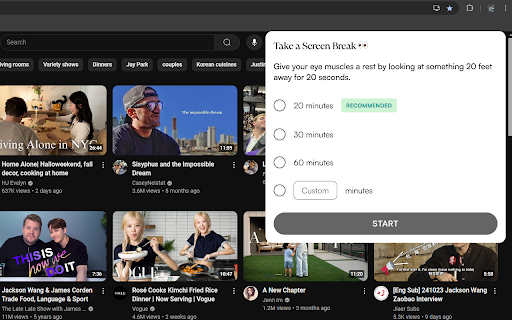


Reminds you to take screen breaks. Give your eyes a break with Screen Break Reminder! This Chrome extension helps you maintain eye health and reduce screen fatigue by reminding you to step away from your screen at regular intervals. - Customizable Break Intervals: Set reminders every 20, 30, or 60 minutes, or customize to any interval that suits your needs. - Gentle Notifications: Get friendly pop-up notifications to remind you when it's time for a break. Each reminder encourages you to look at something 20 feet away for 20 seconds. 1. Choose a preset interval or set a custom time. 2. Start the timer, and receive a notification when it’s time to take a break. Follow the 20-20-20 rule to give your eyes a quick rest: look at something 20 feet away for 20 seconds. Take a few moments to relax and refocus with Screen Break Reminder. Great for students, professionals, or anyone who spends long hours at the computer.

Productivity & Break Reminder
Manage your work/break times, to-dos, and reminders! Productivity & Break Reminder Chrome Extension ( EN ) Do you spend long hours at your computer and struggle with time management? With the “Productivity & Break Reminder” extension, you can easily track your tasks and protect your well-being! What Does It Offer? Pomodoro-style work and break timer Customizable durations and notifications To-Do list: Add, edit, complete, and delete tasks Set date/time-based reminders for each task and get notified Break notifications with health tips Dark/Light theme and multi-language (English/Turkish) support Modern, clean, and user-friendly interface Who Is It For? Perfect for office workers, students, developers, and anyone who spends long hours at the computer! Why Use It? Manage your time more efficiently Never forget your tasks or breaks Take care of your health with regular reminders Install the extension, boost your productivity, and build healthy work habits! Version 1.2.0 Update Notes This release adds comprehensive multi-language support to the plugin. Main improvements: English (en) language file added and set as default language. German (de) language file added. Portuguese (pt) language file added. Spanish (es) language file added. French (fr) language file added. Added Italian (it) language file. Added Russian (ru) language file. Japanese (ja), Chinese (zh_CN), Turkish (tr), Korean (ko), Arabic (ar) language files have been added. manifest.json file has been updated to make plugin name and description compatible with chrome.i18n API and upgraded to version 1.2.0. In-app text (buttons, notifications, health tips) and language selection menu have been updated to support all added languages using chrome.i18n API. v1.1.0 – Changelog Enhancements & New Features Added smooth fade-in and fade-out animations for To-Do add/remove actions. Modernized UI with Material Design colors, card style, and improved button/input visuals. Implemented animated toast notifications for successful and error actions. Improved dark mode: To-Do and Reminders lists now always display with proper contrast. Theme and language settings persist and apply correctly on popup reopen. All UI elements, notifications, and placeholders are now fully i18n/localization compatible. Added alarm conflict check: prevents setting multiple reminders for the same date/time. Prevented users from setting reminders for past dates/times. Reminders and To-Do items are now always in sync; deleting a To-Do also removes its reminder. Editing a To-Do updates/removes the associated reminder as needed. Reminders list updates instantly after deleting a reminder, no refresh needed. Improved feedback: status and error messages are now always shown in the selected language. Enhanced accessibility and keyboard navigation for better UX. Improved error handling and user feedback throughout the extension.

Eye Saver - Break Reminder
Eye Saver helps remind you to look away from the screen to prevent eye strain. A simple timer to remind you to look away from the screen! EyeSaver promotes the 20-20-20 rule that was designed by optometrist Jeffrey Anshel. The 20-20-20 rule involves looking away from your computer screen every 20 minutes, for 20 seconds at a time, at something that is 20 feet away. This simple rule has been proven to promote healthier eyes! Benefits from this extension include: - Prevents eye strain - Combats computer addiction - Combats lower back pain - Improves mood - Prevents eye strain related headaches - Prevents red eyes - Boosts energy Features from this extension include: - Full browser overlays during break time - Customizable reminder durations - Desktop notifications - Sound notifications - Ability to stop and resume timer with a single click - Synchronization of settings across browsers with the same chrome profile We understand that your privacy is very important. Eye Saver does not have access to your browsing history.

eyeCare - Protect your vision
Notifies you in multiple ways to take breaks and helps you with eye exercises based on 20-20-20 rule and with lower back exercises. If you are spending too much time in front of computers, your eyes are the ones that gets strained to the maximum. Taking breaks at regular intervals will help to ease this strain and to protect your vision. A good rule here is to follow 20-20-20 rule to keep your vision intact for a healthy future. As per this rule, every 20 minutes, take your eyes off your computer and look at something 20 feet away for at least 20 seconds. eyeCare will remind you to take this break in multiple ways. Features: 1. 20-20-20 rule based break reminder setup. 2. Ability to customize the duration of the reminder. 3. Ability to run in the system tray from system startup, even when your browser is not running. 3. Provides you instructions on how to spend your break time. 4. Ability to customize and configure the break alert using desktop notification, sound notification etc. 5. Ability to disable and enable quickly when needed, with a single click. 6. The extension icon can flash/blink as break reminder for 20 seconds 7. Countdown display of the time remaining for the break (can be used as a standalone countdown timer too). You can reset the countdown as required. 8. Automatic synchronization of settings across your devices on the same browser. 9. Ability to automatically resume eyeCare protection after a preset duration. This is a must-have extension for computer professionals with lower back (spine) related problems, neck pain, eye-strain related headaches and red-eye. Repetitive stress injury (RSI) and eye strain are the common ailments among computer users. Taking a break every few minutes is going to save your health and vision. Have a great health! - “The greatest wealth is Health.” Facebook: https://www.facebook.com/care.for.your.eyes Website: http://eyecare.apps4u.net/

Recharge - Healthy Work Break Reminders
Stay healthy at your desk with customizable reminders for eye breaks, hydration, movement, and stretching. Recharge helps you maintain healthy habits while working at your computer by providing gentle, customizable reminders for essential breaks. With a clean, intuitive interface, Recharge runs quietly in the background while helping you take better care of yourself during long work sessions. Customizable reminders for: - 👀 Blink Breaks - Remember to rest your eyes by looking away from the screen - 💧 Water Breaks - Stay hydrated with regular water reminders & simple logs - 🚶 Movement Breaks - Get up and walk around periodically - 🧘 Stretch Breaks - Take time to stretch and avoid muscle tension - ⏲️ One-time Timer - Set custom countdown timers for focused work sessions - V1.3 2025-01-16 - Bug fixes and code quality improvements: race condition fixes, error handling, input validation, timer state persistence, automated test coverage - V1.2 2025-05-17 - Added water logging counter feature - V1.1 2024-11-25 - Added one-time countdown timer feature - V1.0 2024-11-03 - Initial release. Supports Blink, Water, Movement, and Stretch reminders.
