
emfmnikpggjpmcngklkifngaplokogja
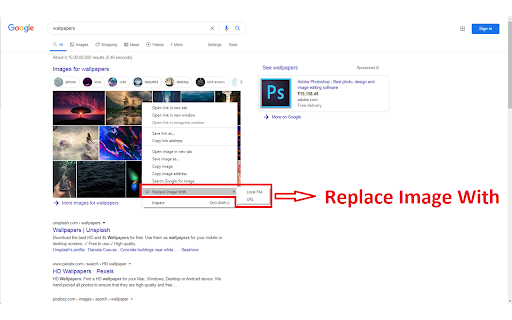

Replace the Image in an with local file Visualize how your website will appear with the image you have in local or image URL. Helps designers to check whether the images suits for the site. Note that the changes will not preserved after page reload. This extension is browser based only and it does not store any of your data remotely. Make sure to reload page you're currently on before you start playing with add on

Text & Image Replacer Extension
Replace webpage text and images with custom content. Clean, fast, and configurable. Text and Image Replacer Extension The Text and Image Replacer Extension is a versatile tool designed to enhance your browsing experience by allowing you to replace any text and images on a webpage with your own selected content. Whether you want to personalize web pages, have some fun by swapping out content, or conduct unique experiments, this extension provides a simple and efficient way to customize your web browsing. Features: Replace Text: Easily replace all instances of specific words or phrases on a webpage with your chosen text. Replace Images: Swap out all images on a webpage with an image of your choice. Simply upload an image, and watch as it replaces the existing ones. Customizable: Choose exactly what text and images you want to replace, providing complete control over your web content. User-Friendly Interface: The extension boasts a straightforward and intuitive interface, making it easy for users of all levels to customize their browsing experience. Fun and Practical: Great for fun, creative projects, or even productivity by replacing distracting content with motivational quotes and images. Lightweight and Fast: Designed to be efficient without slowing down your browsing experience. Install the Extension: Add the Text and Image Replacer Extension to your Chrome browser from the Chrome Web Store. Open the Extension: Click on the extension icon in your toolbar to open the control panel. Upload Your Image: Select an image from your computer that you want to use for replacing existing images. Enter Your Text: Type in the text you want to use for replacing existing text. Activate the Replacement: Click the “Start Replacing Text + Images” button to apply your changes to the current webpage. Stop the Replacement: If you want to revert to the original content, simply click the “Stop Replacing Text + Images” button. Ideal For: Web Designers and Developers: Test how different text and images look on a webpage without making permanent changes. Educators and Students: Create customized educational content for better engagement and learning experiences. Content Creators: Mock-up how your content will appear on live websites. Entertainment: Have fun by replacing text and images to create amusing and creative web pages. Join our community of satisfied users who have found innovative and entertaining ways to use the Text and Image Replacer Extension. Download now and transform your web browsing experience today!

SVG Export
SVG Export searches for SVGs on websites and enables you to export them quickly as PNGs, JPEGs or SVGs. Features - Bulk export - Export as PNG, JPEG or SVG - Resize images - Quickly copy SVGs and paste into tools like Figma - Inlines important styles and colours that are applied with css - Embeds linked nodes from other parts of the site This is useful for designers and developers wanting to pull SVGs from sites without having to dive into the source code. How it works? - Simply go to the webpage you'd like to download the SVGs from, - Click the extensions icon in the browser top right, - A new tab will load with all the SVGs available for you to download.

Design Mode - Page's Rich Text Editor
Edit any page's content by switching to design mode, where you can modify the content and drag images around like a Word Editor This extension modifies the current page's attributes to act like a content edible document (Similar to MS Word, or Open Office). This allows the user to: 1. Edit the page content 2. Drag and drop assets 3. Remove elements that cause chaos on the page 4. Insert , , , and heading elements. 5. Convert font styling to bold or italic. 6. Add a link to the selected text. 7. Insert bulleted and numbered lists. 8. Increase and decrease indentation. 9. Insert an image. 10. Convert selected text to a blockquote. 11. Turn spellcheck on and off. 12. Remove formatting. With this extension, you can edit the entire document and when it is ready, toggle back to the read-only mode (normal operation mode). The modified document can be printed or saved like any page. Usage Instruction: 1. To enable the extension, press the toolbar button once. When the document is editable, the toolbar button is blue, and you will get a desktop notification 2. To switch back to the normal mode, press the toolbar button one more time. In the normal mode, the toolbar color is gray. Notes: 1. You can save the modified document in HTML or MHTML or print it. To save in MHTML you will need to install an extension. 2. To change the formatting of a text into bold, select the desired section, and press Ctrl + B or Command + B. For italics, press Ctrl + I or Command + I. Alternatively, the extension inserts a helper toolbar so that you can access the rich text editing tools from a floating panel.

Word Replacer Max
Seamlessly replace text on any web page. ⚡️ Smart Text Replacement Set up rules to automatically transform text across the web. 🌐 Domain Controls Specify which sites your rules apply to using allow or block lists. 🤝 Share & Import Exchange rule sets with friends and teammates to share useful replacements. 🎯 Pattern Matching Fine-tune rules using whole word, case sensitivity, or regular expressions for exact control. 🎨 Visual Styling Optionally highlight changes with styles such as bold, italic, underline, or background colors to make them stand out. 🌗 Dark Mode Eye comfort for all times of day. 1. Install Word Replacer Max 2. Click the extension icon in your toolbar 3. Create your first replacement rule 4. Start browsing with your personalized web experience ❯ Simple to use but powerful when you need it ❯ Full control over where replacements happen ❯ Your rules stay private on your device ❯ Open source code on GitHub: https://github.com/dan-lovelace/word-replacer-max
