
emdmahnehdppicbchapdffkpkkghpceh


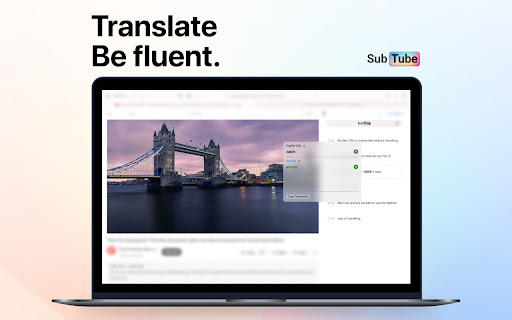
Skip the boredom! Save time when watching YouTube videos by filtering subtitles and skipping uninteresting parts. Once you select a specific language, it will translate the caption and display the translated caption below along with the official one. Subtube converts YouTube subtitles into a convenient, scrollable, and searchable format. Easily dive straight into the juiciest content. Say goodbye to introductions, intermezzos and empty words. If the video contains a lot of speech, read on as the text syncs seamlessly with the flow of the video. You can also learn English using our mobile application. It is available for free on iOS and Android:

YouTube Anti Translate
A small extension to disable YouTube video titles/audio/descriptions autotranslation. YouTube title translation is helpful for beginners, but once you know the language well enough to understand original titles, it quickly becomes frustrating. Even worse, there's no proper way to disable this — unless you change your YouTube country, which messes up your recommendations and trends. This extension fixes the problem. Over 100,000 users trust it to restore YouTube the way it was meant to be. ✨ Restores original video titles instead of auto-translated ones 📝 Restores original video descriptions and chapters 💬 Restores original subtitles (untranslates captions) 🖼️ Restores original video thumbnails 🎨 Restores original channel branding, headers, and channel names 🔇 Disables automatic audio translations (dubbing) 📱 Supports YouTube Shorts — restores both audio and titles 📱 Also works on mobile (m.youtube.com) — untranslates both titles, descriptions, and audio (beta) 🔔 Fixes translations in notifications 🌐 Works everywhere — homepage, embedded videos, youtube-nocookie.com, and more ⚙️ Works automatically — no configuration or API keys needed 🎯 Advanced settings — whitelist specific channels to keep translations if needed 🧼 Lightweight and safe — clean code, no tracking, open source Chrome for Android doesn't support extensions, but you have two options: 1️⃣ Firefox for Android (Recommended): • Install Firefox • Visit FireFox page of this extension: https://addons.mozilla.org/firefox/addon/youtube-anti-translate-mv3/ • Install this extension • Open YouTube and enjoy! 2️⃣ Kiwi Browser: • Install Kiwi Browser • Open Kiwi and go to this page (Chrome Web Store) • Install this extension • Open YouTube and enjoy! 💖 This is a completely free, open‑source project maintained by volunteers. If the extension has helped you, please consider supporting the original creator at https://www.patreon.com/zpix1 or the maintainers at https://github.com/zpix1/yt-anti-translate. Firefox version: https://addons.mozilla.org/ru/firefox/addon/youtube-anti-translate-mv3/ GitHub page: https://github.com/zpix1/yt-anti-translate No more awkward or misleading title translations — get YouTube back the way it was meant to be. ____

Multi Subsitles for Youtube
Display as many subtitles as you like. Different languages, translated, auto-generated. NO dependency on third-party server Watch with as many subtitles on as you like at the same time. (This is an addon that just works. Don't expect fancy UI) - 🎞️ Display as many subtitles as you like - 🎞️ Support auto-generated subtitle also - 🎞️ Support machine-translated subtitle also (including translating from auto-generated) You should know machine-translate is NOT 100% correct. It could contain lots of mistakes. - 🛡️ No third-party server needed - 🛡️ No confliction with Youtube web player's CC - 🛡️ Maximum safety: - No injection if you don't click the toolbar button. - Minimum permission required. - UI on browser toolbar, inject as less as possible to web Youtube has videos that provide subtitles (CC, closed captions) in different languages, but will not display more than one simultaneously on itself's web player. Why not display several at the same time? Why not? Nothing fancy, this is a browser addon that works! **Watch with two subtitles on. Even more, three, four, five ... Simultaneously.** Display as many as you like! Different languages, translated, auto-generated ... Useful for leaning foreign languages. 1. [Video with only auto-generated English CC] https://www.youtube.com/watch?v=hn5BkviAyvQ 2. [Video with non-English and auto-generated English CCs] https://www.youtube.com/watch?v=M0k5AfBnIQs 3. [Video with CCs in different languages without auto-generated English] https://www.youtube.com/watch?v=otjvUz7qKXc Disclaiming again: We are not affiliated with Google, LLC.

Udemy Subtitle Translator - Yakuu
Subtitle translator for Udemy. Also, Show YouTube subtitles to the corresponding language, No need for hierarchical menu selection. Enables Udemy course subtitles to be translated and displayed in dual language mode. Translation subtitles now natively support various display modes including full screen and auto-paging Usage of Udemy That's it -- just open any Udemy course and enable captioning. Usage of YouTube Just click the subtitle icon on the video to enable subtitles, you don't have to open the options icon to specify the language each time. How to show the Yakuu icon in the toolbar 1. Select "Extensions" 2. Find the Yakuu extension 3. Select Pin to show Yakuu icon in the toolbar Use the toolbar icon to enable or disable Yakuu extension at any time. All: Supports all languages provided by Google Translate Add the feature of specifying the target language for translation. You can choose which language you want the subtitle to be translated into. Udemy: Supports early subtitle formats. Translation subtitles now natively support various display modes including full screen and auto-paging. Add bilingual subtitle feature, allowing you to switch between single and dual language subtitles at any time.

Medium Rare Subtitle - Dual Subtitles & AI Translation
Learn languages on YouTube and Bilibili with AI contextual translation, blurred subtitle training, and vocabulary collection for… Still struggling with whether to turn off the subtitles? There’s a better way! If Chinese-dubbed videos are "well-done," bilingual subtitles are "medium-well," and English-only subtitles are "medium," then "Medium-Rare Subtitles" offers you a brand new "medium-rare" experience—retaining enough challenge to keep your listening skills improving, while providing just the right support at critical moments. Smart Blur: Not just showing or hiding; it uses blur effects so you only see clearly when you need to! Personalized Learning: Mark words you can't hear clearly. The system automatically reveals them next time they appear. AI Contextual Translation: Get precise translations based on the specific sentence, including slang and professional jargon. Stay Immersed: No more frequent pausing to look up words. Focus on the video! Dual-Sub History: Provides a secondary track showing the previous line. Never miss a word again! Subtitle Masking: Mask hardcoded subtitles with a frosted glass effect. Bilingual Mode: Blur only the translation—see it clearly only when you need to! The Traditional Dilemma: Subtitles OFF → Constant pausing for new words breaks the experience. The Breakthrough: Blurred Display → Focus on listening, break the reading crutch. Active Progress → Unmark words as you master them to reduce dependence. 1.6.6: Massive Language Expansion! Added support for English (en), Simplified Chinese (zh-CN), Traditional Chinese (zh-TW), Japanese (ja), Korean (ko), Spanish (es), French (fr), German (de), Portuguese (pt), Russian (ru), Italian (it), Vietnamese (vi), Thai (th), and Arabic (ar). Supports cross-language targets (e.g., Japanese to English). 1.6.5: Redesigned UI style! Added subtitle export and word pronunciation. 1.6.0: Added Frosted Glass Masking; Dual-sub mode; Hover-to-Pause mode. Squeezed the toothpaste tube for this one!
