
elnjagingppccbpccnldbhmlgmomeaml
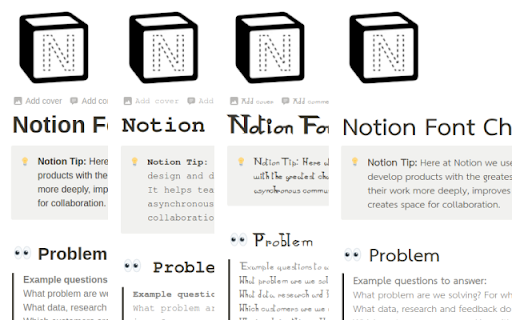

An extension that will allow you to change the default font used in Notion, and separately the font used in code blocks This extensions makes it incredibly easy for you to change up the look and feel of Notion! Notion already gives users the ability to change between 3 fonts: serif, sans-serif and monospace. That's all well and good, but what if you wanted to choose a different font family for those styles? With this extension, you can! Font's will be applied Notion-wide on your desktop machine. Further, you can change the font specifically for code blocks, so instead of using a sans-serif or serif for code, you can choose your favourite monospace font.

custem Font Changer
*Font Changer Extension* Transform your online experience with the Font Changer Extension, the ultimate tool for customizing fonts on your favorite websites. Choose from a vast collection of over 500 fonts, carefully curated to suit every style and mood—from classic serifs to modern sans-serifs, playful scripts, and more. ~Extensive Font Library: Access over 500 fonts to personalize your browsing experience. ~Easy-to-Use: Simple interface with a click-to-apply functionality. ~Customization: Tailor fonts on popular websites like Google, YouTube, Gmail, and many others. ~Search Functionality: Easily find and apply fonts with a built-in search bar. ~Modern Design: Sleek, black-and-white interface designed for a seamless user experience. ~Universal Compatibility: Works across Google sites and 200+ other popular websites. ~Enhanced Readability: Customize fonts for better readability and visual appeal. ~Personalization: Make every website uniquely yours with a wide range of font choices. ~Efficiency: Save time with quick and straightforward font selection. ~Flexibility: Adjust fonts to suit different tasks, from work to leisure browsing. ~No Registration Required: Enjoy immediate access and customization without any sign-up process. Elevate your web browsing experience with Font Changer Extension and discover a new level of control over your online content. Transform the way you read and engage with the web today!

Font Changer
This extension can change the font of any website to a locally installed font to be able to help people who may have trouble reading some fonts. Also it helps with customization on sites where you cannot import a local font.

Notion Mate
Notion Mate productivity with 30+ customizations like outline TOC, small text, mark manager, image viewer, scroll to top, theme etc. 🚩Chrome and Edge browser extensions make your Notion more efficient and enhance your experience. Supports unlimited zoom, pan, and rotation of the image viewer, as well as icon history, colored text mark manager, outline (Table of Content), lots of beautiful themes. 🎉Free trial for 3 days 🎉 > The extension is available in Pro and Free versions, Pro version requires additional purchase, one-time purchase. ✔️ Outline - TOC ✔️ Image Viewer ✔️ Full Width ✔️ Beautify Scrollbar ✔️ Hide Notification ✔️ Hide Help Button ✔️ Scroll To Top ✔️ Hide Comment Section ✔️ Indentation Lines ✔️ Hide Backlinks ✔️ Small Text ✔️ Code Line Numbers ✔️ Prevent Table Overflow ✔️ Generate Header Number ✔️ Count Words ✔️ Icon History ✔️ Empty Trash ✔️ Bolder Text ✔️ Growth Height ✔️ Border Image ✔️ Narrow Row Spacing ✔️ Hide Slash Command ✔️ Compact Code Block ✔️ Auto Set Default Font ✔️ Hide Hover Page Preview ✔️ Change Custom Font ✔️ Hide Sidebar Toolbuttons ✔️ Hide AI Menu When Press Space ✔️ Fixed Favicon ✔️ Mark Manager ✔️ Align Caption ✔️ Medium Width ✔️ Center Header ✔️ Lots Of Beautiful Themes ✔️ Hide Link Arrow ✔️ Hide Corner AI Button ✔️ Align Image (left, center, right) ✔️ Hide Notion Default TOC ✔️ Auto Set Page Configuration ✔️ Set Code Block Language ✔️ Set Wrap Code Block ✔️ Wider Search Box ✔️ Disable Hover Sidebar ✔️ Header Hashtag Symbols ✔️ Align Media ⭐⭐⭐⭐⭐If you find it helpful to you, hope to get your five-star praise, thank you! 1. Visit any notion page. 2. Click on the extension icon (clickable only when you are on a notion page). 3. A popup menu will appear, you can toggle features from there. Notion Mate is produced by Joans. I'm a coder and a productivity freak, and I rely heavily on Notion to organize things and manage work. I made this extension to make Notion more productive (and less distracting) by filling in gaps that I felt were lacking in the product. I hope you find this extension helpful :) The Notion Mate extension is a secure browser extension with no ads, no analytics, and no trackers. In addition, the Notion Mate extension does not store or send any data from your Nontion account.

Notion Tools
Make your Notion experience a little bit better with some QOL including colored headings, folded sidebar buttons and more. This extension provides a group of options that aim to improve your experience with the Notion website. These include: + ⭐ Automatically highlighting every heading across all your Notions. + 🔥 Having more vertical space in the sidebar by folding the "Search", "Inbox", and "Settings" buttons into horizontally lined icons (the notification counter also works). + Additional headings indication by adding # symbol at the end of it. + More horizontal space for your database board view. + Slightly more vertical space on page by reduced margin above it icon/name. + Ability to hide "invite members" button from sidebar. Every option can be disabled, if you want. I will continue adding more features over time. Hope you like it! ♥ UPDATE 1.2.2 - Added support for dark theme.
