
ellokeilepgocdknilnlljmgohncjllb
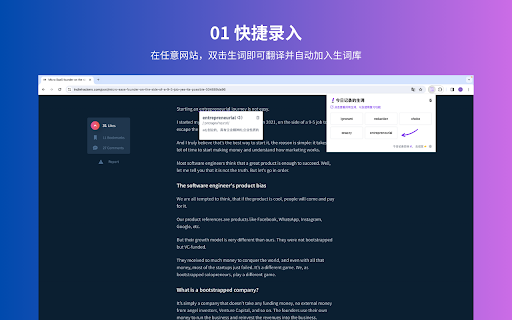
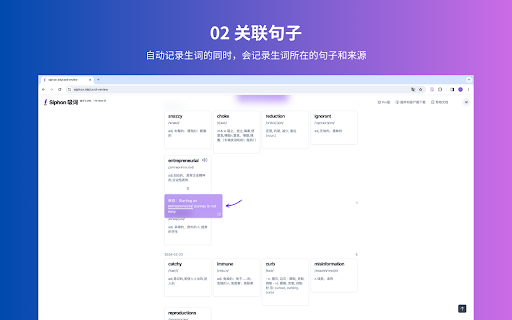
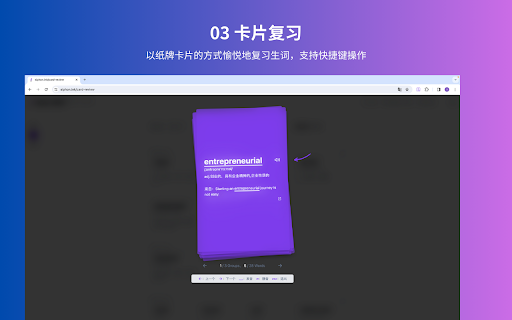
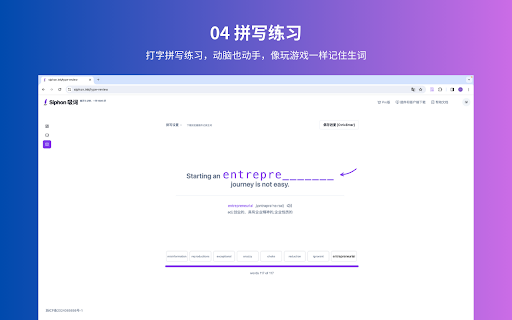
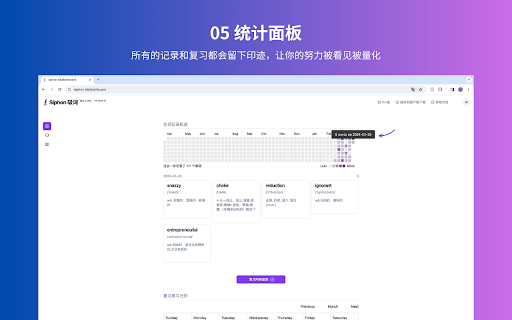
双击单词快捷记录在线阅读中遇到的生词,以轻松愉快的方式复习记录的所有生词,一天5分钟一年1000词 Siphon 的产品理念可以概括为一句话: 用简单且愉悦的方式让“通过英文阅读积累词汇”这件事变得可行且有效。 产品功能: 1. 快捷记录:安装浏览器插件后,打开任何一个包含英文单词的网页,如果遇到生词,鼠标双击生词,即可记录生词,并弹窗释义。 2. 关联句子:Siphon 的产品理念强调除了记录单词外,更重要的是记录单词用法。所以你在双击记录生词的时候,程序会自动记录生词所在的句子以及来源地址。 3. 纸牌卡片复习:纸牌卡片复习提供了类似扑克牌发牌的展示和交互体验,通过键盘快捷键方便地操作卡片的切换。展示优美,动画自然,帮你愉悦且高效地复习记录的生词。 4. 打字拼写练习:通过打字练习掌握生词拼写,让复习变得更有互动,动脑也动手,不枯燥,记得住。拼写有音效、动效等反馈,并且拼写的单词有关联句子上下文,整体体验和玩游戏一样愉悦。 5. 复习练习统计:通过 Siphon 记录的所有的单词都会有痕迹,你可以看到自己一年记录生词的轨迹,以及每一天究竟记录了多少生词,记录了哪些生词。所有的复习也都有记录,你可以看到你复习的轨迹,以及究竟复习了多少次,复习了多少单词。 Siphon 的口号是:每天 5 分钟,一年 1000 词。 如果你想了解更多的,可以访问 Siphon 官网:https://siphon.ink。 欢迎使用和反馈,谢谢。

Burning Vocabulary - Learn words from reading
Master vocabulary effortlessly with the full cycle process. Mark and save the words you don't understand while surfing the web. The Burning Vocabulary will help you learn their meanings and memorize them effortlessly by associating them with paragraph snapshots, word audio, and translations in various contexts such as events, news, social media, tech posts, and articles. ★ Mark and highlight words on any website - Highlight words on any web pages. - Highlight words of Subtitles on Youtube/TED. - Highlight words on PDF File (online and local PDF file). - The saved words will be marked automatically while on other pages. ★ Very user-friendly Use Right-clicking, shortcuts, or double-clicking to mark words then shows a professional definition pop-up instantly. Save-automatically. Just focus on your reading. ★ Manage words with Vocabulary Calendar The Vocabulary Calendar shows words you marked day by day. You can feel the improvement in your vocabulary every day. You can delete a word if you are familiar. Export and import vocabulary. ★ Sync on your multiple devices Login on your multiple devices with license key. The marked word will be sync-auto in your multiple devices. The web App shows the marked words and sentence context. ★ Flashcards and Spaced Repetition Use the Flashcards and Spaced Repetition to practice your marked words. Use the Web App Flashcards to learn the marked words in anywhere. ★ Paragraph Sentence Snapshot Auto-generating paragraph snapshot so that you can recall words more easily through sentence snapshot. Mark a word by clicking, then save a word to the Vocabulary Calendar, practice a word with Flashcard, then apply a word to your daily reading with auto-highlighted. The process becomes more and more familiar with new words and memorize it forever. Privacy Policy - We respect your privacy. https://burningvocabulary.com/privacy-policy.html

Transider——随手记单词
manifest.json description Transider是一款免费的英语单词翻译和记录工具,它能帮助你在阅读文章的过程中随手记单词,提升词汇量。 📌 使用方法 1. 安装插件之后刷新需要翻译的页面。 2. 使用鼠标双击想翻译的英语单词,即可在浏览器侧边栏显示单词音标、释义并播放读音。 3. 可通过点击 ❤️ 将单词记录在单词本中。 4. 点击单词本即可查看已记录的单词及其所在语句。 🎖️ 插件特点 1. 使用浏览器侧边栏显示单词释义,不打断阅读,不干扰原页面。 2. 在页面上双击单词即可呼出侧边栏词典,操作简便。 3. 释义和记录分开,查看释义后你可以自主决定是否记录这个单词。 4. 不需要注册或登录,即装即用。 5. 在任何网络环境下都可使用。(大陆直连可能会稍慢一点) 🆕 新版功能 v2.0.2: 1.修复了一些小bug,增强了稳定性,优化了性能。 v2.0.1: 1. 紧急修复了之前标记的单词在单词本中不显示的bug。 v2.0.0: 1. 支持导出标记的单词。 2. UI优化。 3. 用户体验得到一丢丢增强。 v1.1.0: 1. 新增英—英释义。 2. 修复了一些bug。 3. 细节优化。 v1.0.1: 为以下自定义配置增加设置入口: 1. 可选择是否自动标记单词。 2. 可选择是否自动播放单词读音。 3. 可选择是否暂时停用插件。 🈚 免费使用 这是我独立开发的第一款正式产品,为了回馈一路以来得到的各种帮助,我会在我能承受的范围内免费为用户提供服务。 📬 欢迎反馈 这是我开发的第一款产品,多有不足,还望海涵。我会持续改进迭代,有任何意见和建议,欢迎大家在下方评论或通过邮件联系我: jedxie2022@gmail.com。

LuLu Translate
LuLu Translate, the world-leading cross-platform translation software, supports translation by selecting words.

Ries - AI Writing & Translate. Any Language.
[Free] Grammar, polish & translate — in your input box, no copy-paste. Write in any language. Gmail, Slack, WhatsApp & more. Write with confidence. Every message, every platform. In your input box — polishing, translation, bilingual input — done in one place. A translator can convert your text to English. But "translated English" isn't always English you can actually send. Ries does the work that comes after translation. It reads your context and the relationship behind the message, turning English that's "correct but stiff" or "clear but unnatural" into the kind of expression that earns trust in professional settings. Example ① What you meant as professional sounded awkward ✗ We want to cooperate with you on this project. → Grammatically fine. But native speakers wouldn't write it this way. Example ② Over-apologizing makes you look less confident ✗ Sorry for late reply. I was very busy. → Too casual. And "very busy" sounds like an excuse. ✓ Thanks for your patience — it's been a hectic week on my end. → Reframes the apology as gratitude. Professional. Example ③ Stuck mid-sentence? Keep writing in your language. ❶ Write English in any input box Ries detects unnatural expressions in real time with color-coded underlines. One tap to replace with a natural, professional alternative. ❷ Any language or mixed input works Can't find the right word in English? Switch to your language and keep going. Press [R] and the whole message becomes fluent English. ❸ No copy-paste. Finish where you started. No need to open a new tab or switch to an external tool. Your usual input box becomes your English writing assistant. 【Works with】 Gmail · LinkedIn · Slack · WhatsApp · Teams · Outlook and more Works in any browser input field — wherever you type. • Webpage translation: Read English pages in your language • Bilingual video subtitles: Auto-generate dual-language subtitles on YouTube • Beyond grammar — adjusts tone and formality level too • Native bilingual input support — type in any language, output in English
