
eldinohbpncocmdgofhfimpljomnibjl
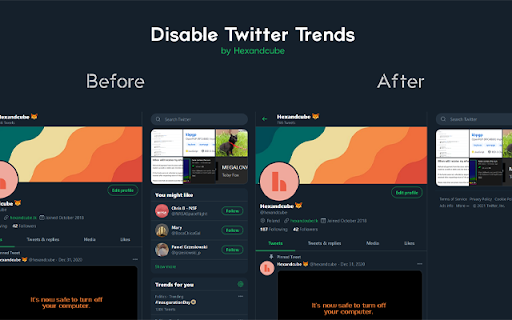
This extension hides the Trending section in the Twitter/X UI. Supports both: Twitter.com and X.com domains!

Hide Google AI Overviews
This browser extension is designed to enhance your browsing experience by removing AI-generated overviews from Google search results. Recognizing that not all users appreciate the AI-powered summaries and insights which can clutter search results, this extension offers a clean, streamlined interface that focuses solely on traditional results, allowing you to easily turn off AI Overviews. Note: This project is open source. If you have privacy concerns or want to contribute, view the source code here: https://github.com/zbarnz/Google_AI_Overviews_Blocker

Control Panel for Twitter
Gives you more control over Twitter and adds missing features and UI improvements Control Panel for Twitter is a browser extension for Twitter - its main goals are to reduce the amount of algorithmic content you see, give you more control over your timeline and make the UI less distracting. By default, your Home timeline will be the reverse-chronological "Following" timeline, which will only contain tweets and quote tweets from the people you follow. The algorithmic "For you" timeline will be hidden, and Control Panel for Twitter will keep you on "Following" if Twitter tries to automatically take you off it. Everything is configurable, so start by opening the options popup and customizing to your liking. Changes you make in the options will be applied immediately. • Use the "Following" (chronological) timeline by default • Hide the "For you" (algorithmic) timeline • Retweets • Show in separate tab / Hide • Quote Tweets • Show in separate tab / Hide • Enable muting of Quote Tweets • Hide "See new Tweets" • Hide "Who to follow", "Follow some Topics" etc. in the timeline • Hide inline prompts in the timeline • Full-width timeline content • Hide the sidebar and let timeline content go full-width • Add "Add muted word" to the "More" menu • Fast blocking (skips confirm dialog) • Hide quotes and replies to blocked and muted accounts • Hide Retweets in user profiles • Retweets in Lists • Default to "Latest" tab in Search • Hide the quoted tweet when viewing Quote Tweets • Redirect to twitter.com • Tweak new layout • Hide Toggle navigation • Replace X branding changes • Hide Views under tweets • Hide "Verified" Notifications and Followers tabs • Restore headlines under external links • Restore Quote Tweets link under Tweets • Restore other links under Tweets • Default sorting of replies • Latest / Likes • Premium blue checks • Replace with Twitter Blue logo / Hide • Hide Premium blue check replies • Hide Premium upsells • Hide Grok • Hide Jobs • Hide Subscriptions • Don't use the Chirp font • Disable bold and italic text in tweets • Use normal text font style in navigation bar • Navigation density • Comfortable / Compact • Use normal font weight in dropdown menus • Uninvert Follow / Following buttons • Monochrome / Themed • Unblur sensitive content • Hide sidebar contents • Hide Explore page contents and use it only for searching • Hide "Discover more" tweets • Hide metrics • Reduced interaction mode • Hide the action bar under tweets – replies are now the only means of interacting • Hide the Compose Tweet button • Disable the home timeline • Find yourself wasting too much time on Twitter? Try preventing use of the home timeline • Notifications • Hide badges only / Hide Hide UI items you don't use • Bookmark button under tweets • Share button under tweets • "View post engagements" under your tweets • Tweet box in timeline • Account switcher • Messages drawer • Explore • Communities • Hide "More" menu items you don't use TWITTER, TWEET and RETWEET are trademarks of Twitter Inc. or its affiliates

Clean Twitter
Clean up some annoying elements on Twitter and make your Twitter experience cleaner Clean up unnecessary elements on X (Twitter) and enjoy a cleaner, more focused browsing experience. FEATURES Branding: • Restore classic Twitter logo - Bring back the bird logo Layout: • Hide right sidebar - Remove trending topics and suggestions Left Navigation: • Hide Chat - Remove the Chat/Messages tab • Hide Grok - Remove the Grok AI assistant • Hide Lists - Remove the Lists tab • Hide Bookmarks - Remove the Bookmarks tab • Hide Communities - Remove the Communities tab • Hide Premium - Remove X Premium/Twitter Blue promotional elements • Hide Profile - Remove the Profile navigation link • Hide Creator Studio • Hide Ads - Remove promotional advertisements from navigation • Hide Create your Space • Hide More - Remove the More menu option • Hide Follow - Remove the Follow navigation • Hide Aritcles - Remove the Aritcles navigation • Hide App Download in iOS Tweet Actions: • Hide Analytics - Remove analytics buttons from tweets • Hide Bookmarks - Remove bookmark buttons from tweet actions • Hide Grok - Remove the Grok AI assistant Content Area: • Hide Timeline Explore - Remove the Explore tab from your timeline • Hide Discover More - Remove "Discover more" recommendations • Hide Advertisement - Remove sponsored content and ads from your feed • Hide Today News - Remove "Today" news section • Hide Who to Follow - Remove "Who to follow" suggestions • Text mode in Home - Remove Image and Video in Home • Hide Space Live - Remove live notification in Home • Hide Notification Recommendation - Remove recommended posts from notifications GETTING STARTED 1. Install the extension from Chrome Web Store 2. Visit X (Twitter) - The extension activates automatically 3. Click the extension icon in your toolbar to customize which features to enable or disable 4. Your preferences are saved automatically and sync across devices CUSTOMIZATION All features can be individually toggled on/off through the extension popup. Choose exactly what you want to see and hide everything else. OTHER EXTENSIONS The extension popup also includes links to our other browser extensions for your reference. SUPPORT Join our Discord community for support, feature requests, and discussions: https://discord.gg/gFhKUthc88

Hide X.com Ads
Free tool that hides Promoted Tweets/Posts while you browse X.com (formerly Twitter). Hate seeing the same ads over and over again? Hate Twitter / X.com ads in general? This tool is free, doesn't require signup, and does not track anything you do. To request new languages or customize your Twitter ad-block settings, go here: https://github.com/ryanckulp/twitter_ad_blocker/issues/new
