
elbagpciheegocbkflmdckajdfdjbmjb
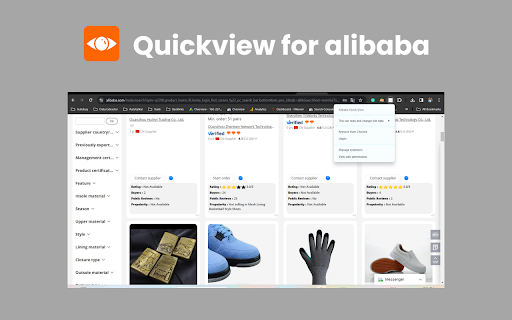
Enable Quickview for Alibaba to search any products in Alibaba for fast interaction Boost your Alibaba sourcing with 1 click! Install the Alibaba Chrome extension for quick access to diverse products on Alibaba. Easily explore data on ratings, buyers, visibility, and reviews for efficient product research. 🛍️ Key features of Quickview for Alibaba chrome extension Explore millions of Alibaba products in seconds right from within your browser. 🌐 Dig into ratings, trends in buyer behavior, visibility, and review scores to make smarter sourcing decisions. 📊 Eliminate the need to look through countless search pages and research product models. 💡 Maximize your profits through informed sourcing decisions. 💰 With just a click of the button, you can have access to powerful research tools anytime anywhere. 🖱️ 1. Visit the Chrome Web Store. 🌐 2. Search for "Quickview for Alibaba Chrome extension" in the search bar. 🔍 3. Click on the extension in the search results and then click "Add to Chrome" to install it. 🛒 4. After installation, the extension's icon should appear in your Chrome toolbar, typically near the address bar. 📌 5. Click on the icon to activate the extension. 🚀 6. Open the extension and connect your Alibaba.com account for full access. 🔗 7. Select the preferred currency, language, and notification settings. Hover over any product image and see how magic happens! ✨ 8. The extension instantly displays key research data: Ratings, verified buyers’ feedback, product rank, and even reviews. 📊 9. Compare like products side by side for a full analysis. Display data in spreadsheets for easy offline analysis. 📈 10. Find out different alternatives and unique product options your competitors overlook. 👀

Search by image on Alibaba
Search for any product in one click on alibaba. Search by Image on Alibaba is an innovative browser extension designed to make your online shopping experience on the Alibaba platform as simple and streamlined as possible. With our extension, you can quickly and easily find the perfect products at the best prices. With the tremendous growth of e-commerce in recent years, Alibaba has emerged as one of the most popular and widely-used platforms for online shopping. However, with millions of products available, finding the right item can often be a challenge. This is where the Search by Image on Alibaba extension comes in, providing users with a range of powerful tools and features that make it easy to find the products they need quickly and efficiently. The Search by Image on Alibaba extension is a must-have tool for anyone who shops on Alibaba regularly. One of the key features of the extension is its ability to analyze images and return a range of suitable Alibaba products based on a range of parameters. Whether you are looking for clothing, electronics, or any other type of product, the extension can quickly identify and present a selection of products that match the image you have uploaded. To use the extension, all you need to do is right-click on any image in your browser and select "Product Search". The extension will then upload the image to the server, analyze it using its trained neural network, and return a selection of suitable Alibaba products. With this powerful tool at your fingertips, you can quickly and easily find the products you need without having to spend hours searching through the Alibaba website. In addition to its powerful image search capabilities, the Search by Image on Alibaba extension also provides users with a range of other useful features and tools. For example, the extension allows you to view real prices for Alibaba products, making it easy to compare prices and choose the best option for your needs. The extension also provides users with access to a huge selection of eligible products, ensuring that you always have a wide range of options to choose from. One of the key advantages of the Search by Image on Alibaba extension is its ease of use. Unlike many other browser extensions, the extension is designed to be user-friendly and accessible to all Internet users. This means that even if you are not familiar with complex technical concepts, you can still benefit from the powerful features and tools that the extension provides. Overall, if you are an avid Alibaba shopper, the Search by Image on Alibaba extension is an essential tool that can help you save time, money, and effort. Whether you are looking for clothing, electronics, or any other type of product, the extension can quickly and easily find the products you need, with real prices and a wide range of options to choose from. So why wait? Download the Search by Image on Alibaba extension today and start enjoying a better, more streamlined shopping experience on Alibaba!

Linqbase - LinkedIn CRM & Outreach
Effortlessly collect, organize, and export detailed LinkedIn profiles for an enhanced networking experience. Linqbase - Simplify and Enhance Your LinkedIn Experience Effortlessly collect, organize, and export LinkedIn profiles for better networking. Here's how Linqbase makes it easy: 📊 Collect LinkedIn Profiles with One Click Quickly gather important profile details with a single click—no more manual work. 📂 Organize Your Connections Automatically sort and group profiles into categories for better management. 📋 Export Data Easily Export your organized LinkedIn data for further review or sharing with your team. 🚀 Boost Your Productivity Automate key tasks like profile extraction and grouping to save time and improve efficiency. 👥 Perfect for Professionals Ideal for recruiters, sales teams, and business owners looking to streamline LinkedIn tasks. 🔗 Optimize Your LinkedIn Strategy Turn LinkedIn into a powerful tool for business growth and connection management. Explore how Linqbase can transform your networking. Visit linqbase.io or contact support at support@linqbase.io for more information.

阿里机器人
集合运营.业务.广告.无人直播等综合性效率软件,多快好省的帮您做好店铺提高效率 "阿里机器人"插件版是一款专为阿里国际站打造的多功能工具。它的目标是为您提供更清晰、更直观的信息查看方式,以及更便捷的数据处理方法。 信息优化 在 Popular 页面上,插件能够显示询盘数量和订单数量,帮助您了解产品流行度。 产品搜索页面上会显示全网的产品数量、RTS产品数量、供应商数量以及金品店铺数量等统计数据,为您提供更多市场信息。 插件优化了 P4P 计划页面的字段间距,让信息更清晰,一目了然。 搜索结果页面可以直观展示P4P产品,橱窗产品以及普通产品,并显示其产品ID。 数据处理 插件新增了数据概览及国家数据的导出功能。 为了更好的了解店铺流量来源,插件提供了数据导出功能。 插件可以下载非金品的关键词表,有助于更深层的研究产品市场。 功能增强 插件增加了右键文本搜索功能,您可以进行阿里主页、RFQ以及popular的搜索。 在产品详情页,可以下载主图视频链接。 提供了外贸导航系统的快捷方式,使用更方便。 避免了直通车最后一次点击的超额扣费。 详情页访客记录可以直接下载,显示访客的国家文字及其搜索的完整关键词。 数据概览页面具有净化功能,让您更聚焦关键数据。 产品运营工作台提供了编辑数据的功能。 搜索页面产品的公司名旁边增加了链接,直接点击即可到达公司店铺首页。 橱窗页面提供所有列排序功能,方便您查找需要的信息。

Ali Sorter - Sort Alibaba products by price
Sort and filter Alibaba products by price Tired of endless scrolling on Alibaba? Ali Sorter is your solution to effortlessly sort Alibaba products by price. This powerful Chrome extension revolutionizes your Alibaba shopping experience, making it easier than ever to find the best deals. 🚀 Sort Alibaba by Price with One Click Ali Sorter brings the missing "sort by price" feature to Alibaba: - Instant Price Sorting: Automatically arrange products from lowest to highest price - Comprehensive Results: Our smart algorithm loads all available products before sorting - Customizable View: Choose how many sorted products you want to see 🔍 Key Features for Alibaba Price Sorting: 1. Smart Auto-Scroll & Load - Explore thousands of Alibaba products effortlessly - Our tool keeps scrolling until it uncovers all available items - Save hours of manual searching and scrolling on Alibaba 2. Precision Alibaba Price Sorting - Instantly organize Alibaba products from lowest to highest price - Uncover hidden deals and best-priced items with ease - Make informed decisions based on your budget 3. Intuitive Side Drawer - Access your price-sorted Alibaba results in a sleek side panel - Keep your original Alibaba search view intact while comparing options 4. One-Click Product Access - Open detailed Alibaba product pages directly from our sorted list - Streamline your research and purchasing process on Alibaba 💡 Perfect For Alibaba Shoppers: - Dropshippers seeking the best-priced products on Alibaba - Bargain hunters looking for the lowest prices on Alibaba - Researchers comparing Alibaba product prices across categories - Anyone who wants to sort Alibaba search results by price 1. Install Ali Sorter 2. Navigate to Alibaba.com 3. Click 'Sort & Load All' 4. Watch as Ali Sorter organizes Alibaba products by price 5. Browse your perfectly price-sorted Alibaba results 🚀 Transform Your Alibaba Shopping Today! Stop wasting time manually comparing prices on Alibaba. With Ali Sorter, transform your Alibaba experience into a precise, efficient price-sorting powerhouse. Say goodbye to confusion and hello to clear, price-sorted Alibaba product lists. Download Ali Sorter now and start sorting Alibaba products by price like a pro! Ali Sorter: The easiest way to sort Alibaba products by price. *Disclaimer*: This extension does not store your data. It is also not affiliated with Alibaba in any way.
