
ekmbninbehldbhmeikgfnkgnbipgaeoh

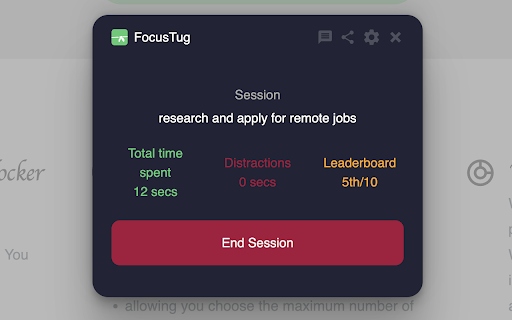
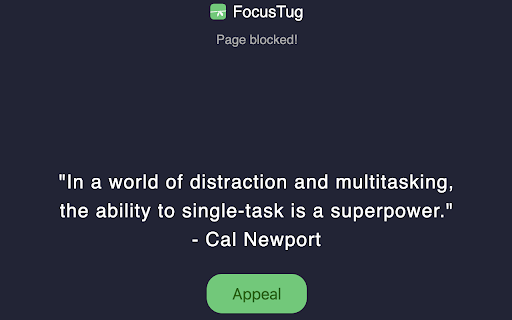
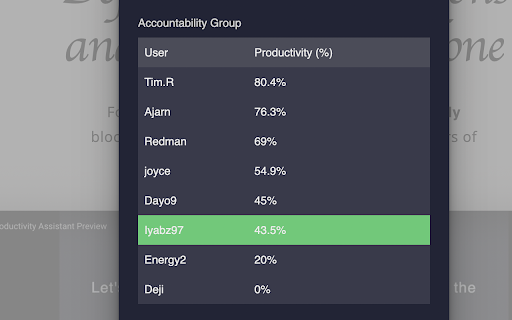
Are you tired of constantly losing focus while trying to work on important tasks? Do distractions keep pulling you away from your goals, leaving you frustrated and unproductive? Say goodbye to those productivity killers and meet your new ally: FocusTug. FocusTug is a simple yet powerful distraction-blocking extension, designed to help you stay on track and accomplish more. With just a click, you can initiate a focused work session and experience a whole new level of productivity using the AI distraction blocker. Unlike other distraction blockers, FocusTug is dynamic and intelligent. By harnessing the power of AI, it detects distractions that don't align with your current task. No need to create lengthy block lists; FocusTug swiftly blocks distraction triggers and evolves with your work.

Locked In: AI-Powered Focus & Site Blocker
AI-powered site blocker that learns your habits, blocks distractions, and helps you achieve deep work with smart insights. LockedIn - Smart Site Blocker & Productivity Manager helps you stay focused and productive by intelligently managing distracting websites. Built with powerful blocking features and insightful analytics, it's easier than ever to take control of your online time. With LockedIn, you can create custom blocking rules that work around your schedule. Whether you need to block social media during work hours, limit entertainment sites, or completely lock out distracting content, our AI assistant makes it simple and effective. ⚡️ Smart AI Blocking: 🧠 - Intelligent detection of distracting content - Custom blocking rules and exceptions - Emergency override options for important cases Site Management: 🔒 - Set up custom block lists for work, study, or focus time - Quick toggle blocking with just one click - Sync settings across all your devices

Focus AI | AI Website Blocker, Pomodoro Timer, ADHD, Distraction Blocker
AI website blocker, focus timer & Pomodoro app for ADHD. Reads what you're working on and blocks every distraction automatically. Focus AI is the distraction blocker that actually understands what you're working on. Type your task in plain English. Focus AI reads the pages you open during a focus session and quietly blocks anything unrelated to that task. No URL lists to maintain. 1. Tell it what you're working on Type your task in plain English. "Draft the auth section of the proposal." "Study chemistry past papers." Your words, no templates. 2. Pick a session length Choose 25, 45, or 60 minutes, or set a custom duration for longer deep work blocks. 3. Let the AI handle the rest Focus AI reads each page you open and decides whether it matches your active task. Pages that relate to your work stay open. Unrelated sites are blocked for the rest of the session. 4. When you slip, it brings you back If you open something off-task, you see a calm reminder of what you said you'd be working on, and a one-click way to return to your work. Most website blockers are static URL lists. You add "twitter.com" once, then spend the next year fighting your future self every time you genuinely need it for work. Focus AI is task-aware. It reads what you said you're doing, then judges every page against that goal. That means the same site can be allowed for one session and blocked for the next, automatically, based on whether it helps your current task. - AI task-based blocking during focus sessions - 25, 45, 60 minute sessions, or any custom duration - Calm block screen that reminds you of your task and lets you return to work in one click - Session history with daily streaks, sessions started, weekly time focused, and average session length - Local dashboard that tracks your focus progress over time WHO IT IS FOR People who keep ending up on YouTube when they meant to be studying. Writers, researchers, designers, and founders who need long stretches of uninterrupted thinking. Anyone tired of static blockers that don't understand context. Includes 3 focus sessions to get started. No account required to install or run your first session. Upgrade to continue using Focus AI beyond the included sessions. Focus AI reads the content of pages you open during an active focus session, only to decide whether each page matches your stated task. Page content is processed for blocking decisions and is not stored long term. Focus AI does not log your browsing history and does not sell user data. Install Focus AI and reclaim the deep work you actually want to do.

Rebound - AI YouTube Video Filter
Helps you avoid procrastination on YouTube by analyzing video content - don't waste your time! Tired of falling into the YouTube rabbit hole? Rebound helps you stay on track by blocking distracting videos and keeping your content purposeful. Whether you're trying to study, work, or just minimize screen time, Rebound ensures you make better choices every time you open a video. - Automatic Video Analysis: Rebound activates whenever you open a YouTube video. It instantly analyzes the video title and description to check if it aligns with your focus preferences. - Customizable Preferences: Set your own list of preferred and non-preferred content. Whether it's coding tutorials or math lectures you want to see—or entertainment and podcasts you want to avoid—Rebound lets you take control. - Smart Notifications: If the video content doesn’t match your criteria, Rebound will alert you with a simple message, giving you the option to continue or close the video. - Seamless Setup: On first install, Rebound walks you through a quick setup to define your focus preferences. You can update them anytime by clicking the extension icon. - AI-Powered Filtering: Uses natural language processing to assess video relevance. - Instant Feedback: Detects distractions as soon as the video loads. - Custom Rules: Tailor the extension to your goals with personalized content filters. - Easy Toggle: Turn Rebound on or off with a single click from the extension menu. - Lightweight and Fast: Minimal performance impact while keeping you focused. Why Choose Rebound? YouTube is designed to keep you watching, but Rebound flips the script. By helping you set boundaries on your video consumption, it makes your time online more intentional. Instead of mindlessly clicking through video after video, you stay in control—focused on what matters most. Ideal For: - Students: Limit distractions while studying or working on assignments. - Professionals: Stay focused on educational content and block entertainment during work hours. - Anyone Seeking Productivity: Reduce wasted time and stay aligned with your goals. Support and Updates: We’re constantly improving Rebound based on user feedback. If you encounter any issues or have feature suggestions, feel free to reach out through the support link. Make your time on YouTube count. Download Rebound today and take back control!

Hedge - AI-powered distraction blocker
Hedge is a web browser extension designed to help you stay focused and achieve your goals by blocking distracting websites. You know that moment when you're finally ready to tackle your to-do list? "Just need to check one thing online real quick," you tell yourself. Next thing you know, it's 2 hours later and you've watched 14 different "how to be productive" videos on YouTube (ironic, right?), read every news article about that random topic you suddenly HAD to know about, and somehow ended up deep in threads about conspiracy theories involving pigeons. Meanwhile, that important task? Still sitting there, untouched. Hedge is here to help break this cycle. It's not another complicated "productivity system" – it's a straightforward Chrome extension that helps you stay focused by keeping you away from the sites that always seem to pull you away from what matters. ⏰ Smart Time Blocking: Set your active hours (like 9 AM to 5 PM) and working days to automatically enable site blocking during your productive hours. Because your focus time should match your actual work schedule. 🎯 Goal-Aligned Blocking: Set your work hours and active days to automatically keep distracting sites at bay when you need to focus. Because we all know willpower alone isn't enough. ⚡ Smart Pomodoro Timer: Built-in 25-minute focus sessions with short (5-minute) and long (15-minute) breaks help you maintain actual, sustainable productivity. No more "just 5 more minutes" that turns into 3 hours. 🔒 Flexible Site Access: Block entire domains (like youtube*) or specific pages. Whitelist the stuff you actually need, blacklist the stuff that keeps stealing your time. Simple as that. ☢️ Nuclear Mode: When you absolutely, positively MUST get something done, enable Nuclear Mode. It locks your blocking settings until your predetermined time is up. Future you will thank present you. 🎨 Intuitive and User-Friendly: No PhD required. Simple setup, straightforward controls, and a clean interface that doesn't need a manual to understand. Take back control of your time with Hedge. Whether you're a student trying to survive finals week, a professional working on important projects, or just someone who wants to be more intentional with their browsing habits, Hedge helps you stay focused on what actually matters. We Value Your Input! 🌟 Your feedback helps make Hedge better! If you find Hedge helpful in your productivity journey, please consider leaving us a 5-star review. Got ideas, questions, bugs, or just want to share your Hedge success story? Drop us a line at info@hedge.coach or submit your feedback through the extension popup. When you install Hedge, you'll notice it requests permission to "Read and change all your data on the websites you visit." This might sound broad, but it's necessary for Hedge to do its job effectively - we need this permission to recognize and block distracting websites when you're trying to focus. Think of it like a bouncer who needs to check IDs at every door to keep the party running smoothly! For total transparency: Hedge needs these permissions to function as your productivity guardian, helping you stay on track across all websites you visit. We take this responsibility seriously and use these permissions solely for the purpose of keeping you focused and productive.
