
ekhagklcjbdpajgpjgmbionohlpdbjgc
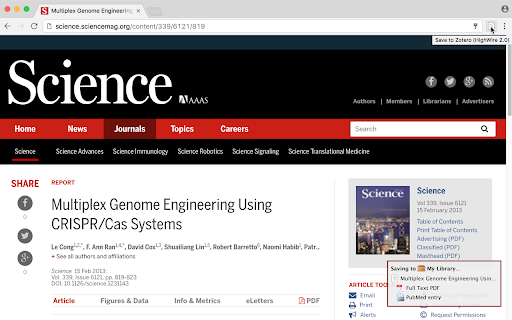
Save references to Zotero from your web browser Zotero is a free, easy-to-use, open-source tool to help you collect, organize, annotate, cite, and share research. The Zotero Connector automatically senses content as you browse the web and allows you to save items to Zotero with a single click. If a PDF is available, the Connector can save it to your library to read later, and it can even save snapshots of webpages in case they change or disappear. Whether you're searching for a preprint on arXiv.org, a journal article from JSTOR, a news story from the New York Times, or a book from your university library catalog, Zotero has you covered with support for thousands of sites. Additionally, if you use a web-based proxy to access resources your institution subscribes to, the Zotero Connector can automatically redirect you through the proxy when you follow links to those sites from elsewhere on the web, making sure that you always have access to PDFs and other gated content. While the Connector can save most pages directly to your zotero.org account, for the full Zotero experience be sure to install the Zotero desktop app, which allows you to organize your references efficiently, insert citations automatically into Word, LibreOffice, and Google Docs, and much more. You can download Zotero for free from https://www.zotero.org/download We are happy to help with any issues you encounter with the Zotero Connector, but we cannot do so through the Chrome Web Store. For bug reports, questions, comments, or help, please visit https://www.zotero.org/support/getting_help

Scite
scite allows users to see how a publication has been cited, providing the citation context and classification See the real impact of any paper. Not just how many times it's been cited, but how. The Scite extension shows you citation context directly on Google Scholar, PubMed, and thousands of journal websites, so you can quickly understand whether a paper's findings have been supported, contrasted, or simply mentioned by other research. - View Smart Citation counts on paper listings across Google Scholar, PubMed, and major publisher sites - See at a glance how many citations support, contrast, or mention a paper's claims - Click any citation badge to open the full Scite report with detailed citation statements - Works automatically on pages you already use for research Stop relying on citation counts alone. Understand what the research actually says about any paper.

Google Scholar PDF Reader
Supercharge your paper reading: follow references, skim outline, jump to figures, cite and save. When you install Scholar Reader, PDFs on all sites will have a new look in Chrome. To make this happen, Chrome will ask for permissions to read and change data on all sites. Scholar Reader makes no changes other than the presentation of PDFs. • Preview references as you read. Click the in-text citation to see a summary and find the PDF. • Read faster with the AI outline. Get a quick overview and click on interesting bullets to jump within the paper. • Highlight and comment on PDFs. Highlights are saved to your Scholar library. • Make it right for your eyes with light, dark, and night modes. • Copy and paste common citation formats without leaving the paper. • Save articles to your Scholar Library to read or cite later. • Click in-text figure mentions to see the figure and the back button to keep reading. By installing this extension, you agree to the Google Terms of Service and Privacy Policy at https://www.google.com/intl/en/policies/.

Elicit: AI for Scientific Research
Browser extension for use with Elicit.com Get full-text papers instantly in your Elicit Systematic Reviews! 📚✨ Streamline your research workflow with our smart extension that securely connects to your institutional access. Your credentials stay safe on your device while we do the heavy lifting of retrieving full-text papers. ⭐️ Key Features: ✓ Automatic full-text retrieval from major publishers like Wiley and Springer ✓ Secure institutional access integration ✓ EZProxy support for off-campus access 1. Install the extension 2. Log in to your institutional accounts (like Wiley or Springer) on those websites, no special Extension-specific login needed 3. Start your Elicit Systematic Review When you reach the Extract step, we'll automatically fetch full texts for your papers. Watch the magic happen with our friendly status indicator that shows: * "8 full-texts retrieved" - Success! We've found your papers * "2 papers need action" - Quick heads-up about papers that need a bit more help to access Need off-campus access? No problem! Just add your academic proxy (e.g. EZProxy) information in your Elicit settings at https://elicit.com/settings, and we'll take care of the rest. Read the full help documentation here: https://support.elicit.com/en/articles/6123329

CCFrank
Displays CCF recommended rank of conferences/journals in dblp, Google Scholar, Connected Papers and WoS. 此扩展程序会添加一个网页标记,以便用户可以从 dblp、Google 学术、Connected Papers、Semantic Scholar 和 Web of Science 轻松查询学术文章的类别(即其在《中国计算机学会推荐国际学术会议和期刊目录》2022年拟定版(2022年12月)中的类别)。CCFrank 可执行以下操作: - 在 dblp 的 publication、person、conferences 和 journals 搜索结果中标记论文的类别;适配 dblp 各镜像站点。 - 在 Google 学术的 articles 和 author 搜索结果中标记论文的类别;适配 Google 学术各镜像站点; - 在 Connected Papers 的搜索结果中标记论文的类别。 - 在 Web of Science 的搜索结果中标记论文的类别。 - 在 Semantic Scholar 的 search results、citations 和 references 中标记会议和期刊论文的类别。 您的 Star 是我更新的动力
