
ekgllcpppdjkaagfjhdoeacdbihbmban

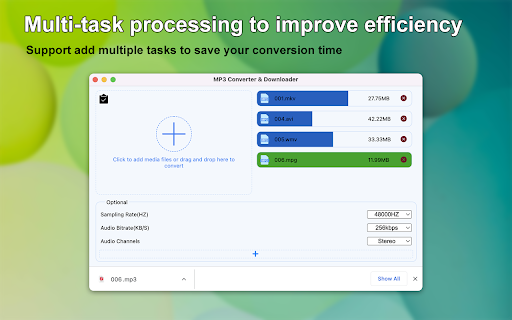


Convert video and audio files to Mp3 format! Support the conversion of local and online media files to MP3 format and add ID3 tags. This is a fast and high-quality mp3 converter & downloader, which can fast convert video and audio files to mp3 file format; and it can add ID3 tags arbitrarily; support local and web online media files to convert to mp3 format. Extension main features Convert multiple media formats to mp3 Support mp4, avi, ogg, m4a, webm, wma, mkv, mov and other formats convert to mp3. Fast and high-quality convert local media files You can click the "add button" in the extension, or drag and drop local files to the extension for conversion. After the conversion is complete, the files will be placed in your default download directory. online conversion You can copy the media link to the clipboard, then click the "clipboard button" in the extension, the extension will automatically extract the media link from the clipboard and start conversion automatic. You can also in the web page through the context menu item "Convert media files to mp3", it will automatically parse the media files in the web page, and add to the task list conversion automatic. flexibility This extension provides users with amazing flexibility in setting various options. You can seting bit rates, sample rates, channels to convert media files, making the perfect choice to meet your various conversion requirements. Freely add ID3 tags You can add various ID3 tags to mp3 files, it provides more than 30 ID3 tags for you to choose from. For example, you can add a favorite cover image to your mp3, record singers, composers, etc.

Video & Audio Downloader
Video & Audio Downloader is an extension that enhances the process of downloading media files (video & audio) from the internet. Badge icon text shows the number of captured items. ### Important note ### : Video & Audio Downloader add-on is NOT working for YouTube website or any other YouTube videos embedded in other websites due to Google, YouTube, and Chrome web store policies and restrictions. ### Important note ### : Video & Audio Downloader add-on is NOT responsible for the media content(s) that you download with this add-on. You are responsible for verifying the media's copyright permission before downloading anything from the internet. To work with this add-on, simply browse to a website with online media content. Once the media (video or audio) is loaded and played, the addon automatically detects the media and renders it in toolbar popup. Within the popup, you can download media items easily. Moreover, there is also a button to copy the download link to the clipboard. You can download all media items at once as a "zip" file. Please note that this add-on only shows media items for the active tab (current tab). Once you switch tabs, the list in the popup will be updated. If you have a feature request or found a bug to report, please fill the bug report form in the add-on's homepage (https://mybrowseraddon.com/video-audio-downloader.html).

Video to Audio Converter
Use Video to Audio Converter: online convert video to audio (mp4 to mp3, etc). App for file convert to mp3 and extract music, sound. 🎉 Introducing Video to Audio Converter - your ultimate media transformation tool! Have you ever needed a quick way to answer - How to convert video to audio file? Look no further! Our video to audio converter is designed to make converting videos to audio files easier than ever. Whether you want to turn video to audio for music, podcasts, or any other needs, this extension has you covered. Why Choose video to audio converter online? Our converter stands out with its user-friendly interface and efficient performance. Here are some reasons: 1️⃣ Effortless conversion process. 2️⃣ High-quality output. 3️⃣ Supports multiple formats. 4️⃣ Lightning-fast conversions. 5️⃣ No need for additional software. 📂 Features of Video to Audio Converter • Converting: Easily transform video file into an audio file. • Multiple format support: Whether you need to convert mp4 to mp3 or other formats, we’ve got you covered. • Online accessibility: Use the converter online without any downloads or installations. 🎶 How to convert video to audio Follow these simple steps: 1. Install the video to audio converter Chrome Extension. 2. Upload your file. 3. Select the desired format - if necessary. 4. Click 'Convert' and download complete job. It’s that easy! Versatility in Conversion ✅ mp4 to mp3 converter: Quickly video to audio convert for music, ringtones, and more. ✅ video to mp3 as well as mov to mp3: Perfect for extracting interviews, webinars, and educational content. ✅ audio extractor: Use to isolate the sound from any video. 🌟 Top Apps to turn video to audio When looking for apps to convert video to audio, our extension tops the list due to its seamless performance and versatility. Whether you need for a professional project or personal use, our converter mp4 to mp3 delivers exceptional results every time. ☝ Advanced Conversion Options 🔸 mp4 to mp3: Our tool excels at convert mp4 video to audio, ensuring you get the highest quality sound. 🔸 video to audio file converter: A reliable solution. 🔸 extract audio from video and video to mp3 converter: Effortlessly extract it for podcasts, voiceovers, and more. 🎢 User-Friendly for All Skill Levels Even if you’re not tech-savvy, you’ll find our converter easy to use. The intuitive interface guides you through each step, making the process simple and straightforward. ⚡ Converting video to audio made simple Our Chrome Extension is designed to convert video to audio mp3 files straightforward and hassle-free. With intuitive controls and a powerful engine, you can turn mp4 to mp3 in seconds. 🌐 Benefits of Using ➤ Wide Compatibility: supports various formats for versatile use. ➤ Online Convenience: access online anytime, anywhere. Great for Mobile Use Convert your videos into audio files and transfer them to your mobile device. Enjoy your favorite content wherever you go. All-in-One Solution 🔹 convert to mp3: Ideal for transforming various formats into high-quality mp3 files. 🔹 vid to mp3 converter: Use our app for quick and efficient audio extractions. 🔹 video mp3 converter: The ultimate tool for converting video to mp3, perfect for all your needs. 🔹 If you wonder - how to convert mp4 to mp3 or how to convert a video to an audio - our app is made for you. 🎯 Streamlined Conversion Process The process of convert video to mp3 has never been more streamlined. With our extension, you can make it with just a few clicks. 🚀 Efficient and Reliable ➾ mp4 to audio: convert mp4 to audio with unmatched reliability. ➾ video to mp3 audio: achieve crystal-clear sound files from any video source. ➾ video to audio: our extension ensures a smooth and efficient convert video to mp3 audio. 🎧 Ideal for Various Professions Teachers, journalists, content creators, and many others will find this tool incredibly useful for transforming their content into accessible formats. 🎉 Seamless User Experience Our Chrome Extension is designed with the user in mind. Enjoy a seamless experience, with intuitive controls and fast processing times. ✨ In Conclusion Our app solves a multitude of problems that you may face. All you need to do is just install it and use it - saving time and getting great quality. The Video to Audio Converter chrome extension is the ultimate tool for all your conversion needs. Whether you're looking to convert mp4 to mp3, extract audio from video, or answer the question how to convert video into audio - our extension provides a reliable, high-quality solution. Install it today and transform your media files with ease!

SoundCloud to MP3 Player
Use SoundCloud to MP3 Player to play music in background, control playback, and stream music online without switching tabs. Use SoundCloud to MP3 Player to play music in background, control playback, and stream music online without switching tabs. 🎧 Elevate how you play music while surfing the web SoundCloud to MP3 Player puts full playback control at your fingertips so you can listen to music without ever opening the SoundCloud tab again. Keep the vibe alive, stay focused on your tasks, and enjoy truly effortless music streaming in Chrome. ➤ All‑in‑one toolbar widget lets you play music, pause, skip forward or rewind, and manage volume in one swipe ➤ Glanceable mini‑panel displays cover art, artist, album, and timing so you always know what is playing ➤ Works in the background even when dozens of tabs are open or the browser is minimised ➤ Zero learning curve: install, pin, and start to listen a music instantly ➤ Compatible with every public track on SounCloud, giving you limitless cloud music options 1️⃣ Play music from any page without changing context 2️⃣ View the queue, jump to the next hit, or replay a favourite in one click 3️⃣ Adjust the volume with precision sliders instead of tiny default buttons 4️⃣ Track information auto‑updates in real time, perfect for discovering new artists 5️⃣ Stream audio continuously while you email, code, study, or relax 🌍 Designed for every listener – Remote workers who need a smooth groove while handling spreadsheets – Designers who sketch with ambient beats on loop – Students who listen to music to improve concentration during late‑night study sessions – Creators who test sound levels while editing videos – Anyone who simply enjoys online music without distractions This extension focuses on playback control only. It is not a soundcloud downloader, soundcloud to mp3 utility, or soundcloud converter. We respect copyright policy, so soundcloud a mp3 conversion and similar features are intentionally absent. Install with confidence knowing your account stays compliant. Many users type soun, souncloud, sounclod, soud, soudcloud or even soundcloud downloader when looking for easier ways to listen to music. By offering a lightweight controller we satisfy that need for quick music streaming without violating guidelines. Whether you search music online, or cloud music, this tool appears because it keeps you streaming legally. ▸ Reduce tab‑hopping and keep momentum while you work ▸ Maintain steady focus as you stream music in the background ▸ Save screen space by replacing bulky web players with a compact controller ▸ Skip tracks instantly when inspiration strikes ▸ Monitor current track duration so meetings never overrun 1. Open Chrome Web Store 2. Click Add to Chrome next to SoundCloud to MP3 Player 3. Pin the orange icon for one‑tap access 4. Sign in to SoundCloud if needed and start to listen to music immediately The extension operates entirely in your browser. No history is stored. You enjoy uninterrupted cloud music while your data stays on your computer. Stop juggling tabs just to listen your favourite songs. Install SoundCloud to MP3 Player, hit play, and enjoy seamless online music everywhere you click. From the first beat to the last chord, the simplest way to stream music is now only a toolbar away.

CRX Emulator
Emulate CRX files in your browser CRX Emulator allows you to test and run Chrome extensions (.crx files) securely in a sandboxed environment, ensuring complete privacy and isolation from your browser. Whether you're a developer testing your extensions or a user verifying an offline extension, CRX Emulator offers a safe, installation-free solution with no data tracking. 🔒 Privacy & Security Runs in a Secure Sandbox – CRX files are executed in an isolated environment, preventing unauthorized access to your browser data. No Installation Required – Test extensions without modifying your browser settings. Zero Tracking – We do not collect, store, or transfer any data to third-party servers. Local Storage Only – Your settings and data remain inside your browser and are never accessed or shared. Privacy policy No unnecessary data tracking – The extension only requests permissions required for its core functionality. All optional permissions require user approval – The extension will not access websites or perform actions without user consent. Local storage only – Any stored data remains in the browser and is never sent to external servers.
