
ekccllhkobdjemdinnbdopagcdjglohf


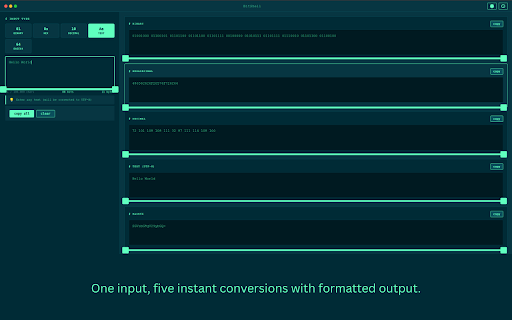


Binary, hex, decimal, text, Base64 & IP converter with IPv4/IPv6/CIDR support, smart format detection, history, and one-click copy. BitShell is a fast, fully offline conversion tool for developers, security researchers, students, and system administrators who work with encodings and number systems daily. No websites. No tracking. No data ever leaves your machine. Universal Conversion - Binary (0b) - Hexadecimal (0x) - Decimal (ints and floats) - UTF-8 text - Base64 encode/decode - IPv4 and IPv6 support - IPv4 subnet / CIDR calculator Smart Detection - Auto-detects IPv4 and IPv6 addresses and switches to IP mode - Auto-detects CIDR notation (e.g. 14.12.72.8/24) and switches to subnet mode - Real-time validation with helpful error messages and format suggestions - Character and byte counters Blazing Fast and Private - Instant conversions as you type - Handles up to 100,000 characters - No server calls — 100% offline - No tracking, analytics, or data collection Copy and History Tools - One-click copy for any format - Copy all formats at once - Visual copy confirmation - History of your last 50 conversions, including subnet calculations Keyboard Shortcuts - Ctrl/Cmd + K — Clear input - Ctrl/Cmd + Enter — Copy all - Ctrl/Cmd + H — Toggle history - Ctrl/Cmd + , — Settings - Escape — Close sidebars Terminal-Inspired UI - Clean, distraction-free layout - Solarized dark theme - Smooth transitions and professional monospace fonts Perfect For - Developers - Security researchers - Students learning binary, hex, and networking - Sysadmins and network engineers - Reverse engineers and protocol analysts Common Use Cases - Calculate subnet ranges, host counts, and network addresses from CIDR notation - Convert IP addresses between binary, hex, and decimal formats - Decode Base64 strings - Convert hex color codes - Analyze packet capture data - Switch between number bases for coding - Encode/decode text for web development Recent Updates (v1.0.7) - New: Dedicated IP tab for IPv4, IPv6, and CIDR — select IP mode directly or let auto-detection switch to it as you type - Auto-detection now switches to the IP tab when an IPv4, IPv6, or CIDR address is entered from any other tab - Invalid IP input shows a clear error with format suggestions, matching the behavior of all other input types - CIDR auto-detection now also activates the IP tab correctly - Version bump and description update to reflect IP conversion support Previous Updates (v1.0.6) - New: IPv4 subnet / CIDR calculator — type any CIDR address (e.g. 200.107.16.17/18) to instantly see IP in binary, subnet mask, network address, broadcast address, first/last host, address count, and max hosts - CIDR is auto-detected as you type — no extra tab or button needed - CIDR results fully supported in copy, copy all, and history - Fixed hex prefix display for multi-byte binary and decimal inputs - Fixed leading zeros on space-separated decimal-to-binary conversion - Improved bit and byte counter accuracy for decimal and fractional binary inputs - Fixed decimal float text conversion to show clear error instead of silent output - Code cleanup and performance improvements - Added a pop-out button for a resizable window Why BitShell? Most online converters require internet access and track your data. BitShell is different: - Offline anywhere - Zero data collection - Instant performance - Professional-grade tools - Clean, focused interface Support and Feedback Found a bug or want a new feature? Reach out through the support link. BitShell improves with your feedback. Privacy BitShell does not collect personal data, track usage, send data to servers, or use analytics. All settings and history stay on your device only.

Base64 Buddy
🧩 Base64 Buddy – Encode, Decode & Preview Files with Ease Base64 Buddy is your all-in-one tool to encode, decode, preview, and analyze files in Base64 format — built for developers, designers, and everyday users who work with image data, en 🚀 What Base64 Buddy Does Base64 Buddy makes Base64 handling simple, visual, and developer-friendly. Whether you’re debugging image uploads, working on API payloads, or testing encoded data — this tool provides a clean, modern interface to get it done instantly. ✅ Encode Mode - Upload or drop any file (image, text, PDF, JSON, etc.) - Instantly convert to Base64 - View file info: name, size, type, resolution, and bit depth - Preview image files before encoding - Toggle Data URI format (data:image/png;base64, ...) - One-click copy of Base64 data - Works fully offline 🔄 Decode Mode - Paste or upload Base64 data - Automatically detect MIME type and file extension - Instantly render image preview or downloadable file - View decoded file details (type, size, resolution, bit depth) - Download decoded file in its correct format - Copy decoded data with a single click 🧠 Smart Features - Auto-handles large Base64 strings efficiently - Preserves image resolution — no stretching or distortion - Clear “File Info” panel for quick reference - Clear Data button to reset workspace instantly - Built-in toast notifications for actions like copy, error, or invalid data 🌓 Beautiful, Modern UI - Base64 Buddy features a clean dual-pane design: - Left side for real-time Preview - Right side for detailed File Information - Every section is responsive and adapts perfectly for desktop and mobile users. - Enjoy seamless usage in both light and dark themes. 🔒 Privacy-First Design - Base64 Buddy was built with privacy at its core: - Works 100% offline - No data collection, analytics, or external API calls - No cookies or tracking - All user preferences (like theme or recent history) are stored locally on your device - Your files never leave your system. 🧰 Built for Developers & Designers - Base64 Buddy is perfect for: - Frontend developers debugging image upload APIs - Salesforce, Web, and Mobile developers handling Base64-encoded data - Designers testing image embedding via Data URI - QA testers validating encoding/decoding outputs - Educators demonstrating Base64 encoding in classrooms 🧠 Why Install Base64 Buddy? - Because you deserve a developer-grade Base64 tool that: - Works fast and offline - Looks clean and modern - Keeps your files private - Gives you full control over data encoding and decoding - Simplifies what’s normally tedious 🔗 Useful for: - Salesforce & Web Developers - Designers embedding images in HTML/CSS - Backend Engineers testing payloads - QA Teams validating API responses - Students learning about Base64 encodingcoded strings, or text-to-file conversions. - No setup. No online dependency. 100% offline, secure, and privacy-friendly.

Base64 Decoder
Simple Base64 Decoder is a Chrome extension to instantly base64 decode and base64 encode online. A quick, easy-to-use B64 decoder! Base64 Decoder: The Application for base64 Encoding and Decoding Strings Looking for an efficient and easy way to handle base-64 encoding and decoding? The base64 decoder Chrome App is your solution! With just a few clicks, you can base64 encode decode online or decode base64 strings with unmatched simplicity. 🤔 Why Choose Base64 Decoder? Base64 decoder offers a powerful toolset for working with base-64 encoding and decoding. Whether you need to encode data for secure transmission or decode base 64 strings for analysis, this extension is designed to make your life easier. Here’s what makes it stand out: 1. Instant Base64 Decoder Online: Decode base-64 strings quickly without leaving your browser. Perfect for developers and data analysts. 2. Base-64 Encoder and Decoder: A combined tool to handle both encoding and decoding with ease. 3. User-Friendly Interface: No steep learning curve. Just open the extension, input your data, and let the 64 bit decoder do the work! 4. Universal Compatibility: Works across all modern versions of Chrome and seamlessly supports base-64 encode decode online. 5. Privacy First: All operations are handled locally in your browser. Your data never leaves your device. 🔒 🔑 Key Features of Base64 Decoder • Base 64 Encoding and Decoding Made Simple: No technical skills? No problem! Handle base 64 encoding and decoding like a pro. • Dual Functionality: Base64 encoder and decoder combined in one intuitive tool. • Secure and Private: Local processing ensures your data stays safe. • Supports Various Formats: Whether you need to b64 encode or decode base-64 string data, this extension has you covered. • Fast and Lightweight: The 64 encode and 64 decode functionality operates instantly with no lag. ✨ What Can You Do with Base64 Decoder? 1️⃣ Decode base 64 strings into plain text or raw data. 2️⃣ Encode sensitive information using the base-64 encoder for secure sharing. 3️⃣ Convert b64 encode or b64 decode tasks with ease. 4️⃣ Process files and strings with the reliable base 64 string decoder. 5️⃣ Explore advanced options for 64 bit decoder needs, all in one place. 🧑💻 How to Use Base64 Decoder Chrome Extension: 1 Open the extension from the Chrome toolbar. 2 Choose whether to base 64 en-code or decode base 64 strings. 3 Paste your data into the input field. 4 Click the appropriate button (En-code/Decode). 5 Copy the result directly to your clipboard or save it for later. 🌎 Who Can Benefit from Base64 Decoder? ⮞ Developers: Handle b64 decoder and encoding tasks without relying on external tools. ⮞ Data Analysts: Quickly de-code b64 strings or work with raw base-64 encoding. ⮞ Everyday Users: Simplify file sharing with the base-64 decrypter and b64 encoder online. 🙌 Why Base-64 Encoding Matters Base-64 encoding is a vital tool for transmitting data securely. With the base64 encoder and decoder, you can ensure your information is encoded into a format that’s both compact and universally understood. Need to base-64 de code or b64 de code a file? The base64 decoder Chrome App is here to help. 🌟 Advanced Use Cases - De-code base-64 string data from APIs or files. - Base 64 encoder functionality for embedding data in HTML or JSON. - Securely handle base64 encoding and decoding for sensitive information. ✨ Built for Speed and Accuracy 🔹 Instantly process 64 en code tasks with unparalleled efficiency. 🔹 De-code base-64 strings in real time without delays. 🔹 Access a fully responsive b64 encoder interface. 🌈 Enhanced Productivity with Base64 Decoder Streamline your workflow by using a single tool for all your base64 encoding and decoding needs. The base64 decoder Chrome App is a time-saver for anyone dealing with 64 de-code tasks or base-64 decrypter operations. ❓ Frequently Asked Questions Q: Can I use this extension to de-code base 64 strings securely? A: Yes, all decoding and encoding are handled locally, ensuring complete privacy. Q: Does the extension support 64 en-code tasks for large files? A: Absolutely! The base64 encoder and decoder efficiently process even large inputs. Q: Is this an online base64 decoder? A: Yes, the program operates directly in your browser, providing a fast and reliable base64 decoder online experience. 🚀 Try Base64 Decoder Today Make your base-64 en code de code online tasks faster and easier with this must-have Chrome Extension. Whether you need a 64 encoder or a 64 decoder, this tool is your go-to solution. Install now and simplify b-64 en-coding and decoding forever! 😊

Dev Tools - Web Dev Tools Suite
Streamline your workflow with a powerful, all-in-one browser extension designed for developers, designers, and tech professionals. Access 40+ premium tools directly from your browser, all optimized for speed, privacy, and productivity. Comprehensive Toolset: Everything you need for coding, debugging, testing, and designing in one place. Offline Functionality: All tools work seamlessly without an internet connection, ensuring privacy and speed. Customizable Interface: Pin your favorite tools for quick access or hide unused ones to declutter your workspace. Modern Design: Intuitive UI with light/dark themes for a comfortable user experience. Privacy-First: All processing happens locally in your browser—your data never leaves your device. Regular Updates: New tools and features added based on user feedback. Free Forever: No ads, subscriptions, or hidden costs. 🛠️ Tools Included: Code Formatter: Beautify and format code with syntax highlighting. Code Snippets: Save and organize reusable code snippets. Minifier/Beautifier: Compress or beautify JavaScript, CSS, and HTML. Regex Tester: Test regular expressions with live highlighting. Diff Checker: Compare texts and highlight differences. HTML Previewer: Live preview HTML with CSS (JavaScript disabled). API & Network Tools: API Tester: Test REST APIs with various HTTP methods. WebSocket Tester: Test WebSocket connections. Speed Tester: Measure network speed and latency. Network Speed Monitor: Monitor real-time network speed. Data Tools: JWT Decoder: Decode and verify JWT tokens. Base64 Encoder/Decoder: Encode/decode Base64 strings. Hash Generator: Generate MD5, SHA-1, SHA-256, and other hash digests. UUID Generator: Generate unique identifiers. Utility Tools: Calculator: Basic and programmer calculator. Unit Converter: Convert between different units (length, weight, temperature, etc.). Timestamp Converter: Convert Unix timestamps. QR Code Generator: Generate QR codes from text. Password Generator: Create secure passwords. Lorem Ipsum Generator: Generate placeholder text for layouts. Page Performance: Analyze webpage performance metrics. SEO Analyzer: Analyze webpage SEO and accessibility. Meta Tags Manager: Generate and analyze HTML meta tags. Visual Tools: Color Picker: Pick colors from webpages. CSS Grid Generator: Create CSS grid layouts visually. Flexbox Generator: Learn and generate flexbox layouts interactively. CSS Extractor: Extract CSS from selected webpage elements. Viewport Measure: Measure pixel distances and dimensions on webpages. Element Inspector: Advanced element inspection with detailed properties. Storage Tools: Cookies Manager: View, edit, and manage browser cookies. LocalStorage Manager: Manage browser local storage data. SessionStorage Manager: Manage browser session storage data. IndexedDB Explorer: Browse and manage IndexedDB databases. Storage Analyzer: Analyze storage usage across all browser storage types. 🎯 Extra Features: Pin Tools: Keep your most-used tools at the top for quick access. Hide Tools: Customize your interface by hiding tools you don’t use. Search Functionality: Quickly find tools using the built-in search bar. Keyboard Shortcuts: Access tools faster with configurable shortcuts. Export Options: Save results or configurations directly to your local storage. 🔥 Why Choose This Extension? Designed for Developers: Tailored for frontend/backend developers, designers, DevOps engineers, and students. Boost Productivity: Eliminate repetitive tasks with one-click solutions. Chrome Guidelines Compliant: Fully adheres to Chrome Web Store policies for security and performance. 🚀 Get Started Today! Transform your browser into a professional development powerhouse. Install now and experience the ultimate toolkit for coding, debugging, and designing—all in one extension.

HTML to Markdown
Convert HTML to Markdown. Copy any webpage to markdown file — AI ready data and context with token counter. HTML to md in one click. Turn any web page into clean, structured markdown — optimized for AI assistants, note-taking, and documentation. HTML to Markdown is a lightweight Chrome extension that delivers formatted output to your clipboard or download as file in seconds. 🚀 Get Started in Seconds 1️⃣ Install HTML to Markdown from the Chrome Web Store 2️⃣ Open any webpage you want to convert to markdown 3️⃣ Click the extension icon or press Alt+C 4️⃣ Clean markdown is copied to your clipboard — done! Whether you need to convert html to md for AI context, save a webpage to markdown file, get markdown to download, or grab clean text from a cluttered page — this html to md converter handles it all. A true web clipper for AI that strips noise and delivers what matters. ✨ Key Features 🔹 One-click convert html to markdown from any web page 🔹 Smart content extraction — strips ads, navigation, popups, and clutter 🔹 Built-in token counter powered by tiktoken BPE — accurate to ±1-8% 🔹 Download url to markdown file or copy to clipboard 🔹 Full html table to markdown support with GFM formatting 🔹 Code blocks, task lists, and strikethrough preserved 🔹 GitHub extraction — files with syntax, issues, pull requests, and READMEs 🔹 Selection mode — convert only selected text, works with PDFs 🔹 Compact mode — strips URLs and images, saving 30-50% tokens 🔹 Comment extraction — Reddit, Hacker News, Stack Overflow, YouTube 🔹 Google Docs and Sheets — native markdown and csv export 🔹 YAML front-matter with page metadata (URL, title, author, date) ⚙️ Converting HTML to Markdown — How It Works The HTML to Markdown converter uses a smart multi-step pipeline: 1. Content Extraction — removes sidebars, ads, navigation, and clutter 2. HTML Convert — structured output with headings, lists, code blocks, and tables 3. Cleanup — empty elements, broken links, and decorative images removed 4. Metadata — YAML front-matter with source URL, title, author, and date 5. Token Counting — estimates for major AI models calculated in real time 📋 Who It Is For ➤ Developers and Engineers Feed documentation, API references, or Stack Overflow answers directly into AI assistants. URL to markdown captures any technical page as clean output — code blocks and tables preserved. ➤ Students and Researchers Convert articles, papers, and web resources into structured study notes. Website to markdown makes it simple to build a knowledge base. Save any url to markdown file for offline access. ➤ Content and Knowledge Workers Grab web content for analysis, summarization, or repurposing. Web to markdown removes visual noise and delivers a portable, structured format — no manual cleanup required. 🤖 AI Models Supported HTML to Markdown includes a built-in token counter compatible with: ▸ GPT-4o and ChatGPT ▸ Claude Sonnet and Claude Opus ▸ Gemini Pro and Gemini Flash See token estimates before pasting into any AI assistant and plan your context budget with confidence. 💡 What Makes This Markdown Converter Different 1. AI-ready output — not just an html converter, but a context preparation tool with metadata and token awareness 2. Local processing — everything runs in your browser, no data leaves your device 3. Accurate conversions — GFM tables, fenced code blocks, and task lists fully supported 4. Clean results — catches noise that other html to markdown tools leave behind 5. Minimal footprint — no accounts, no bloat, just a fast and focused html-to-markdown extension 🔒 Privacy and Security HTML to Markdown processes everything locally in your browser. No data is sent to external servers. • No account required • No tracking or analytics • No external API calls • Works offline after installation 📌 What types of pages can I convert? 💡 This html to markdown chrome extension works on articles, documentation, blogs, forums, wikis, and more. Complex elements like tables, nested lists, and code blocks are converted accurately. 📌 How accurate is the token counter? 💡 Token estimates use tiktoken BPE (the same algorithm as GPT-4o) and are accurate to within ±1-8% — precise enough for context budget planning. 📌 Can I customize the output? 💡 Settings let you toggle YAML front-matter, choose metadata fields, adjust heading normalization, enable compact mode to save tokens, and extract comments from discussions. 📌 Does it support online markdown conversion for any URL? 💡 This html to markdown online tool works with any URL in Chrome. Navigate to the page, click the icon, and the html to md conversion runs instantly. 📌 Does it handle code-heavy pages? 💡 Absolutely. Code blocks, nested lists, and tables are all preserved during the convert html to markdown process. GitHub files are extracted with syntax highlighting and proper code fencing. 📌 What AI assistants can I use the output with? 💡 The output works with any AI assistant — ChatGPT, Claude, and Gemini included. The token counter helps estimate context usage for each model. 📌 Is my data safe when using HTML to Markdown? 💡 All processing happens locally in your browser. No page content is sent to any server. 🚀 Install HTML to Markdown today and turn any web page into AI-ready context. One click — clean, structured md file with accurate token estimates.
