
ekbliogmbfkjmankikloogcknocdmaae

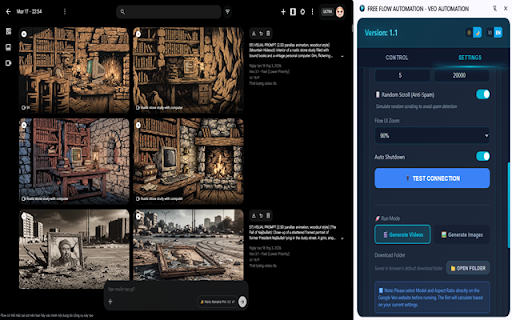
Free tool to automate creating images and videos in bulk on Flow, managed with smart queues. Extension Name: FREE FLOW AUTOMATION - VEO AUTOMATION Short description: A free, powerful tool to automate bulk Video (Veo) and Image (Imagen) generation workflows on Google Flow Detailed Description: FREE FLOW AUTOMATION is the ultimate solution to turn Google Flow (AI Test Kitchen) into an industrial content-creation machine. Stop wasting hours manually copy-pasting and clicking download. This extension completely automates bulk Video (Veo) and Image (Imagen ) generation pipelines directly from your prepared prompt lists. Best of all: It's 100% FREE forever. ✅ Ultimate Prompt Queue Control: You have absolute control over your generation flow, way beyond basic auto-runners: Run All: Generate the entire prompt list. Run by Range: Pick exactly where to start and stop (e.g., line 10 to 50). Custom Indices: Only render specific target prompts (e.g., lines 1, 4, 7, 12) while skipping the rest. ✅ Smart Character Synchronization (Character Sync): Works for both Video and Image Generation. Use the @CharacterName syntax right in your prompt. The Bot utilizes advanced DOM-matching to automatically search, open menus, and securely attach your pre-uploaded Character Reference images. It even checks if you missed an @Name or forgot to upload the photo, safely pausing the process to alert you before mistakes happen. ✅ Zero-Config Native UI Integration: No bloated, complicated settings panel. Simply select your desired Model and Aspect Ratio (16:9, 1:1, etc.) directly on the official Flow website. The Bot dynamically adapts and inherits your actual browser configurations for the entire bulk run. What you see on Flow is exactly what the Bot produces. ✅ Crash-Resilience & Auto-Save Project Recovery: Did your browser crash or internet drop halfway through a 100-prompt batch? No panic! The tool continuously Auto-Saves your progress. Upon reopening the tab, just hit "Resume", and the Bot will pick up generating exactly from the prompt where it left off. No duplicate files or lost time. ✅ Intelligent Environment Anti-Mismatch Loop: If you accidentally choose "Video Mode" heavily in the Tool but leave your web browser in "Image Mode" (or vice versa), the Extension acts as a fail-safe. It detects the cross-mode discrepancy and safely aborts the generation, presenting a direct Error Alert to save your quota and prevent infinite rendering loops. Autonomously selects your preferred resolution (4K / 2K / 1K) and elegantly renames downloaded output files matching your prompt text for perfect organization. Support for an optional AutoShutdown(Native Host) Module: Going to sleep while rendering 200 videos? The Extension will track the final completion state and automatically trigger a safe shutdown of your Windows PC, conserving energy and system lifespan. 🛠 Experience true hands-free automation on Google Veo and Imagen 3. Install FREE FLOW AUTOMATION today and multiply your daily outputs! ------------------------- Tên Extension: FREE FLOW AUTOMATION - VEO AUTOMATION ✅ **Tối Giản Cài Đặt - Tích Hợp Giao Diện Gốc (Zero-Config):** Không nhồi nhét thông số kỹ thuật rườm rà. Bạn chỉ cần lên trang web Google Flow, lựa chọn Model, tỉ lệ khung hình (16:9, 1:1) bằng tay. Extension sẽ tự động "nhập gia tùy tục", đọc các thiết lập bạn vừa chọn và mô phỏng lại y chang cho toàn bộ mẻ render hàng loạt. ✅ **Cơ Chế Khôi Phục Dự Án Khi Gặp Sự Cố (Auto-Recovery):** Đang chạy dở 100 prompt thì cúp điện hoặc lỡ tay tắt trình duyệt browser? Không sao cả! Extension tự động lưu trạng thái (Auto-Save). Khi bật lại, bạn chỉ việc bấm **"Tiếp Tục (Resume)"**, bot sẽ đi tiếp tục dán prompt chính xác tại nơi nó vừa dừng lại. Không render trùng lặp, không hỏng mẻ.

Auto Flow Pro - Automation for VEO AI
Automate video generation on Google Flow with batch processing. Free tier: 50 videos/day. Developed by Flow Automation. Auto Flow Pro is the most reliable bulk automation extension for Google Flow (VEO AI). Generate hundreds of Veo 3.2 videos and Nano Banana Pro images automatically — set it once, walk away, come back to a downloaded library. Built by a registered software company in Dhaka, Bangladesh. Trusted by content creators, agencies, and YouTubers worldwide. ✅ TRUST & TRANSPARENCY: - Built by a registered software company (Mamun Software Solutions) - Real website with full Terms, Privacy, and Refund policies - Stripe-secured payments — no card data stored - Human support via WhatsApp, email, and website - Chrome Web Store "Good Record" badge 🚀 WHAT AUTO FLOW PRO DOES: Auto Flow Pro fully automates Google Flow workflows at labs.google.com/fx/tools/flow. It submits prompts, monitors progress, handles retries, and downloads completed videos to organized folders — all without any manual clicking. Process 10 prompts in parallel for true bulk speed. ⚡ KEY FEATURES: ✅ Bulk batch processing — up to 10 prompts simultaneously ✅ Auto Veo: Text-to-Video, Frames-to-Video, Ingredients-to-Video ✅ Auto image generation with Nano Banana, Nano Banana Pro, Imagen 4 ✅ Import prompts from TXT, DOCX, and JSON files ✅ Auto-download with organized folder structure and clean naming ✅ Real-time progress tracking with detailed logs ✅ Pause, resume, stop, or skip individual prompts ✅ Smart retry logic for failed generations ✅ Resume any interrupted batch from any task number ✅ Session management with unique download folders ✅ Modern, clean side-panel UI with dark mode PRO plan: - Unlimited videos per day - Unlimited batch processing - Unlimited outputs per prompt - Priority queue - Priority email and WhatsApp support 🎯 PERFECT FOR: - YouTubers generating Shorts at scale - Marketing agencies producing client video content - Dropshippers creating product videos - TikTok creators batching vertical content - Educators producing course material - Anyone tired of manually clicking "Generate" 1,000 times 🌍 WHY USERS SWITCH TO AUTO FLOW PRO: - Newer model support (Veo 3.2 + Imagen 4 — most competitors stuck on Veo 3.1) - True parallel batch (10 prompts at once) - Real company, real website, real human support - Consistent updates, the day Veo ships new features - Modern UI built for power users 📲 HOW TO START: 1. Click "Add to Chrome" 2. Create a free account at flowautomation.store 3. Open Google Flow (labs.google.com/fx/tools/flow) 4. Add your prompts (paste, import file, or upload images) 5. Configure batch settings and click Start 6. Watch your video library fill up automatically 🔐 PRIVACY & PERMISSIONS: We take privacy seriously. The extension stores all your prompts and queue data locally on your device. Only your email is collected (for account login). No prompts, no videos, no personal data are shared with third parties. All server traffic uses HTTPS. Permissions: - activeTab — interact with Google Flow pages - downloads — save generated videos to your computer - storage — save your settings and queue locally - sidePanel — display the extension UI - notifications — alert you when batches finish - scripting — automate Flow's interface 🚀 VERSION 3.0.0 — May 4, 2026 Major release. Completely rewritten from the ground up. NEW: ✅ 4 Creation Modes: Text-to-Video, Frames-to-Video, Create Image, Ingredients-to-Video ✅ 6 AI Models supported: Veo 3.1 Fast, Veo 3.2 Quality, Nano Banana, Nano Banana Pro, Imagen 4 ✅ Redesigned modern UI with glass-morphism side panel and dark mode ✅ In-app announcements for important updates ✅ Pro version now available — unlimited videos, unlimited batch processing IMPROVED: ✅ Batch processing up to 10 concurrent prompts ✅ Rolling window processing for large queues (500+ prompts) ✅ Multi-format prompt import: TXT, DOCX, JSON ✅ Smart queue controls — pause, resume, stop, skip ✅ Automatic retry on failed generations ✅ Real-time progress monitoring per prompt VERSION 2.0.0 — March 15, 2026 ✅ Account system with OTP email verification ✅ Pro version introduced with unlimited daily videos ✅ Usage tracking and daily limits VERSION 1.0.0 — February 1, 2026 ✅ Initial release with text-to-video automation on Google Flow 📌 IMPORTANT: - This is a third-party tool, not affiliated with Google or Veo. - Video generation runs on Google's servers; Auto Flow Pro automates the interface only. - Requires an active Google account with Flow access. - Works only on labs.google.com/fx/tools/flow. Install Auto Flow Pro today and turn hours of clicking into minutes of setup. Free plan available — try before you upgrade.

VEO Automation - Tool on Google Flow (VEO3 - GEMINI ULTRA)
VEO Automation: Streamline Your Google Flow Workflow VEO Automation is a powerful side-panel extension designed to accelerate your Google Flow experience. Eliminate repetitive manual tasks by batch-processing prompts, monitoring progress in real-time, and automating your downloads. Transform Google Flow into a high-performance production pipeline for AI video and image generation. Key Features: - Batch Automation: Process entire prompt queues automatically. The extension auto-fills and submits generation jobs, removing the need for manual entry. - Live Monitoring: Track the status of every prompt directly from your side panel with built-in retry-safe logic for maximum stability. - Smart Download & File Management: Automatically download results in up to 4K quality. Organize your media with custom subfolders and automated, ordered file renaming. - Workflow Cloning: Quickly clone workflows from existing audio or video sources to maintain creative consistency. - Gemini-Assisted Scene Generation: Leverage AI to generate structured scene prompts for long-form content and complex production workflows. Supported Modes: - Video Generation:Text to Video, Frame to Video, and Ingredients to Video. - Image Generation: Text to Image and Ingredients to Image (supporting **Nano Banana** models). - Advanced Controls: Preset aspect ratios (16:9, 1:1, 9:16), per-prompt configuration, and robust timeout handling for long-running queues. Best For: - Content Creators: Individuals looking to scale their AI media output. - Production Teams: Teams requiring standardized, high-volume workflows for video and image assets. - Power Users: Anyone seeking to automate manual tasks and increase efficiency on Google Flow. Technical Specifications: - Output Quality: Images (1K, 2K, 4K) and Video (up to 4K). - Multi-language UI: Supports English, Vietnamese, Chinese, Korean, Japanese, and Spanish. - Disclaimer: VEO Automation is an independent productivity tool and is not an official Google product.

FlowForge Pro - Veo AI Automator
Automate video generation with Veo AI. Send prompts in batches and download all videos automatically. FlowForge Pro - Google Flow AI Automator Automate bulk video and image creation inside Google Flow AI. Generate content faster with smart automation, manage large prompt lists, and download everything organized automatically. Automate your Google Flow workflow FlowForge Pro helps creators and teams eliminate repetitive manual steps when working with Google Flow. Instead of entering prompts one by one and downloading results manually, you can run your entire workflow in fully automated batch mode with real-time tracking. How it works Paste your prompts (one per line) Set the delay between generations Choose your download folder Enable Auto Mode and let FlowForge Pro handle everything The extension automatically sends prompts, waits for generation, downloads results, and retries any failures — all without manual intervention. Key features Full Auto Mode — Sends prompts, downloads, and retries failures automatically Smart prompt mapping — Tracks each prompt to its generated content in real-time Videos + Images support — Works with both VEO video and image generation Bulk download with naming — Organized folder structure (prompt_0001, prompt_0002...) Auto-retry on failures — Automatically re-sends failed prompts until complete Emergency Download — Backup option to download any project with scroll detection Video validation — Checks file size to avoid downloading incomplete files Real-time logs — Track every action with detailed console output Background processing — Close the popup and automation continues Nano Banana support — Extended workflows for advanced creation Clean interface — Simple popup, powerful results Who is it for? FlowForge Pro is designed for creators, marketers, and teams who need to: Test multiple prompt variations quickly Scale video/image content production Maintain organized and efficient workflows Save hours of repetitive manual work Pricing 1-day free trial. Then R$49.90/month (charged in BRL, approx. ≈ USD 9/month depending on exchange rate). Secure payment via Stripe. Cancel anytime. Disclaimer FlowForge Pro is an independent tool and is not affiliated with or endorsed by Google.

Google Flow Video Automation
Automate video generation on Google Flow with batch prompt processing on any domain. Google Flow Video Automation - Streamline Your Video Creation Workflow Transform your Google Flow video generation process with powerful batch automation. This extension enables you to process multiple video prompts efficiently, saving hours of manual work. ✓ Batch Processing • Process multiple prompts from a single text file • Support for both simple text and NDJSON format prompts • Sequential automation with intelligent queue management ✓ Real-Time Monitoring • Live progress tracking with percentage indicators • Detailed logging of each step in the process • Visual progress bar and statistics display ✓ Flexible Input Methods • Upload .txt files with prompts (one per line) • Direct text input for quick testing • NDJSON format support for advanced prompt configurations ✓ Robust Error Handling • Automatic retry mechanism for failed prompts • Comprehensive error logging and reporting • Graceful handling of network issues and timeouts ✓ User-Friendly Interface • Clean sidebar design with intuitive controls • Pause/Resume functionality for long batches • Settings customization (auto-download toggle) • Help documentation built-in PERFECT FOR: • Content creators generating multiple video variations • Marketing teams producing batch video content • Developers testing Google Flow capabilities • Anyone needing to automate repetitive video generation tasks HOW IT WORKS: 1. Navigate to your Google Flow project page 2. Click the extension icon to open the sidebar 3. Upload a text file with your prompts or paste them directly 4. Click "Start Processing" and let automation handle the rest 5. Videos are generated and downloaded automatically Simple Text: A cat playing with a ball of yarn A sunset over the ocean TECHNICAL DETAILS: • Manifest V3 compliant (latest Chrome extension standard) • Works exclusively on labs.google/fx/tools/flow pages • Requires permissions: activeTab, downloads, storage, sidePanel • No data collection or external server communication • All processing happens locally in your browser PRIVACY & SECURITY: • No personal data collection • No analytics or tracking • No external API calls • Open source code available for review • Operates only on Google Flow pages REQUIREMENTS: • Chrome browser (version 88 or higher) • Active Google Flow project page • Internet connection for video generation Get started today and transform your video generation workflow with powerful automation!
