
ejfggghgcjepapmacedlkpgmijfmbije
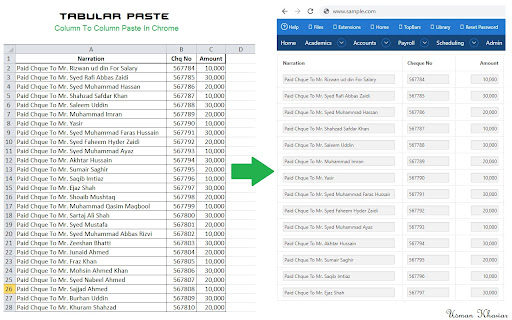
Column to Column Pasting. Copy Your Spread Sheet Columns and paste them on the web. You can either replace the value present in the forms and enter complete new value or you can either update the current values in the form. Just Select the option accordingly

Bookmark It — Personal & Team Bookmarks
Save, share, and find bookmarks in one click. Personal collections and shared team workspaces, with fast import and instant search. Bookmarks are a necessary evil. Lost in folders. Buried in browsers. Impossible to share. Almost no one bookmarks the way they actually want to — and almost no one can collaborate on bookmarks with their team, family, or friends. It's the only bookmarking app that combines real ease of use, real organization power, and real collaboration in a single place — for yourself, your team, and everyone in between. 🚀 Get started in seconds ● One-click import from your existing Chrome bookmarks bar ● One-click import from your browser history ● No spreadsheets, no copy-paste, no re-saving ● Free plan with no credit card. Ever. 👤 Personal + 👥 Team workspaces ● Keep a private collection just for you ● Spin up a shared workspace for your team, family, or side project ● Invite anyone in seconds — everyone sees the latest version, every time ● No more "send me that link again" in Slack, Messages, or email 🔍 Find anything in one click ● Recently Viewed history puts the page you're looking for one click away ● Instant search across every bookmark in every workspace ● Collections, tags, and notes that scale from 10 bookmarks to 10,000 📌 Bookmark from anywhere ● Browser extension — save the active tab with one click ● Menubar app — save and search without leaving what you're doing ● Web app — organize and manage from any device ● Title, URL, and page details pre-filled so saving really is one click 💬 Built for collaboration ● Share entire collections, not just single links ● Add notes and context so teammates understand why a bookmark matters ● Organize together — for work projects, family hubs, reading lists, travel planning, recipe collections, anything 🪄 More than a bookmark manager ● Boosted productivity — spend less time searching, more time doing ● Onboarding made easy — new teammates get the full knowledge hub on day one ● Cross-platform — your bookmarks follow you across browsers and devices ● Upstream from the browser into a dedicated app you'll actually open Stop losing links in chat threads. Stop emailing yourself URLs. Stop maintaining bookmarks five different places. Bookmark It is the home for every link that matters — personal, professional, and everything in between. 🔒 Privacy first ● We will never sell or share your data ● Imports are optional and read-only — we never modify your native browser bookmarks ● Page content is never sent to our servers

Chatty File Uploader
⚠️ This extension only works on chat.openai.com 1. Press 'Submit File' to upload a text file to ChatGPT 2. The extension splits file in multiple chunks that won't overload the model 3. A progress bar indicates how much has already been loaded 4. Lower the `Character Count` if you're seeing any errors 5. That's it! 💡 For best results, add your prompt *before* uploading the file. Right now it accepts the following file types: * Summarise long documents? * Find actions in meeting notes? * Analyse interviews? * Find patterns and insights in tabular data? * Find bugs in your code?

Clipp'd efficiently
Clip and drop finishes and furnishings into your design efficiently Catalog Say goodbye to Pinterest boards, spreadsheets, and clunky product management tools, and let us do the busy work instead. Visit any website and easily clip and drop finishes and furnishings into your design .efficiently Catalog in an instant. Include images, descriptions, dimensions, price and SKU details and make your next project easy as 1, 2, 3. Clip your go-to finishes and furnishings and utilize your personalized product Catalog thereafter, always available for you and your team. Make the busy work easy with Clipp’d .efficiently.

Tanuki Utilities
Provide useful utilities for GitLab users. * Change the GitLab favicon to a project icon; you can easily distinguish many GitLab tabs. * Move "Copy reference" button on top bar; the button is always shown for your easy access. This extension tries to change favicons in the **all** sites by default. You can specify which GitLab site (e.g. gitlab.com or your self-hosted site) you would like to change favicons. #### Change the GitLab favicon to a project icon
