
ejeppbjonidnckhjmmpomnilfcgdjjnk
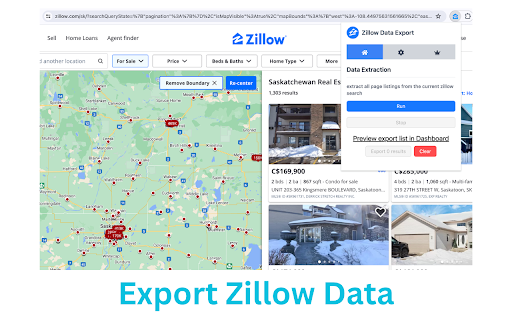

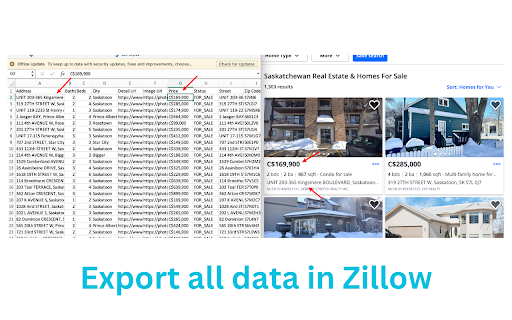
Zillow data exporter: export zillow data to excel with one click. Zillow data exporter, your key to real estate data, scrapes and extracts data from Zillow search results pages effortlessly. No need for programming knowledge or coding skills. Download the data as XLSX (Excel Document) and CSV formats to facilitate better real estate investment decisions. Perform your personal real estate market analysis for buying or selling properties with ease. # Features ✓ Extract property search results and all pages automatically ✓ Extract current page results as you browse automatically ✓ Preview data in a user-friendly Dashboard ✓ Export data as XLSX (Excel Document) and CSV # Supported fields: - Zillow Property ID - Listing Status - Time on Zillow - Price - Property Area - Zestimate - Rent Zestimate - Lot Area - Bedroom and Bathroom Count - Address - Street - City - State - Zipcode - Geolocation (Latitude, Longitude) - Broker Name - is zillow owned - Sold Date - Sold Price - Image URL - Property detail URL - URL of the search result where the property is found - etc. # How to use 1. Open the Zillow search results page 2. Click on our tool's icon 3. Click "run" 4. Once extraction is done, click "Export" # Use Cases Zillow data exporter is perfect for: - Identifying real estate investment opportunities - Monitoring home prices - Real estate market research - Forecasting real estate trends # It's free? Yes, Zillow data exporter - Extract Data from Zillow is free. You can get basic functionality and upgrade to get more functionality. # Data Privacy All the data you process is on your local computer and never passes through our servers. # Statement Zillow is a trademark of Zillow, LLC. Zillow Scraper is not affiliated with, endorsed, sponsored, or otherwise related to Zillow, Inc. or any of its affiliates or subsidiaries.

Comp Crunch (Analyze Zillow Data)
Get insights on your Zillow search in just a few clicks! With the Comp Crunch Chrome extension, you can easily analyze and/or export any Zillow search. This saves you time spent talking to real estate agents or laboriously copy and pasting data points into excel! We offer the ability to export your Zillow search data as either a PDF or CSV file. Additionally, we provide a quick summary of your searched area by showing the average, median, 25th percentile and 75th percentile prices of the results in your search. You also can see how sold homes have trended in an area over time. How to use (free plan): 1. Conduct your search like you normally would in Zillow 2. Open the Comp Crunch chrome extension 3. Click the "Get Results" button to search over an area 4. Click the "Export CSV" button to export the data as a CSV file or the "Export PDF" button to export results as a PDF If using a paid plan, you can also get advanced results How to use (paid plan): 1. Make sure you have setup a paid account (if not, visit https://www.compcrunch.com/pricing) 2. Conduct your search like you normally would in Zillow 3. Open the Comp Crunch chrome extension and login to your account 4. Click the "Get Results" button to search over an area 5. Click the "Get Advanced Results" button in the extension to initiate a pro export 6. Visit your reports page available at https://app.compcrunch.com/reports to see your advanced results You also can, of course, use all the free features as much as you'd like with a pro plan. *Currently the pro export only supports exporting 250 urls at a time Want to search over a new area? Simply update your search criteria or search boundary, open the chrome extension and click the "Get Results" button again. What type of properties can I analyze? Properties for rent, sale and recently sold properties are all available. We also have introduced the ability to export saved homes. What data points are included? * Beds * Baths * Price (sold and for sale listings only) * Rent (rental listings only) * Date Sold (sold listings only) * Date Sold Numeric (sold listings only) * Sqft * Price Per Sf (sold and for sale listings only) * Rent Per Sf (rental listings only) * Lot Area (sold and for sale listings only) * Lot Area Type (sold and for sale listings only) * Address * Zip Code * City * State * Zillow Url * Latitude * Longitude * homeType * Zestimate * Rent Zestimate * imageUrl Looking for more data? Upgrade to our pro plan. You can see what pro fields are available here: https://www.compcrunch.com/pricing Note that each search result will return as many as 500 listings but possibly less. If you would like to capture all listings, keep changing your search criteria and exporting until you've gathered all your results. Does this cost any money? Nope! While there may be some paid features down the road, all features described above are completely free! Disclaimer: Comp Crunch does not own any of the data displayed in the extension. It simply makes this data easier to analyze and understand. Comp crunch has no affiliation with Zillow.com nor any of its intellectual property. All data and Intellectual property belong to Zillow.com and its owners. Listing data is bound to the data provided by Zillow and may be incomplete. Comp crunch is not legally responsible for the accuracy of the data provided and all information should be double checked.

Zillow Data Exporter
Export listing data from Zillow's listings page to a XLS/CSV file 🔧 How it Works: 1️⃣ Open an Zillow search listing page. 2️⃣ Click open our extension, then click the Export button. 3️⃣ Done! Sit back and just wait a moment, let our extension handle the rest. 🔥 Key Features: 1️⃣ Run in the background without waiting for finish. 2️⃣ Export on multiple product pages simultaneous. 3️⃣ Export listing data for current item to Excel or csv file, data include: Zillow Property Id, Listing Status, Time On Zillow(days), Price, Property Area, Zestimate, Rent Zestimate, Lot Area, Bedroom And Bathroom Count, Address, Street, City, State, Zipcode, Geolocation, Broker Name, Is Zillow Owned, Image URL, Property Detail URL, Origin Search URL etcs. 🎯 Targeted Users: business owners, data analysts, and competitor researchers alike. 💡 Benefit from our dedicated support team! We're here to assist you at every step and provide prompt, knowledgeable help. 💪 Take control of your business data management and make informed decisions with Zillow Data Exporter today! Note: This extension is an independent creation and is not affiliated with or endorsed by Zillow ❗️🔒

Zillow Data Exporter
Instantly export Zillow property listings into clean CSV or Excel (XLSX) files, right from your browser. Zillow Data Exporter is the ultimate tool for real estate professionals, investors, and data analysts. Capture detailed property data from Zillow in a single click, saving you hours of manual work. You can easily export four types of listings: - Properties For Sale - Properties For Rent - Sold Properties - Your Saved/Favorite Properties A free Property Data Labs account is required to use the extension. Signing up is quick, free, and no credit card is needed. Get started at https://www.propertydatalabs.com. ❓ What do I get with the Free plan? Our free plan is designed to be generous and genuinely useful. It includes: - 50 exports per month. - Up to 40 listings per export, totalling 2,000 listings monthly. - Data saved in CSV format. Note: On the free plan, you export one page of results at a time. Our paid plans unlock powerful automation and data features designed for serious professionals. Basic Plan - Supercharge Your Exports: - 300 exports per month - Multi-Page Exports: Capture up to 800 listings across many pages in a single click. - Custom Columns: Choose exactly what data you want to export. - Time Filters: Automatically avoid exporting duplicate listings you've already seen. - Rich Data: Export over 35 data points per listing and all image URLs. - Building Units: Export all sub-listings for rent (e.g., all units in an apartment building). Pro Plan - The Ultimate Data Toolkit: - Includes all Basic plan features. - Unlimited Exports: No monthly limits. - Google Sheets Integration: Automatically send your exported data directly to Google Sheets. - Cloud Features: Save your export history and use our Cloud Importer and Monitor tools. - Custom Templates: Create and save export settings for different projects. - Parquet File Exports: For advanced data analysis workflows. Yes. Your privacy is a priority. All data is processed and stored locally in your browser. We do not have access to your exported files. If you uninstall the extension, your data is automatically deleted. We'd love to hear from you! For help, bug reports, or suggestions, please email us at support@propertydatalabs.com or use the contact form on our website. If you find the extension useful, please consider leaving a five-star rating. It helps us immensely! Zillow Data Exporter is an independent tool developed by Property Data Labs and is not affiliated with, endorsed by, or in any way officially connected with Zillow, Inc. For more information, please visit our disclaimer page at https://www.propertydatalabs.com/legal/disclaimer.

Data Ranch Zillow Plow
Collect YOUR OWN data + save money by cutting out the middle man. This is not a bot. This extension runs in your browser and will not trigger CAPTCHAs. ---------------- 🙋♀️HOW DOES THIS HELP ME MAKE MORE MONEY? 1) This extension replaces a freelancer that you'd typically hire for a job like this, cutting out the time needed to find a hire, communicate what you need, work out bugs, and pay them. 2) Your brain will get tired after looking at a few hundred property listings. Your computer will happily continue scraping ZIllow. 3) You can (and should) keep your spreadsheets for future reference. This allows you to look for movements in price, and keep track of trends over time. 4) You can run this tool OVER AND OVER again. 5) There are no system requirements, this will work as long as you have a computer with Chrome installed. (Mac, Windows, Chrome OS, Linux) 1) Install Zillow Plow 2) Visit any listing page on Zillow and wait 10 seconds for the pages to load. (Pages load automatically) 3) Once the pages are done loading, Google Chrome will show multiple spreadsheets being downloaded (.csv files). These can be opened with Excel. 4) Enjoy. *A listing page is any page that is pulled up when you enter something in Zillow's search bar. 🙋♀️WHAT'S THE CATCH?? - This extension costs $0. - There are kinks to work out and early adopters will be gifted this extension's full functionality FOR FREE when paid features are added. - You are encouraged to reach out! Please let us know if there's any features you'd like to see. Disclaimer: This extension is not endorsed or affiliated by Zillow. Zillow is a registered trademark of Zillow Group, Inc.
