
ejcpmillkpnillhppmnpfilfnbdcljff
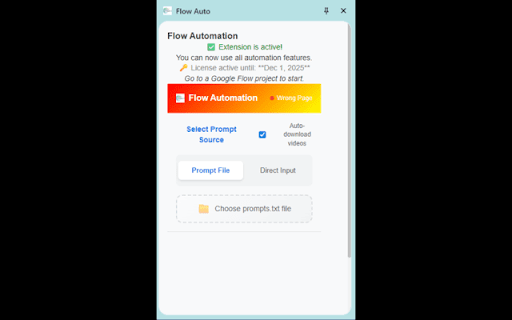
Flow Auto Can Help You: Automate video generation on Google Flow

YouTube Auto HD + FPS
Automatically set the video quality on YouTube according to its FPS! My extension allows you to customize the video quality experience based on the video's FPS (Frames Per Second) on YouTube, YouTube Music and Shorts. You can adjust the quality anywhere from 144p to 8K This means, for example, that you can watch 30FPS videos at 4K and 60FPS videos at 1080p You also have the option to automatically select the enhanced bitrate quality, as well as opt out of super resolution. Additionally, the extension lets you choose the quality of embedded videos, which are videos outside of YouTube.com Lastly, you can enable the auto-resize feature to adjust the video size automatically

Google Flow Video Automation
Automate video generation on Google Flow with batch prompt processing on any domain. Google Flow Video Automation - Streamline Your Video Creation Workflow Transform your Google Flow video generation process with powerful batch automation. This extension enables you to process multiple video prompts efficiently, saving hours of manual work. ✓ Batch Processing • Process multiple prompts from a single text file • Support for both simple text and NDJSON format prompts • Sequential automation with intelligent queue management ✓ Real-Time Monitoring • Live progress tracking with percentage indicators • Detailed logging of each step in the process • Visual progress bar and statistics display ✓ Flexible Input Methods • Upload .txt files with prompts (one per line) • Direct text input for quick testing • NDJSON format support for advanced prompt configurations ✓ Robust Error Handling • Automatic retry mechanism for failed prompts • Comprehensive error logging and reporting • Graceful handling of network issues and timeouts ✓ User-Friendly Interface • Clean sidebar design with intuitive controls • Pause/Resume functionality for long batches • Settings customization (auto-download toggle) • Help documentation built-in PERFECT FOR: • Content creators generating multiple video variations • Marketing teams producing batch video content • Developers testing Google Flow capabilities • Anyone needing to automate repetitive video generation tasks HOW IT WORKS: 1. Navigate to your Google Flow project page 2. Click the extension icon to open the sidebar 3. Upload a text file with your prompts or paste them directly 4. Click "Start Processing" and let automation handle the rest 5. Videos are generated and downloaded automatically Simple Text: A cat playing with a ball of yarn A sunset over the ocean TECHNICAL DETAILS: • Manifest V3 compliant (latest Chrome extension standard) • Works exclusively on labs.google/fx/tools/flow pages • Requires permissions: activeTab, downloads, storage, sidePanel • No data collection or external server communication • All processing happens locally in your browser PRIVACY & SECURITY: • No personal data collection • No analytics or tracking • No external API calls • Open source code available for review • Operates only on Google Flow pages REQUIREMENTS: • Chrome browser (version 88 or higher) • Active Google Flow project page • Internet connection for video generation Get started today and transform your video generation workflow with powerful automation!

Google Flow Automator
Premium automation for Google Flow project creation. Generate more with Nano Banana Pro using Google Flow Automator. Google Flow Automator helps you speed up your Google Flow workflow by automatically sending prompts, managing your queue, and keeping generation tasks moving in sequence. Set your preferred options once, add your prompts, and let the tool handle the repetitive work for you. The core automation tool is free to use. You can queue prompts, run generation tasks, import prompts from CSV, use reference images, and manage your workflow without needing to sign in. Google login is only required for downloader-related features. We do not use or store your login data; Google SSO is used only to verify access for downloader tools. If you do not use the downloader, you do not need to log in. With Google Flow Automator, you can: - Queue unlimited prompts - Run generation tasks in sequence - Import prompts from CSV - Use reference images - Use reference characters - Manage timing and retry behavior - Automatically download generated images - Download 1K or 2K upscaled images after generation when eligible What’s new in v1.5: - New cleaner default theme inspired by visual style. - Better spacing, contrast, and compact layouts for easier daily use. - Added Premium Feature beta access and eligibility handling. - Improved reference image and character picker handler - Premium access for image picker per prompt, and 2K Upscaled downloads. - Improved Google SSO flow for Chrome and Edge users. If this tool saves you time, please consider leaving honest feedback or a review on the Chrome Web Store. Your support helps more users discover the tool and helps keep the project improving. If something does not work as expected, please contact me before leaving a negative review. This tool is built and maintained solo to help the community, so some beta features may still be imperfect and updates may take time. Your feedback helps improve the tool for everyone. June 4: v1.5 - New cleaner default theme inspired by visual style. - Better spacing, contrast, and compact layouts for easier daily use. - Added Premium Feature beta access and eligibility handling. - Improved reference image and character picker handler - Premium access for image picker per prompt, and 2K Upscaled downloads. - Improved Google SSO flow for Chrome and Edge users. June 2 : New features added - v1.4 * Download 2K upscaled images after generation (beta): Login user only. * Support random delay settings * Optimised prompt queue * Optimised prompt for Edge browser May 20: Bug fixed. The reference image was not working because of an update to the Google Flow UI. May 9: Fixed a bug that caused prompt error due to Google UI updates, Also speed up sending queue after each image is generated. This tool has a slight delay in sending prompts to Google Flow to prevent "sending too many queue errors". This is a reliable way to send prompts to the queue without encountering any errors set by Google.

Auto Flow Pro - Automation for VEO AI
Automate video generation on Google Flow with batch processing. Free tier: 50 videos/day. Developed by Flow Automation. Auto Flow Pro is the most reliable bulk automation extension for Google Flow (VEO AI). Generate hundreds of Veo 3.2 videos and Nano Banana Pro images automatically — set it once, walk away, come back to a downloaded library. Built by a registered software company in Dhaka, Bangladesh. Trusted by content creators, agencies, and YouTubers worldwide. ✅ TRUST & TRANSPARENCY: - Built by a registered software company (Mamun Software Solutions) - Real website with full Terms, Privacy, and Refund policies - Stripe-secured payments — no card data stored - Human support via WhatsApp, email, and website - Chrome Web Store "Good Record" badge 🚀 WHAT AUTO FLOW PRO DOES: Auto Flow Pro fully automates Google Flow workflows at labs.google.com/fx/tools/flow. It submits prompts, monitors progress, handles retries, and downloads completed videos to organized folders — all without any manual clicking. Process 10 prompts in parallel for true bulk speed. ⚡ KEY FEATURES: ✅ Bulk batch processing — up to 10 prompts simultaneously ✅ Auto Veo: Text-to-Video, Frames-to-Video, Ingredients-to-Video ✅ Auto image generation with Nano Banana, Nano Banana Pro, Imagen 4 ✅ Import prompts from TXT, DOCX, and JSON files ✅ Auto-download with organized folder structure and clean naming ✅ Real-time progress tracking with detailed logs ✅ Pause, resume, stop, or skip individual prompts ✅ Smart retry logic for failed generations ✅ Resume any interrupted batch from any task number ✅ Session management with unique download folders ✅ Modern, clean side-panel UI with dark mode PRO plan: - Unlimited videos per day - Unlimited batch processing - Unlimited outputs per prompt - Priority queue - Priority email and WhatsApp support 🎯 PERFECT FOR: - YouTubers generating Shorts at scale - Marketing agencies producing client video content - Dropshippers creating product videos - TikTok creators batching vertical content - Educators producing course material - Anyone tired of manually clicking "Generate" 1,000 times 🌍 WHY USERS SWITCH TO AUTO FLOW PRO: - Newer model support (Veo 3.2 + Imagen 4 — most competitors stuck on Veo 3.1) - True parallel batch (10 prompts at once) - Real company, real website, real human support - Consistent updates, the day Veo ships new features - Modern UI built for power users 📲 HOW TO START: 1. Click "Add to Chrome" 2. Create a free account at flowautomation.store 3. Open Google Flow (labs.google.com/fx/tools/flow) 4. Add your prompts (paste, import file, or upload images) 5. Configure batch settings and click Start 6. Watch your video library fill up automatically 🔐 PRIVACY & PERMISSIONS: We take privacy seriously. The extension stores all your prompts and queue data locally on your device. Only your email is collected (for account login). No prompts, no videos, no personal data are shared with third parties. All server traffic uses HTTPS. Permissions: - activeTab — interact with Google Flow pages - downloads — save generated videos to your computer - storage — save your settings and queue locally - sidePanel — display the extension UI - notifications — alert you when batches finish - scripting — automate Flow's interface 🚀 VERSION 3.0.0 — May 4, 2026 Major release. Completely rewritten from the ground up. NEW: ✅ 4 Creation Modes: Text-to-Video, Frames-to-Video, Create Image, Ingredients-to-Video ✅ 6 AI Models supported: Veo 3.1 Fast, Veo 3.2 Quality, Nano Banana, Nano Banana Pro, Imagen 4 ✅ Redesigned modern UI with glass-morphism side panel and dark mode ✅ In-app announcements for important updates ✅ Pro version now available — unlimited videos, unlimited batch processing IMPROVED: ✅ Batch processing up to 10 concurrent prompts ✅ Rolling window processing for large queues (500+ prompts) ✅ Multi-format prompt import: TXT, DOCX, JSON ✅ Smart queue controls — pause, resume, stop, skip ✅ Automatic retry on failed generations ✅ Real-time progress monitoring per prompt VERSION 2.0.0 — March 15, 2026 ✅ Account system with OTP email verification ✅ Pro version introduced with unlimited daily videos ✅ Usage tracking and daily limits VERSION 1.0.0 — February 1, 2026 ✅ Initial release with text-to-video automation on Google Flow 📌 IMPORTANT: - This is a third-party tool, not affiliated with Google or Veo. - Video generation runs on Google's servers; Auto Flow Pro automates the interface only. - Requires an active Google account with Flow access. - Works only on labs.google.com/fx/tools/flow. Install Auto Flow Pro today and turn hours of clicking into minutes of setup. Free plan available — try before you upgrade.
