
eiphidhdhamekjmhjgdahlcnhnmagkjp
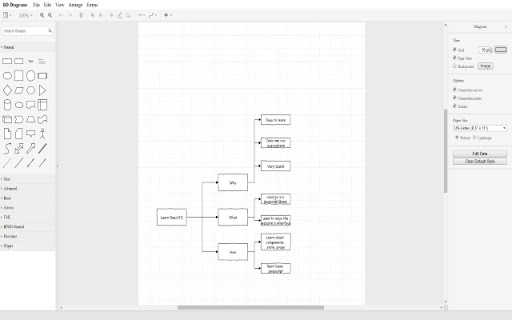
You can create your Mind Map diagrams Create your own mind map now using this free online mind map creator software. Our software allows you to organize your project/brainstorm for ideas and much more when you use a mindmap to clarify and write out your points. You can also save your mind map into Google Drive. - Create Mind maps for free - Save your mindmap into Google Drive

Mxmind-Free Mind Mapping&Mind Map Creator
Free Mind Mapping,Free Mind Map Creator,Free Mind Map Maker,Easy create your mind map,and cross platform availability Free mind map,Keep your idea by drawing MindMap quickly. 1️⃣ Import support xmind,markdown,freemind. 2️⃣Export support svg,png ,pdf, text, word 3️⃣Feature Task,Image,Link,Note,Boundary,Flag,Equation,Relationship,Tag,Serial Number, 4️⃣ ❤️❤️❤️Free❤️❤️❤️

Mindomo - AI Mind Map Maker
Capture links, text, and images in Mindomo. Let AI create mind maps for you. Develop diagrams with saved elements from web pages. Capture links, text snippets, and images to Mindomo and let AI create mind maps for you or enhance your existing mind maps using saved elements (images, text, or links) from web pages. Mindomo is an AI-powered mind mapping software that can turn text into mind maps. It's also a full-featured mindmap maker. You can create and edit diagrams from scratch or use templates, and you can personalize them using text snippets, images, or links you save using this Chrome extension. Pin Mindomo to access your diagrams directly from Chrome or create a new diagram instantly. Key Features: - Quick Save: Bookmark links, text, and images with one click. - AI-Powered Mind Mapping: Turn captured content into mind maps automatically. - Real-Time Syncing: Access your saved resources instantly across all devices. - Instant Diagram Access: Pin Mindomo for direct access to your mind maps from Chrome. - Create Stunning Maps: Use saved elements to build and enhance your mind maps with ease. - Stop losing valuable web pages and resources - capture them quickly and use them to create better ideas with Mindomo. Get started in seconds and transform your research and creativity with Mindomo AI Mind Map Maker.

MindTree: Mindmap for ChatGPT
MindTree: Turn your linear ChatGPT chats into visual mindmaps Version 1.2.2: Fix bugs caused by the html changes of ChatGPT page. ** New feature **: take notes📝 and add link🔗 to a topic MindTree transforms your back-and-forth ChatGPT chats into super cool mind maps. Think of it as turning a bunch of text messages into a picture that shows all your thoughts with connections. It’s perfect for folks who love seeing the big picture and hate getting lost in a sea of words. 🖼️ Whole Picture: Flips your chat into an awesome network of ideas. 🤔 Intuitive FAQs: Fast-track your understanding of any subject. 🔍 Dive Deep: One-click dive into any part of the mind map. 🔄 Draggable Editing: Quickly reorganize your mindmap. 📥 Export Image/Markdown: Download your mindmap as png or markdown. 📝 Notes & links: Notes and links connected to topic. # Why You’ll Love MindTree ⚡ Find Stuff Fast: No more scrolling through chats forever but spot in a flash. 💡 Boost Creativity: Your second brain that helps you connect the dots. 🎓 Learn Like a Boss: Visual maps make stuff stick in your brain better. 🧠 Universal Mindmaps: Always a mind map suitable for your scenario. # Empower Your Experience Using ChatGPT With MindTree, you can take the dynamic flow of your conversation and lay it out in a colorful mind map, making it easier to track your train of thought and see the connections between different ideas. Whether you're a student, professional, or lifelong learner, MindTree is your go-to for making sense of the chaos. 🚀🚀Ready? Let’s map your mind out! 🎉

MindPane
Turn any web page into a mind map with clean, distraction-free reading mode Welcome to MindPane, your ultimate tool for transforming the way you read and navigate web content. Designed as a Chrome extension, MindPane takes any web page you are reading and visualizes it as an interactive Mind Map. With this innovative approach, you can quickly grasp the main structure of a document, explore key topics, and jump between sections with ease. * Pleasantly read the document in a Mind Map * Ads are eliminated in the Mind Map * 16 Mind Map themes can be chosen * 8 Mind Map Layouts can be chosen * Export the Mind Map as a high quality PNG image In today's fast-paced digital world, skimming and comprehending web content efficiently is more important than ever. Traditional methods of reading through long articles or reports can be time-consuming and often lead to missed details. MindPane changes this by offering: - Instant Visualization: Get a clear and concise Mind Map of the web page content, so you can understand its structure at a glance. - Easy Navigation: Jump seamlessly between topics and sections without losing your place or focus. - Enhanced Retention: Visually organized content helps improve information retention and comprehension. - User-Friendly Interface: A clean and intuitive design that makes browsing content effortless and enjoyable. ## Who Is It For? MindPane is perfect for: - Researchers and Students: Quickly gather insights from academic articles or long papers. - Professionals: Speed up your workflow by navigating complex reports or documentation with ease. - Avid Readers: Enhance your reading experience with a better overview of articles and blogs. After installing this extension, pin the MindPane extension to the browser toolbar. According to the rules of the Extensions Store, extension can not work on the store pages and home page. Please open any other article pages (for example, https://en.wikipedia.org/wiki/OpenAI) after installing this extension and click the MindPane icon from the browser toolbar to check how the extension will work on it. Thanks for checking out MindPane - we'd really love to know your impression about this Chrome extension. Please don't hesitate to let us know your thoughts and suggestions! All notable changes to this extension will be documented in this section. ### Version 1.3.3 - Improved options page accessibility by opening it in a new tab instead of inline popup - Made host permissions optional for floating icon feature - Disabled floating icon by default for better privacy ### Version 1.3.2 - Implemented a new floating icon on each page - Implemented a new context menu item: "Show/Hide MindPane" - Added new options to toggle the floating icon and context menu item - Improved the styles of the welcome page - Miscellaneous bug fixes and improvements ### Version 1.3.1 - Improved compatibility to support a wider range of web pages - Enhanced app view and title bar styling - Improved parsing and display of article content for better readability - Refined article page styling for PDF export and printing - Added an Options page to configure user preferences ### Version 1.3.0 - Rewrote the Mind Map renderer to improve performance and reliability. - Added the ability to expand/collapse nodes in the Mind Map. - Made it more robust and consistent across different web pages. - Other bug fixes and improvements. ### Version 1.2.1 - Enhanced styling of preview content for better readability and presentation. - Resolved issues with jump links, ensuring smoother navigation and link accuracy. ### Version 1.2.0 - Enhanced the reliability of content parsing and display from web pages. - Resolved issues to ensure the preview and Mind Map reload each time the extension icon is clicked, capturing the latest content even after navigating to a different page. ### Version 1.1.0 - Added print support for preview content - Fixed bookmark links issue for some websites - Improved Mind Map text drawing algorithm ### Version 1.0.4 - Improved the design of interaction between extension and web page - Fixed code block display issue in the preview area ### Version 1.0.3 - Improved preview layout by not showing elements with empty text content ### Version 1.0.2 - Fixed issues of show Mind Map on Sentry documentation pages and Github gist ### Version 1.0.1 - Save user preferences of theme, layout, and splitter position - Added a Discord community link on the sidebar
