
eilpehpjibclcpdhkejgfaapnadlkanl
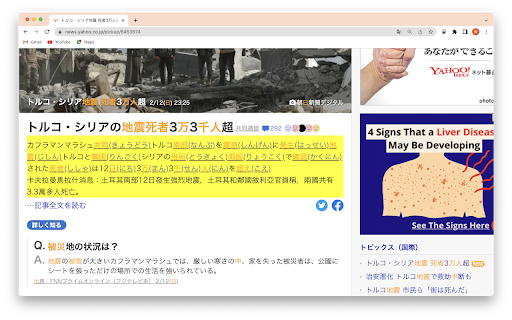
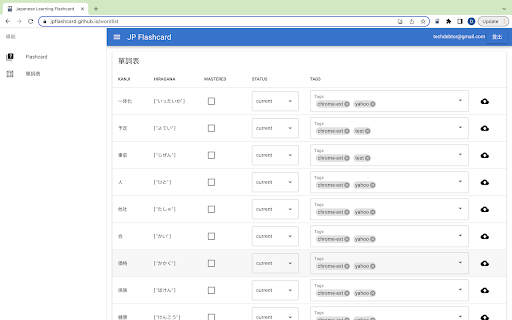
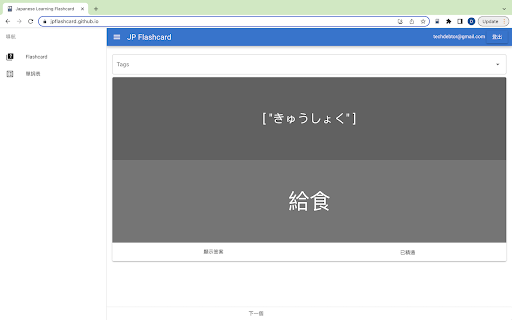
日文翻譯及假名轉換 Chrome extension,將文本轉換為平假名並使用JP Flashcard應用程序進行進一步學習從未如此簡單。立即開始使用它,將您的日語技能提升到一個新的水平!

autoTranslate - Translate web & PDF, Dictionary
🌐 AutoTranslate - Instant Translation for Web & PDF Translate full webpages, PDFs, and even your own writing into 248+ languages — automatically, instantly, and without intrusive permissions. Highlight and replace text, save phrases, listen with TTS, and learn with built-in dictionaries. 🚀 Key Highlights => 🌟 Why Choose AutoTranslate? ✪ No signup or permission required ✪ Don't ask permission: "Read and change all your data on all websites" ✪ Automatic translate full webpages when foreign language detect. ✪ Domain-wise auto translate. ✪ Translate while read and write . ✪ Translate and learn words in 248+ languages. ✪ Reverse translation ✪ Translate and replace text while writing in input field area ✪ Provides word meanings, pronunciation, synonyms, hypernyms, hyponyms, and more ✪ Persistent text highlighter with translated text in tooltip. ✪ Replace selected source text with translated text in tooltip ✪ Translate youtube subtitle ✪ Translate selected text in PDF file ✪ Unlimited number of whole PDF file translate ✪ Saved & history phrases ✪ View date-wise & domain-wise saved phrases in phrasebook ✪ Lightweight 35KB ✪ No tracking & no Ads. ✪ Dark mode ⌨ Keyboard shortcut: Press "Alt+P" to open extension's popup window Press "Alt+T" to open extension's popup card on any webpages Go to "chrome://extensions/shortcuts" to modify keyboard shortcuts Ctrl+Shift +Z ⇒ undo highlight Ctrl+Shift +Y ⇒ redo highlight Ctrl+ Shift + H ⇒ remove highlight Shift + Space ⇒ extend selection (At least one highlighted text exist on current page) 1. Go to extension options page to enable "Automatic translate full webpages". 2. Open extension's popup window and check the checkbox "auto translate this domain". 3. Right click on extension's icon and then click on "Translate this page" 🔐 Don't ask permission: "Read and change all your data on all websites" Due to privacy concern, autoTranslate don't ask this permission. So that autoTranslate and translation button on text selected disabled by default. 🔮 Translate while read and write Translate while reading You won’t have to skip emails, articles, or websites anymore. You can view the content you’re browsing in Chrome in your chosen language, in its original context. Translated text is editable. Edit translated text and click on swap language icon to reverse translation. You can highlight text. When you re-visit this webpage, you will see highlighted text with translated text in tooltip. You can replace source text with translated text. When you hover over replaced text, source text will show in tooltip. Translate your writing Whether you’re writing a social media post, chat message, or email, you can translate your own words immediately after you type them. This means you no longer have to copy, paste, retype, or leave Chrome to communicate in another language. Click on replace icon in translation popup to replace source text with translated text. ✅ Text-to-Speech autoTranslate reads and reproduces words, phrases and entire texts using quality human text-to-speech (TTS) translation. It shows transcription and transliteration, also knows how to reproduce words or texts with the correct accent and with correct stress. Learn the correct pronunciation words right away, without postponing it for later! ✅ Dictionary When you select one word, autoTranslate show meaning, pronunciation, synonyms, hypernyms, hyponyms,definition in these categories: Noun,verbmadjective 🖍 Highlight & replace text autoTranslate allow to highlight & replace selected text. When you hover over highlighted text, translated text will show in tooltip. When you hover over replaced text, source text will show in tooltip. 📒 Saved & history phrases All translation history is stored in your browser's local storage. Saved or history phrases never touch our cloud server. Export your saved phrases in HTML format. ⇒ **No invasive permissions** - doesn't request "read all data" access ⇒ **Zero tracking** - your translations stay on your device ⇒ **Ad-free experience** - focus on translation without distractions ⇒ **Dark mode support** - easy on your eyes ⇒ **Lightweight design** - minimal impact on browser performance 💡 Perfect For ⇒ **Students** learning foreign languages ⇒ **Professionals** working with international clients ⇒ **Travelers** browsing foreign websites ⇒ **Researchers** reading academic papers in other languages ⇒ **Anyone** who encounters multilingual content online Supports 248+ languages with Google Translate integration, including: ⇒ Major world languages (English, Spanish, French, German, Chinese, Japanese, etc.) ⇒ Regional dialects and variants ⇒ Less common languages for comprehensive coverage Start breaking language barriers today - install AutoTranslate and make the web truly multilingual!

FlashSpanish - Spanish Translator
Learn Spanish vocabulary while reading online. Hover for instant translation and export to Anki for spaced repetition. Learn Spanish vocabulary while reading online. Hover over any Spanish word for instant translation and automatically save words to Anki for spaced repetition. FlashSpanish is the easiest way to improve Spanish reading comprehension without constantly switching tabs to Google Translate. ✨ HOW IT WORKS 1. Hover over any Spanish word while reading 2. See instant English translation in a popup 3. Click to save words to your personal dictionary 4. Export your vocabulary to Anki for spaced repetition practice 📚 PERFECT FOR - Spanish students (high school, college, self-taught) - Anyone reading Spanish news, articles, or social media - Language learners who want to stop tab-switching - Anki users looking for effortless vocabulary collection 🚀 KEY FEATURES - Instant hover translations - no interrupting your reading flow - Works on any website (news, Reddit, Twitter, articles) - 50,000+ word Spanish-English dictionary - Automatic conjugation and verb form handling - One-click Anki export (.txt tab-separated format) - Completely free, no ads, no account required 🔒 PRIVACY FIRST All data stored locally on your device. No tracking, no data collection, no account needed. Your vocabulary stays completely private. 💡 PRO TIPS - Try it on BBC Mundo, El País, or Spanish Reddit - Save words as you encounter them naturally - Export to Anki weekly for spaced repetition review - Perfect alongside Duolingo, Babbel, or immersion learning 🎓 WHY FLASHSPANISH? Traditional approach: Read Spanish → see unknown word → open Google Translate → type word → translate → close tab → forget what you translated → repeat 20+ times per article. FlashSpanish approach: Hover → instant translation → keep reading → remember the word. Built by a Spanish learner frustrated with tab-switching, for Spanish learners who want to actually enjoy reading in Spanish. Questions or feedback? We'd love to hear from you!

Anki Dictionary
Look up words instantly and save them as Anki flashcards, 100x faster than manual entry. Any language, auto-detected. Anki Dictionary is the fastest way to capture, learn, and remember vocabulary in any language while browsing the web. Look up words in seconds, get context-aware definitions, and export beautiful flashcards to Anki for long-term retention. 🔥 Now with Multi-Language Support powered by Wordwise! Learn Spanish, German, French, Italian, Russian, Hungarian, and more - all with the same seamless experience you love. ⚡ Instant Lookup: Double-click any word for instant definitions. 🌍 Multi-Language: Auto detects language from context, get clear, structured definitions in your target language. 📥 One-Click Anki Export: Generate beautifully designed flashcards optimized for Anki. No manual formatting needed. Context sentence auto-captured. 📖 Context-Aware: Definitions adapt to the sentence context, so you learn the right meaning. Double-click any word to see definitions instantly (additional trigger key can be configured in settings) Export to Anki with one click That's it! Enjoy your learning in Anki. No account required for English lookups; Multi-language support available with Wordwise (7-day free trial included) ✅ Install now and start learning without breaking your reading flow. 🛠️ Setup: Connect to Anki (Required for Export) To export flashcards directly to Anki, you need the AnkiConnect plugin: Step 1: Open Anki on your computer Step 2: Go to Tools → Add-ons → Get Add-ons Step 3: Enter this code: 2055492159 Step 4: Click OK and restart Anki Step 5: ⚠️ Important: Refresh any open browser tabs after installing AnkiConnect That's it! Your flashcards will now sync directly to Anki. --------------------------------------------------- Change log v.2.2.0 Improved context selection in lyrics sites etc. Audio on Wikipedia. v2.1.18 Smart head word v2.1.16 Bug fix v2.1.15 Since last export in lookup history page. Option to trigger auto-sync to AnkiWeb after export. Bug fix. v2.1.13 bug fix v2.1.12 Dark / auto mode; improved onboarding; bug fix v2.1.8 Show word on top of context (optional but default) v2.1.7 Bulk export via txt v2.1.6 Bug fix v2.1.5 Local look-up history management and batch export is now available! v2.1.2 Improved performance v2.1.1 Fix audio on AnkiDroid and card size on AnkiMobile v2.0.10 & v2.0.11 Improved export hints & banner v2.0.9 Allow showing pronunciation on card front v2.0.8 Getting started & clarify free usage v2.0.5 Improved sign up display v2.0.4 Minor bug fixes v2.0.1 Brand new design with multi-language support by Wordwise v1.0.18 Add a feedback form v1.0.17 Fix audio play button style on certain pages. v1.0.16 Better scrollbar for pop up window. v1.0.15 Do not redirect to onboarding page from manage page. Fix onboarding description for Mac. v1.0.14 Fix the bug that selected words count is not updated in the manage page. v1.0.13 Add an onboarding page to guide new users, and a congratulations page after looking up 50 words. v1.0.12 Add row to sort by words or added time. v1.0.11 Add a clear all saved words button in options page. v1.0.10 Add a search box to filter all words in manage page. v1.0.9 Support Option or ⌥ key for Mac v1.0.8 Optimize export file v1.0.7 Update AnkiDict template url v1.0.6 Add a warning line when not using AnkiDict template v1.0.5 Minor fix to always show export hint v1.0.4 Use AnkiDict card template for a better card appearance. v1.0.3 Make clear when no definition is found v1.0.2 Fix bug of looking up from right click menu v1.0.1 Change from double click to Ctrl + double click to avoid conflicts with select and copy etc.

Simplified to Traditional Chinese converter
As one simplified character can have multiple traditional equivalences, sometimes the conversion will produce the incorrect traditional character. (For more information, read: https://en.wikipedia.org/wiki/Ambiguities_in_Chinese_character_simplification)
