
eieengmkmmkinnkgdickldmloecjdahl


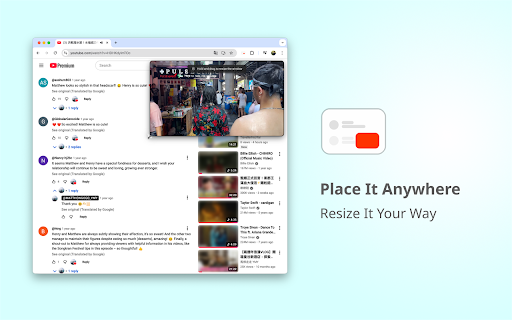
A smart floating mini player for YouTube that automatically shows while you scroll and hides at the top. Automatically enters Picture-in-Picture (PiP) when switching tabs — just like the Arc browser experience — with subtitle support. After installing, open any YouTube video page. When you scroll down and the original video is no longer visible, a floating mini player will automatically appear on the page. Unlike Picture-in-Picture, this player stays within the YouTube page, letting you watch the video while reading comments or browsing related content — no need to scroll back up. You can drag, resize, and control playback just like the native player. YouTube CC subtitles are fully supported, including styled captions (where available), so you never miss a detail. 💡 Note: - This extension only works on YouTube video pages. - To display subtitles in PiP, make sure to enable them first by clicking the YouTube CC button. Shortcut: C - Automatic Picture-in-Picture requires Chrome 134 or later, but the floating in-page player that appears when scrolling works on all mainstream versions. - After installing or updating, if you already have a YouTube video page open, please refresh it once to ensure the floating player activates properly. --- YouTube is a video sharing platform owned by Google LLC. This extension is an independent project and is not affiliated with, endorsed by, or in any way officially connected to YouTube or Google LLC. This extension has been granted official YouTube brand authorisation to use interface elements in screenshots and promotional videos. The following promotional materials are from creators and have been used with their permission: @MATTHEWGOGO_YMY – https://www.youtube.com/watch?v=HDHKdylmTOc https://www.youtube.com/watch?v=e-XDu4NaSNw

YouTube Speed Controller
Control and save YouTube video playback speed across videos A Chrome extension that enhances your YouTube viewing experience by providing advanced playback speed controls. This extension allows you to easily adjust and save video playback speeds across different YouTube videos.

Youtube plus (floating player, screenshot, cinema mode)
Enhanced Youtube experience! Picture in picture (floating player), screenshots, improved volume management and cinema mode! 🛠️ Main Features: 🎥 Floating Player (Picture-in-Picture Mode) – Watch YouTube videos while multitasking! 📸 Screenshot Capture – Save and share moments from your favorite videos. 🔊 Improved Volume Slider – Fixes YouTube’s overly sensitive volume control (no more “too loud, too fast”) 🎬 Enhanced Theater Mode – A bigger, more immersive cinema experience 💡 All features are accessible via sleek red buttons directly inside the YouTube player for instant access. 🎥 Watch YouTube While Multitasking! Tired of being stuck on the YouTube tab just to watch a video? Now you don’t have to. With Picture-in-Picture (PiP) mode, pop videos out of the browser and keep them always on top while working, browsing, or using other apps. Just click the floating player button seamlessly integrated into YouTube’s controls—no extra steps required. Perfect for tutorials, entertainment, or staying productive while watching content in parallel. 📸 Capture Screenshots Instantly! Need to save a specific frame, share a moment with friends, or use an image for work or study? Capture high-quality screenshots in one click, directly from the YouTube player. 🔊 Improved Volume Control YouTube’s default volume slider can be frustrating—too loud, too fast. This feature smooths out volume adjustments, giving you finer control and a more comfortable listening experience. 🎬 Theater Mode, But Bigger & Better! YouTube’s theater mode is good, but it could be better. This extension enhances it with a larger, more immersive layout, maximizing screen space for a true cinema-like experience. Version 1.5 (01/10/2026) - Added improved YouTube volume slider for smoother and more precise volume control - Prevents volume from becoming too loud too quickly Version 1.4 (10/20/2025) - Improved style handling and optimization. - Fixed CSS issues caused by the latest YouTube design update. Version 1.2 (09/27/2024) - Added Improved Theater Mode for an enhanced fullscreen experience. - Code optimizations for faster performance & smoother button integration. Version 1.0 (09/08/2024) - Initial release with Picture-in-Picture mode. 🚀 Get the extension now and upgrade your YouTube experience!

Improved YouTube Miniplayer
A browser extension that allows you to have a floating mini player that allows you to watch youtube videos in a resizable window… A browser extension that allows you to have a floating mini player that allows you to watch youtube videos in a resizable window while in any website. Features Floating Mini Player: Continue watching videos in a small overlay window while browsing other websites In-tab player: Watch Videos embedded into the current tab Customizable Size: Resize the mini player to your preferred dimensions Position Control: Drag and position the player anywhere on your screen Minimal UI: Clean interface that doesn't get in the way of your viewing Usage 1. Click on the extension 2. Enter a YouTube video link into the input 3. Click either create miniplayer (will create in-tab miniplayer) or create window (creates a new window with the embedded video) 4. The miniplayer will appear in the bottom right of the page 5. To move it click on the hamburger icon and freely move it around 6. To close it click the X button on the top right of the miniplayer

YouTube Floating Player
Watch YouTube videos in a floating picture-in-picture window while you work, browse, or study. This extension adds additional PiP control button to YouTube video controls. It allows you to open movable, resizable window floating window on top of the other windows. Why install this extension: 💻 Keep watching videos while using other tabs ✅ Multitask without pausing playback 🏆 Clean, lightweight, and easy to use ⚙️ Works directly on YouTube with no setup The floating player is really great for things like tutorials and podcasts and meetings and videos that play in the background. You can just click the picture-in-picture button and keep watching the floating player without anything getting in the way.
