
eibnkkenjjeaadmjkngfincfnapgpeao
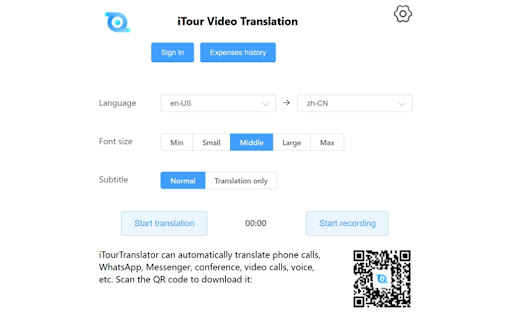
This extension translates video's audio on the current tab to your own language The extension can be used to translate online meetings (such as Zoom , Microsoft Teams, Google Meet,Webex, Canvas, etc.), online videos into two languages subtitle. If you set the sound source to the microphone in the extension, you can translate the video into subtitles being played in the computer in real time, and you can also translate the sound outside the computer in real time. Many international students use this software to translate Zoom online courses. There are also many international students who use this software to translate lectures taught by professors in the classroom in real time. The software automatically translates voices and takes notes for students. It supports dozens of languages, and the translation is fast and accurate. The software can be tried for free.

TranslateTube: YouTube Video Translator
Real-time AI voice dubbing for YouTube videos, no subtitles needed Language barriers shouldn't stop you from enjoying YouTube. Our extension translates videos in real-time using advanced AI, offering both voice dubbing and text translation. • Translates YouTube videos to English and 50+ other languages • Works even with videos without subtitles (no CC required) • Provides AI-generated voice dubbing so you can listen instead of read • Automatically creates transcripts while watching • Translates live streams in real-time as they happen 🔧 How to Use This Extension: 1. Install the extension 2. Open any YouTube video or live stream 3. Select your preferred language 4. Choose translation mode: Voice dubbing or subtitles 5. Click "Start" - translation begins immediately 1. YouTube Video Translator - Convert any video to your language 2. Auto-Translate - Works automatically with one click 3. AI-Powered - Uses advanced neural networks for accurate results 4. Transcript Generator - Creates text transcripts while you watch 5. No Subtitles Required - Translates videos without existing captions • Need to understand videos in other languages? → Get instant translation with voice or text output • Watching content without subtitles? → Our AI generates captions and translates them automatically • Following live international events? → Real-time translation for streams and broadcasts 🎓 Perfect For: • Students watching educational content in foreign languages • Professionals following international industry updates • Travelers preparing for trips with local videos • Anyone enjoying global entertainment without language limits • Supports 50+ languages including English, Spanish, French, German, Russian • Requires internet connection for AI processing • Privacy-focused: no personal data stored • Free basic plan with premium options available ⚠️ Important Note: This extension provides AI-generated translations, not professional human translation. Accuracy may vary with audio quality and specialized terminology.

Audio to Text Converter
Audio to text converter is designed to effortlessly transcribe audio to text. Convert audio to text with the latest ai transcription Why Choose the Audio to Text Converter? Audio to Text Converter makes it simple to transcribe: whether you need to record a lecture, summarize a meeting, or just convert audio to text. Its AI-driven algorithms handle a variety of accents, speech patterns, and even background noise, ensuring that tasks like voice to text and audio to text transcription are effortless and precise. User-Friendly: Quickly install the extension and start converting audio to text without any hassle. High Accuracy: Advanced AI ensures converted audio or speech are precise and accurate. Time-Saving: Transcribe automatically to focus on more important tasks. ⭐ Supports multiple audio formats, including MP3, WAV, and others. ⭐ Compatible with popular video platforms like YouTube to convert audio speech to video text. ⭐ Offers multilingual ai transcription for wide voice to text opportunities. ⭐ Transcribes not only previously recorded audio, but also real-time events including speech to text. ⭐ Provides export options of audio transcription by copying to clipboard or downloading as txt. This versatile tool is more than just an app to transcribe audio to text. It boosts productivity, making it an ideal choice for anyone needing an audio convert to text tool. ✔ Real-Time Transcription: Perfect for capturing live events or webinars instantly. ✔ Multilingual Support: Break language barriers with seamless audio to text conversion in multiple languages. ✔ Flexible Export Options: Save your transcribed audio, video or speech in the format that works best for you. ✔ And many more: With audio file to text converter. This tool is designed for a wide range of users: Students: Simplify note-taking with voice to text technology. Journalists: Accurately transcribe interviews. Content Creators: Convert recorded speech to text and scripts. Professionals: Document meetings efficiently via transcript generator. Anyone: Looking for fast and reliable audio to text transcription. 1️⃣ Simple Interface: No technical expertise required. 2️⃣ Regular Updates: Continuous improvements to stay ahead of user needs. 3️⃣ Dedicated Support: Quick and helpful responses to any queries. 4️⃣ Privacy-Focused: Ensures secure and confidential handling of user data. This tool is perfect for drafting papers, creating subtitles, or summarizing long-form content like podcasts. Its reliable transcript generator guarantees professional results tailored to your specific needs. ❶ Convert audio file to text for personal, academic, or professional projects. ❷ Transcribe live or recorded speech to text. ❸ Convert MP3 audio file to text for easy editing. ❹ Use it as an audio recording to text converter for on-the-spot transcription. ❺ Generate subtitles using its video to text converter feature. Download the audio to text converter extension from the Chrome Web Store. Upload an audio or video file or start a live transcription. Edit the text output as needed. Save or Export the final version in your preferred format. Why It’s the Perfect Fit The Audio to Text Converter google extension excels at handling complex scenarios, such as noisy environments, overlapping speech, and technical jargon. Whether you’re working on class notes, turning podcasts into articles, or documenting brainstorming sessions, this service simplifies your workflow. It even converts MP3 to text smoothly, adapting to diverse needs. By using the audio to text converter app, you can: 1. Save time and focus on what truly matters. 2. Enhance productivity with minimal effort. 3. Get professional-quality results with ease. The last but not the least Embrace the future of transcription with our audio to text converter google extension. From converting audio files to text to generating transcripts from video content, this tool is designed to meet diverse needs. Whether you're looking to transcribe audio recordings to text or convert mp3 audio files to text, our audio converter to text ensures accuracy and efficiency. Every word matters, and this audio to text converter ensures you never miss a detail. Experience the future of transcription today with the audio to text converter ai transcription app.

Post Translator for TWITTER X.COM
This is a convenient tool for instant translation of tweets from the X.COM website into your native language The "Tweet Translator for X (Twitter)" extension is a convenient tool for anyone who wants to easily and quickly translate tweets, comments, and other text on the X (formerly Twitter) platform. No matter what language a post is written in, this extension allows you to instantly translate it into your preferred language, making content accessible and easy to understand. Instant Translation: Translate tweets, comments, and profile descriptions with a single click. Support for Multiple Languages: The extension supports over 100 languages, including Russian, English, Spanish, Chinese, Arabic, and many more. Automatic Language Detection: The extension automatically recognizes the original language and translates the text into your chosen language. User-Friendly Interface: Translations appear directly below the original text without disrupting the page layout. Customizable Translation Language: You can select your preferred target language in the extension's settings. 💢 Who is this extension for: For users who want to read tweets in foreign languages. For those who follow international news, bloggers, and celebrities. For researchers and analysts studying content from different countries. For everyone who wants to broaden their horizons and understand more. 🔥 Download the "Tweet Translator for X (Twitter)" now and make your social media experience even more comfortable and informative! 🌐✨

Speech to Text
Convert speech to text instantly with this voice dictation extension. Transcribe audio,voice memos files to text with high accuracy 🎙️ Turn Your Voice into Text Instantly with the Speech to Text Chrome Extension 🧾🖱️ Need to transcribe audio to text quickly and accurately? This powerful speech to text Chrome extension is your ultimate tool for effortless voice to text conversion, voice typing, and dictation. Whether it's a quick voice memo, a podcast, or a meeting — we've got you covered 🔥 🚀 Key Benefits of Our Speech to Text Tool 1️⃣ Fast and accurate voice to text transcription 2️⃣ Real-time speech recognition with just one click 3️⃣ Upload audio files for instant audio to text conversion 4️⃣ Full integration with google docs voice typing 5️⃣ Lightweight, fast, and secure — no sign-up needed 🔐 Use your voice to write faster, smarter, and without distractions 🎯 🎧 How It Works – Simple & Efficient ➤ Click the mic icon to start speaking 🎙️ ➤ Watch your words turn into text in real-time 📝 ➤ Upload an audio file to text converter for longer recordings ➤ Copy, export, or edit your content on the spot ➤ Use voice typing in Google Docs like a pro 💼 It’s that simple. No clutter, no confusion — just powerful speech to text software 💪 💡 Use Cases That Make Life Easier • Take hands-free notes with speech to text • Record interviews and transcribe audio recording to text • Create blogs, emails, or books using only your voice 🧠 • Use as a dictation app while multitasking • Turn audio into text for reports, captions, and study notes Whether you’re a student, a journalist, or a busy entrepreneur, this tool saves hours every week ⏳ 🌐 Supported File Formats for Upload You can easily upload and transcribe speech to text using: The audio to text converter processes your files with incredible accuracy using automatic speech recognition 🤖 🗣️ Multiple Languages & Accents Speak your native language with confidence! This speech to text tool supports: ▸ English 🇺🇸 ▸ Spanish 🇪🇸 ▸ French 🇫🇷 ▸ German 🇩🇪 ▸ Portuguese 🇧🇷 ▸ Italian 🇮🇹 ▸ And more 🌍 Perfect for multilingual teams, global meetings, and international content creators 🌐 📓 Compatible With Google Docs and More Unlock the power of google docs voice typing with a single click 🖱️ Just open a doc, activate the mic, and enjoy smooth voice typing ✍️ Great for writing essays, reports, or planning your next big project 📑 📱 Who Is This Extension For? 1️⃣ Content creators needing fast transcribe audio to text 2️⃣ Students who want to transcribe audio to text from lectures 📚 3️⃣ Professionals using dictation software during work 💼 4️⃣ Podcasters and YouTubers who need quick captions 🎙️ 5️⃣ Anyone who wants to save time and boost productivity 🧠 🛠️ Tools All in One: Record, Dictate, Transcribe This isn’t just a voice to text app — it's a complete transcription app: Record with your mic 🎤 Use it as a voice recorder with transcription Store your drafts safely Copy and paste anywhere 📋 🔒 Private, Secure, Reliable We care about your privacy. All data and voice transcription are handled locally or through encrypted channels 🔐 No data is stored or shared — your content stays yours 🛡️ 💼 Perfect for Business, Study, and Everyday Life Whether you’re creating a to-do list, responding to emails, or writing chapters of a book — voice to text software gives you full control, faster than typing ⌨️ ➤ Draft ideas with transcribe audio to text ➤ Create transcripts for meetings ➤ Generate searchable content from audio files to text ⚙️ Why You’ll Love This Extension ✅ 100% Free ✅ Easy to use ✅ High-accuracy speech recognition voice ✅ Full support for audio to text converter needs ✅ Ideal for dictation, transcription, and note-taking ✅ Functions as a reliable text to speech converter if needed 🔥 Start Using Voice to Text Now Don't let your ideas fade — capture them instantly using your voice 🔥 Install our speech to text today and turn your microphone into a productivity superpower ⚡ 📌 Speak. Convert. Save. Repeat. 📌 Your go-to tool for audio into text, anywhere, anytime 📌 Join thousands of users loving this smart voice to text app 🎯 Ready to boost your productivity and eliminate typing fatigue? Install the ultimate speech to text software now and take control of your time ⏱️
