
eianjmfecdppblkehkjojenjbmgianih
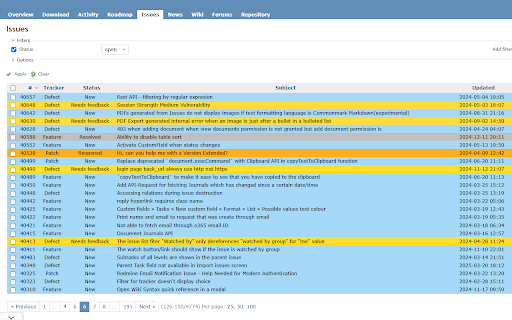

A Chrome extension that lets you customize background and text colors based on Redmine ticket statuses. Customize the background and text colors based on issue statuses in the Redmine Issue tab. When many tickets are shown, this extension improves readability and visual clarity at a glance. You can also restrict it to specific URLs, and toggle the overdue status highlight ON or OFF. How to Use 1. After installing the extension, click the Extensions icon at the top right corner of Chrome. 2. From the list of extensions, select Redmine Styler. 3. Set the URL, overdue status, and colors for each issue status, then click Save Settings.

Redmine Preview Enhanced
You will be able to edit redmine with the preview. Tools to help you edit your redmine wiki and tickets. The left half of the screen can be used for editing and the right half for previewing, making it easier to write textiles and markdown.

Redmine Magic
Enhance your Redmine! Enhance your Redmine! - Moving the layout of the task page (Issue). - Photos and videos in a modal window without opening a new tab. - Additional menu items in the header.

Redmine task field alert
An alert extension for Redmine tasks This extension adds an alerting feature to the open source "Redmine" (https://www.redmine.org/) project management web application. Select a drop down field and an expected value - you'll be notified when the criteria is triggered according to your personal settings.

Redmine Tools
Visual hacks and toys for better redmine experience Extension de chrome para habilitar nuevas opciones en el redmine. Mejoras de interfaz y otros hacks en la visualización que permite mejorar la productividad.
