
eiaekjobfimlijhpggbbkhoihlchdhdl
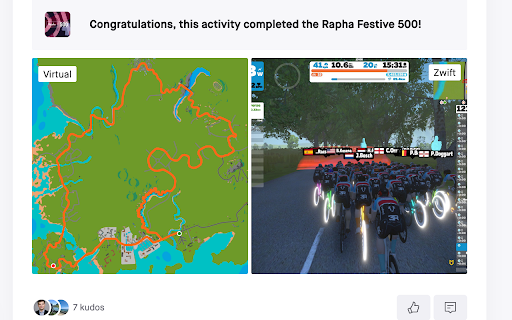


Replace real-world maps with Zwift maps when visiting Strava This extension replaces real-world maps with Zwift maps when visiting strava.com The following maps are currently supported: - Activity - Dashboard feed - Club feed - Profile feed - Segment Maps in your activity feed and on an athlete's profile are only replaced if the activity description contains a link to zwiftmap.com. You can automatically add a ZwiftMap link to all your upcoming Zwift activities by following these steps: - Visit zwiftmap.com - Connect your Strava account via Menu -> "Connect with Strava" - Enable automatic adding of ZwiftMap links via Menu -> Settings The extension is 100% open source. Check it out on GitHub: http://github.com/andipaetzold/zwiftmap Images in the activity feed and on athlete profiles are stored and fetched from Google Cloud Storage. This extension is not affiliated with Zwift.

Elevate for Strava
Elevate your strava experience and goals! Track your fitness and progressions over time. Analyse deeper your activities. And more... Elevate extension is adding features that riders and runners would like to see in Strava web app. If theses features could be added by default in Strava... It could be cool ! Consider getting Strava Premium. There are a ton of features that you will love. Remember, this extension has for ambition to enhance the experience of all users (Free and Premium) and tends to keep users loyal in Strava. - Fitness Trend: All sports, ready for triathletes. - Estimated Fitness Trend: No sensors? If you have at least your phone, you can access the feature - Year progressions: track your progress day by day. - Enhanced activity stats: "Time in zones" graph for all your sensors; Stress scores (heart rate, power, running, swimming); Advanced speed, pace, cadence, power, stats... - Activity best splits - "Google Map" support through strava web app - and a lot more...

TrainingPeaks Virtual Map Overlay
View your TrainingPeaks Virtual activities with satellite imagery! This extension automatically overlays an image of the TrainingPeaks Virtual world onto your activity maps when viewing activities in the virtual world coordinates. Features: - Works with most map pages on TrainingPeaks, Strava, VeloViewer, and Intervals.icu - Adds virtual satellite imagery to your activities - No configuration needed Perfect for: - Visualizing your TrainingPeaks Virtual world routes - Matching activities to the virtual terrain - Sharing screenshots that show the TrainingPeaks Virtual landscape Note: This extension only affects maps displaying activities within the TrainingPeaks Virtual world coordinates (-1.37°S to -1.49°S, 149.57°E to 149.69°E). For thsoe who are wondering, that's Mussau Island, in Papua New Guinea. Not affiliated with TrainingPeaks, Strava, VeloViewer, or Intervals.icu. 2024.11.2 -- Initial release 2024.11.5 -- Updated image (more surrounding ocean); improved geolocation 2024.11.16 -- Updated image (added banners, doubled resolution); split google.maps and Leaflet logic apart 2024.11.18 -- Improved load times, so we are less likely to miss map initialization 2024.11.19 -- Improved support for Strava segment pages, including segment creation 2024.11.28 -- Added support for Xertonline and Garmin Connect 2025.4.4 -- Updated image to include new roads; dropped added banners 2025.8.2 -- Updated image to include Georgetown 2025.9.14 -- Updated image to improve the appearance of the ocean (from TPV v0.4.27)

Strava Ranks
Quality of life features for Strava. Sort segments table. Show personal rank, total attempts and a lot more. Upgrade your Strava experience with this great plugin! Features: * You can now sort the table containing your segments, just click on the relevant table header * On each segment you can see your personal rank, the total amount of attempts, and the percentile of your best attempt * You can see all attempts you made on a segment * The analyse button on the activity page now works * The analysis button on a running segment takes you to the analysis page with the segment selected * The analyse button on a bike segment now brings you to the analysis page with the segment selected For more features, consider a Strava Subscription. https://www.strava.com/subscribe

VeloViewer Strava Plugin
Additions to Strava website to provide helpful links and features for VeloViewer. Add direct links from within Strava to VeloViewer along with other, VeloViewer specific additions. - Top level VeloViewer menu providing direct links to your key pages on VeloViewer. - Direct links to VeloViewer segment details page throughout the Strava site. - Direct links to Activities. - Direct links to Routes. - Direct links to Club yearly leaderboards. - VeloViewer Explorer tiles highlighted in Strava Route Builder including completed tiles, max square(s) and max cluster. - Chronological ordering on your dashboard feeds. 1.49 - Map Switcher bug fixed. 1.48 - Update to handle new Strava Route Builder map. Explorer Tile overlay will no longer work in 3D map mode so logic introduced to switch to 2D when Tile shown. 1.47 - Bug fix to handle update to Strava. 1.46 - Bug fix to last version. 1.45 - Technical update to change the way JS file is loaded. 1.44 - Bug fix to show newly ticked tiles for planned route in updated Strava Route Builder. 1.43 - Update to handle new Strava Route Builder changes for showing Explorer Tiles. 1.42 - Some minor bug fixes to handle some rare exceptions. 1.41 - Change in default Chrome security settings has blocked the way to automatically get your ticked Explorer Tiles from VeloViewer. Functionality added to allow you to copy a user-specific code from VeloViewer Summary page which can be pasted into the Strava Route Builder page which allows a secure connection to get your ticked tile data. 1.40 - Explorer error message wasn't being displayed on Route Builder page if not logged in. Also tidied up code that generates Explorer tile option. 1.39 - Another fix to route builder page to handle slight change in Strava's HTML structure. 1.38 - Fix to route builder page to handle slight change in Strava's HTML structure. 1.37 - Previous fix failed when Strava site viewed in language other than English. Hopefully now fixed for other languages too. 1.36 - Fix on Route Builder to when incorrect text showing on Explorer tile toggle. Also tweak to the main menu layout. 1.34/1.35 - Fix to handle change in React code on Route Builder. 1.33 - Changes to support FireFox. 1.31 - Update to Route Builder Explorer Tiles to handle no structure of menus. Link to VeloViewer corrected on the Segment Details page. 1.30 - A small change to the Route Builder Explorer tiles overlay to work more smoothly with other map-switcher extensions. 1.29 - Hopefully the final bug fix around tiles being shown as newly ticked tiles when already ticked! 1.28 - Another bug fix around tiles being shown as newly ticked tiles when already ticked. 1.27 - Explorer tile lines added to map (only shown when map zoom > 10). Bug fixed around false newly ticked tiles being shown. 1.26 - Tweaks to Route Builder code to handle expected className changes when Strava rolls out updates. Ticking of previously missed new tiles between route points included. Slight difference in opacity of clustered tiles that aren't part of max cluster. 1.25 - Rework for Explorer Tiles to work with new Strava Route Builder. New tiles ticked by route now highlighted. Configure tile colours in map settings on Activities page in VeloViewer. I'll try and get Personal Heatmaps showing again next. 1.24 - Turns out it is nothing to do with "SameSite" mode. Explorer tiles not loading due to "Block third-party cookies" setting being enabled. Added code to catch the situation and redirect to blog post with instructions to add "veloviewer.com" to "Allowed" list on chrome://settings/content/cookies 1.23 - Hopefully fixing an issue for users with "SameSite" mode enabled on Chrome for showing completed Explorer tiles in Route Builder. 1.22 - Moved the text (informing the user to log into VeloViewer in order to see their Explorer tiles in the Route Builder) to the top of the menu to hopefully make it more obvious. 1.21 - Completed explorer tile info now retrieved in a more secure way. Also a slight UI change to stop menus wrapping on a smaller screen. 1.20 - A strange issue with Chrome caching the Explorer Tiles file with the origin set to VeloViewer or Strava resulting in it not being able to be loaded in the other site. Worked around the issue in the extension to get the data in a different way. 1.19 - Update to unexplored tile KML download to fix bug caused by new version of Chrome. 1.18 - VeloViewer link from Activity Details updated to work with new Strava page structure. 1.17 - Personal Heatmaps option added to Route Builder. Works with Ride and Run All-Time heatmaps (Summit users only). 1.16 - Athlete Id added to Activities links to enable the deep link to Activity Details to work post GDPR. 1.15 - Club yearly leaderboard links added. 1.14 - Changed the "Chronological" button to now offer two options, either by sort by activity start date/time or by activity upload date/time. Activity end time isn't easily doable I'm afraid. 1.13 - "Chronological" button added to Dashboard to allow the sorting of activities by start date/time. 1.12 - Correction to KML export: colour changed to aabbggrr (eh?!) 1.11 - KML download for unvisited tiles for current area in the Route editor. 1.10 - Explorer Clump added to Route Builder. Custom colours for Explorer tiles brought in from configuration on user's Activities List page in VeloViewer. 1.9 - Minor tweak to test something out. No new functionality though. 1.8 - Fixed (hopefully) a browser zoom issue that wasn't quite fixed in 1.7. 1.7 - Update to handle browser zoom with explorer tiles. Also remembers whether explorer option was on or off between sessions. 1.6 - Explorer tile logic updated to handle Leaflet map (which looks to be replacing the Google Map on the Route Builder); Explorer tile borders/background set to white when using satellite view for better contrast. 1.5 - Large performance improvement on initial load of route builder if you have a lot of explorer tiles ticked off. 1.4 - Max explorer square(s) now shown. All links to VeloViewer are now https. 1.3 - Route builder now shows explorer tiles at all most zoom levels and on all map types. Completed tiles are now shaded 1.2 - Explorer tile outlines now work on retina displays 1.1 - Tweaked to work alongside Stravaistix 1.0 - Initial version
