
ehnbjlfidmnjogmiedhcfnnbinidjcba


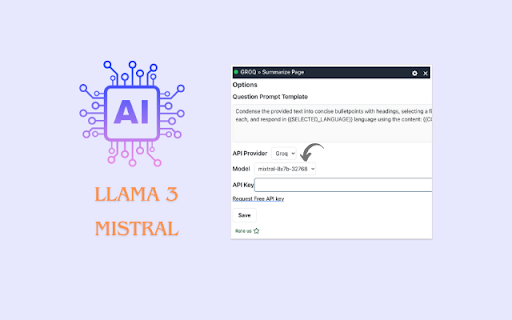
Quickly summarize any article with GROQ at lightening speed. Your chatGPT alternative with better quality and speed. Groq Text Summarizer: Your GPT alternative for Instant Web Page Summaries and Q&A 📌 Overview: Groq Summarizer is an innovative Chrome extension designed to revolutionize the way you interact with online content. With the power to condense information across the web into digestible summaries using AI, this tool is your perfect companion for research, studying, or simply satisfying your curiosity. Experience the future of web browsing, now available in multiple languages. 📌 Getting Started: Add Groq Summarizer to Chrome. Navigate to any web page and click the Groq Summarizer icon in your browser toolbar. Summarize and discover the key points of the page with AI in seconds. 📌 Key Features: 💪Instant Summarization: Transform any web page into a concise summary with just a click. Whether it's a lengthy article or a detailed report, Groq Summarizer captures the essence in seconds. 💪Multilingual Support: Break language barriers. Our technology understands and summarizes content in multiple languages, making information more accessible to everyone. 💪Custom API Key Configuration: Take control of your privacy and performance. Configure your own API key through the plugin settings page, ensuring all data remains secure within your browser. 💪Blazing Speeds with Groq API: Powered by Groq API, the extension offers millisecond latency for summarization tasks. Don't wait for information; access it as swiftly as you think. 💪Secure and Private: Your privacy is our priority. API keys are stored locally in your browser, ensuring that your information and summarization preferences remain confidential. 🔥Llama3 support available now for 8b and 70b parameter models. 🔥 Super fast compared to ChatGPT. At least 5 times faster response times. 🔥 Q&A support added now 🔥 Ideal for summarizing articles, books, and any type of text from web. 🔥 Clear and concise Bullet Points. Very easy to read bullet points 📌 Why Groq Summarizer? In an era of information overload, Groq Summarizer stands out by providing a solution that saves time and enhances productivity with the power of GPT models. Whether you're a student, researcher, or just a curious mind, our AI extension simplifies your online reading experience, allowing you to focus on what truly matters. 📌 What websites are supported? Currently, there are no restrictions on any web pages. You can use as you see fit on any web page. 📌 Do I need a Groq account? The extension offers a limited number of summaries per hour but you can configure your own API key for unlimited summaries. Visit the extension settings page to enter your Groq API key. You can request the API key free of cost @ https://console.groq.com/keys Download Groq Summarizer now and step into a world of efficient browsing, where summaries are instant, reading is streamlined, and knowledge is just a click away. Updates: 1.1.0 - Updated with new models llama3.3-70b model

ChatGPT to Word or PDF
Convert the ChatGPT content into a Word or a PDF format in a single click. Save your ChatGPT conversations as Word or PDF documents with ChatGPT to Word or PDF Chrome extension. With a single click, you can convert ChatGPT responses into a well-formatted Word or PDF file, ensuring easy access, sharing, and reference. Also, the ChatGPT to Word or PDF Chrome extension lets you export ChatGPT Deep research into Word or PDF files in a single click without loosing formatting. This extension preserves formatting, ensuring your content appears just as it does on ChatGPT, including: - Supports exporting the complete conversation as a Word or PDF file. - Supports exporting only ChatGPT responses as a Word or PDF file from the entire conversation, excluding user prompts. - Ideal for research, content creation, brainstorming, and archiving purposes. Whether you need a ChatGPT to Word converter, a ChatGPT table to Word converter or to copy chatGPT equations into Word without loosing formatting, this extension makes it effortless.

AIKTP: All-in-One AI
AIKTP combines ChatGPT, Gemini, Claude, Grok & more for SEO, Chat, and Content Creation. Boost your work with one powerful AI tool Unlock the full potential of AI with AIKTP Side Panel, the all-in-one Chrome extension supporting ChatGPT, DeepSeek, Gemini, Claude, and more! With over 100+ AI tools, AIKTP is your go-to assistant for chat, content creation, AI detection, and beyond. 🚀 Key Features: ✅ AI Chat – Engage in smart AI conversations with real-time enhancements: + Realtime Search – Instantly fetch relevant web data to enrich your responses. + Artifacts – Save important insights and AI-generated content for later use. + Web Access – Retrieve live information beyond the AI’s training data. + Think Mode – Enhance AI’s reasoning for deeper, more complex discussions. + Image Generation – Create high-quality AI-generated images based on text prompts. ✅ AI Rewrite & Translate – Perfect your content with advanced AI-powered tools: + AI Rewriting – Improve clarity, structure, and engagement of any text. + Paraphrasing – Generate multiple variations while maintaining the original meaning. + Multilingual Translation – Translate text into numerous languages with context-aware accuracy. + Tone Adjustment – Modify tone for professional, casual, academic, or creative purposes. ✅ AI Content Detector – Detect AI-generated text with industry-leading tools: + Supports Major AI Models – Detects content from ChatGPT, Gemini, Claude, DeepSeek, and more. + Integrated Checkers – Uses GPTZero, Copyleaks, ZeroGPT, and other detection tools. + Authenticity Score – Provides confidence scores on AI vs. human-written content. + Plagiarism Cross-Check – Ensures content is not only human-like but also original. ✅ Bypass AI Detection – Generate undetectable human-like content with: + AI-to-Human Text Converter – Reshape AI-generated content to mimic human writing. + Multiple Rewriting Modes – Adjust fluency, complexity, and linguistic patterns to evade AI detection. + Bypass Over 10+ Detectors – Creates content that can pass GPTZero, Turnitin AI Checker, and others. ✅ AI Writer – Generate high-quality content effortlessly: + Blog & Article Writer – Create engaging, SEO-optimized long-form content. + News & Report Generation – Produce professional summaries and reports quickly. + Social Media Posts – Craft attention-grabbing posts for Twitter, Facebook, LinkedIn, and Instagram. ✨ Creative Writing – Generate compelling stories, scripts, and ad copies. ✅ Bulk Write & Auto Post – Automate large-scale content creation and publishing: + Bulk AI Writing – Generate multiple articles, descriptions, or posts in one go. + RSS-to-Post – Automatically turn RSS feeds into AI-generated blog posts. + Auto Scheduling – Schedule AI-generated content for publishing across platforms. ✅ Keyword & SEO Tools – Optimize your content for search engines: + Keyword Planner – Discover high-ranking keywords for your niche. + Search Volume & Trends Analysis – Understand keyword popularity and competitiveness. + Content Clustering – Group keywords and topics to build pillar content strategies. + Site SEO Analysis – Analyze websites for ranking opportunities and SEO improvements. ✅ AI Extractors – Extract and analyze valuable insights from text: + Keyword Extraction – Identify key terms and phrases for SEO optimization. + Topic & Entity Recognition – Automatically detect themes, people, organizations, and places. + Sentiment Analysis – Understand emotional tone and context of the text. ✅ YouTube Tools – Enhance video content creation and analysis: + Video Summarization – Quickly generate concise summaries of YouTube videos. + Subtitle & Transcript Download – Extract video subtitles for repurposing or accessibility. + SEO-Optimized Descriptions – Generate compelling descriptions with relevant keywords. ✅ E-commerce & Social Tools – Power up your online store and social media: + Product Descriptions – Create compelling, SEO-friendly descriptions for e-commerce listings. + Customer Review Generation – Generate authentic-sounding product reviews. + Social Media Captions – Craft engaging captions and call-to-actions for posts. + Ad Copywriting – Generate high-converting ad copies for Facebook, Google, and Instagram ads. 🔗 Supercharge Your AI Experience Today! Install AIKTP Side Panel and explore limitless AI-powered possibilities. 🚀

ChatGPT Focus: AI Summarizer, Auto-Highlighter & Speed Reader
🎯 STOP SCANNING. START KNOWING. READ CHATGPT AT THE SPEED OF THOUGHT.🚀 ChatGPT Focus transforms long, robotic AI responses into scannable, highlighted insights. It instantly identifies the logic, facts, and code blocks that matter—dimming the conversational fluff so you can absorb the answer 5x faster. 😥 THE PROBLEM: ChatGPT writes linearly, word-by-word. But you don't read that way—you scan. Even with perfect prompts, you waste hours every week filtering out "As an AI language model" and polite filler text just to find the one sentence you need. 💡 THE SOLUTION 🔥: We don't just summarize (which deletes context). We highlight the signal and dim the noise. You get the full depth of the answer, but your eyes are instantly guided to the 40% of the text that actually matters. ⁉️ WHY YOU NEED THIS (Even if you are a Pro Prompter): Prompt Engineering controls how ChatGPT writes. ChatGPT Focus controls how you read. Don't trade detail for brevity. Keep your detailed responses, but consume them at the speed of a summary. 🧠 Smart Context Highlighting Our AI analyzes the response in real-time to find the core arguments, data points, and code snippets. It highlights them in high-contrast Yellow/Amber, ensuring you never miss the nuance. ⚡ The "Bottom Line" Verdict (New!) Need the answer in 1 second? We automatically generate a One-Sentence Takeaway at the end of every response. Get the executive summary instantly. 👀 Focus Mode (Fluff Filter) Visually fade out the conversational filler words. Your screen becomes cleaner, reducing cognitive load and eye strain during long research sessions. PERFECT FOR: ✅ Developers: Skip the explanation, jump straight to the highlighted code logic. ✅ Students & Researchers: Digest complex essays and papers in seconds. ✅ Productivity Hackers: Read more in less time. 🔒 PRIVACY & SECURITY 100% Local: The highlighting analysis happens in your browser. No Data Storage: We do not save your prompts or ChatGPT's answers. Zero Setup: Install it, and it works immediately on chatgpt.com. 🎯 HOW TO USE- It' s FREE 🔥: Click "Add to Chrome." Open ChatGPT and ask a question. Watch the answer get highlighted instantly. Read the Verdict at the bottom for a quick summary. Stop reading walls of text. Upgrade your reading workflow today. **CHANGELOG:** v2.4.0 - Added feedback form for features improvement v2.3.0 - Update a better domain and some small bug fixes. v2.2.0 - Polish more for pop-up and add more stabilize the authentication user, extension status. v2.0.0 - Enhance the highlight for better visibility and stabilize existing features and better pop-up. v1.4.0 - Adding more advance feature for better highlight key points v1.2.0 - Fixing some bugs about layout and new auto-highlight features v1.1.0 - Rebranded to ChatGPT Focus with enhanced productivity messaging v1.0.2 - Bug fixes and performance improvements v1.0.0 - Initial release with instant highlighting and toggle functionality

YouTube Summary with ChatGPT & Claude — AI Video Summarizer
Summarize YouTube videos in one click with ChatGPT & Claude. Save time, skip the fluff, and learn faster. Save time on YouTube. Get the key ideas in one click. YouTube Summary lets you summarize YouTube videos instantly in one click. Read the main points faster, skip the fluff, and learn more from lectures, tutorials, podcasts, interviews, presentations, and long-form videos. A one-time upgrade allows you to create summaries on-page, using your own ChatGPT or Claude API key. ✨ Features 🎯 One-click YouTube summaries — opens directly in ChatGPT or Claude. Totally free. 🔑 Bring your own key — connect your OpenAI or Anthropic API key, with a one-time upgrade. 📝 On-page transcript with clickable timestamps ⏱️ Jump to key moments while watching 🌐 Choose your summary language 📹 Better support for long videos and long transcripts 🚫 No daily limits from the extension 🚫 No account or sign-up required 👥 Built for Students, researchers, founders, marketers, language learners, professionals, and anyone who uses YouTube to learn, study, research, or stay informed. ▶️ How it works 1. Add your OpenAI or Anthropic API key in Settings 2. Open any YouTube video 3. Click the summary button 4. The video opens in ChatGPT or Claude with the summary prompt ready 5. Read the summary, jump to timestamps, or ask follow-up questions
