
ehliocfmgnkdcgigclppnodpgkiodfco

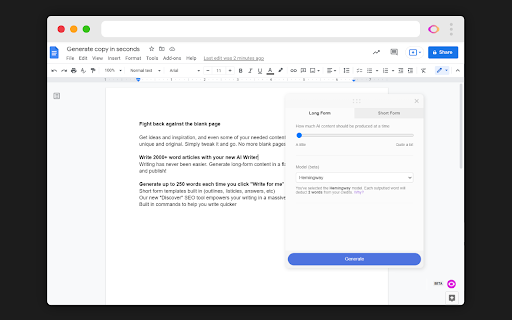

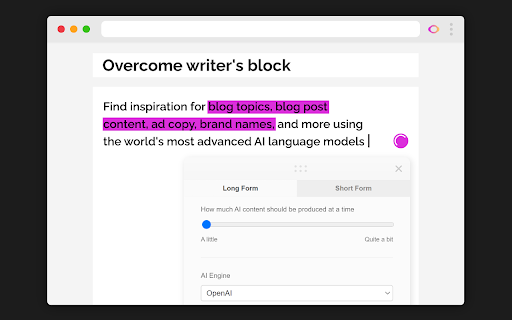

Your new AI team member. Use the world's most advanced AI to write for you. Blog content, landing pages, ad copy, and so much more. Your new AI writer and content team member. Use the world's most advanced AI to write for you. Blog content, landing pages, ad copy, and so much more. For all kinds of creators Our AI Writer helps many types of creators in the digital space. Founders Get your own AI content assistant. Create content 10x faster. Content Marketers Increase your content output substantially with our suite of tools. Digital Marketers Create an abundance of copy for your ad and landing page tests. Copywriters Generate more persuasive copy for your marketing material and products. SEO Specialists Our suite of tools will help you create more persuasive meta content and blog topic ideas. Bloggers We've got you covered. Increase your blogging output substantially Write AI content wherever you are: - Google Docs - Gmail - WordPress - Wix - Shopify - Amazon - StackOverflow - Quora - many, many more Latest updates (04 July 2022) - Added new branding images - Added new branding palette - Added model selection to long-form tools - Added last placement storage and restoring - Fixed issue where system would not load on some WordPress pages - Fixed issue where system would not function on Google Docs. Temporary solution, which will always write to the end of the content - Fixed issue where integration scripts would be loaded multiple times in some cases. Causing errors in the initialization flows - Fixed issue where background scripts would throw errors in some cases. Was not affecting usage, but quality improvement.

Quillbot: AI Writing Assistant to Grammar Check, Paraphrase & Translate
Write better emails, essays and messages with Quillbot's Grammar Checker, Paraphrasing Tool, Generative AI, Summarizer and more! Quillbot for Chrome: AI Writing Assistant, Grammar Checker, and Paraphrasing Tool Quillbot is a multilingual writing assistant extension that helps you write clearly, quickly, and with more control, right where you work. This AI writing assistant combines a Grammar Checker, paraphrasing tool, and AI writing tool to improve your writing in real time. From quick emails to full drafts, Quillbot helps you say what you mean without overthinking it. ➤ How It Works Install the extension and keep writing like you normally do. Quillbot works in the background, ready when you need it. Write in any text field across the web, then highlight text or open the toolbar to get instant suggestions. You can fix grammar, use the sentence rewriter to adjust phrasing, or generate new text with the AI text generator. Everything happens in one place, so you don’t have to copy, paste, or switch tabs. ➤ Privacy and Data Safety Your writing is personal. We treat it that way. Quillbot processes only what’s needed to provide suggestions and does not sell your data. Our systems are designed with modern security standards in mind, and we continuously improve how we handle and protect user information. You stay in control of what you write and what gets changed. ➤ Key Features A writing productivity tool that does more than just fix typos; it helps you communicate better. ✓ AI Writing Assistant Get real-time suggestions as you write. Improve clarity, tighten structure, and keep your ideas moving without stopping to edit. ✓ Grammar Checker Catch grammar, spelling, and punctuation issues instantly. Get clean, readable writing immediately to improve communication. ✓ Paraphraser Rewrite text to sound clearer, more concise, or more natural. Adjust tone without losing your original meaning. ✓ Sentence Rewriter Quickly reshape awkward or unclear sentences into communication that reads smoothly and lands the point. ✓ AI Cursor Access Quillbot’s AI tools directly where you write. Use the AI Cursor to generate text, refine drafts, and take action without leaving the page. ✓ AI Text Generator Draft emails, outlines, or full responses in seconds when you need a starting point—or a reset. ✓ Tone and Clarity Suggestions Understand how your writing comes across. Make it more direct, more polished, or more conversational as needed. ✓ Multilingual Writing Tool Write and edit across languages, including English, Spanish, French, German, Portuguese, and Dutch. ✓ Translation Translate text as you write or edit, helping you communicate clearly across languages. ✓ In-Page Editing Make changes directly in emails, docs, and forms. No switching tabs or breaking your flow. ✓ GIF Insertion Drop in relevant GIFs directly from the editor to add context or personality to your messages. ✓ AI Image Generation Create images from prompts without leaving your workflow—useful for quick visuals, drafts, or ideas. ✓ Custom Modes Tailor writing style to your needs, whether that’s formal, simple, or aligned to your voice. ➤ Use Cases Quillbot works for anyone who writes—and wants fewer rewrites. ✓ Professionals Send emails and updates that get to the point faster and don’t need a follow-up to clarify. ✓ Students and Researchers Turn rough drafts into clear, structured writing without losing your original ideas. ✓ Marketers and Creators Adjust tone across channels without rewriting everything from scratch. ✓ Multilingual Writers Write confidently across languages with built-in support and suggestions. ➤ Why Quillbot? Quillbot focuses on improving your writing—not replacing it. It works directly where you write, so you don’t lose time switching tools. Suggestions are fast, practical, and easy to apply. You get more than surface-level fixes, with support for tone and clarity when you need it. And with frequent updates, the extension keeps getting better at helping your writing do its job. ➤ Free vs Premium Start with the essentials. Upgrade when you want more control. ✓ Free Plan Includes: • Grammar checker and basic corrections • Limited paraphrasing tool access • Core writing suggestions • Multilingual writing support ✓ Premium Unlocks: • Full paraphrasing and rewriting capabilities • Expanded modes for tone and style • Advanced tone and clarity insights • More detailed, sentence-level suggestions ➤ Supported Languages Quillbot supports writing and editing in English, Spanish, French, German, Portuguese, and Dutch, with continued expansion to additional languages over time. Get Started Install Quillbot in seconds and start improving your writing immediately. Write faster. Say it better. Keep your voice intact.

Qopywriter: AI-Powered Article Writer
AI content generator that writes for you! Create human-quality blog posts, SEO articles, news, press releases, and more in seconds. Create quality content in seconds using AI technology! Qopywriter generates unique, highly engaging articles on any topic. Qopywriter uses cutting edge algorithms to deliver fully automated and optimized SEO-friendly content. If you are looking for a new and efficient way to create high quality articles for your website or personal blog, Qopywriter can help! 1. Optimized for long-form writing: Qopywriter creates SEO-friendly content, from in-depth blog posts and press releases to sales copy and academic essays. Its flexible AI adapts to your business or personal needs, making it the ultimate content creation tool. 2. Human-like quality: Experience AI-generated content that feels natural and professional. Qopywriter’s advanced AI mimics human writing, ensuring your articles sound authentic and engaging while maintaining high quality. 3. Personalize your content creation: Simply instruct Qopywriter using natural language prompts, like “write a blog post about…” or “create an essay on…,” and watch as high-quality, tailored content is generated in moments. 4. Reach a global audience: Qopywriter supports multiple languages, allowing you to create content that resonates with readers worldwide. Who is Qopywriter for? Copywriters Write engaging content with the help of AI-powered copywriting tools. SEO Managers SEO article writing services can help you create and optimize high-quality content that search engines will love. Bloggers Your personal AI blog post generator makes it fast and easy to create the content you need, no matter what your niche is. College Students Write college papers and high-quality essays in seconds with our service. Journalists Get your readers' attention and create a first draft of your story automatically. Marketing Specialists AI copywriter software can automate your content marketing tasks, freeing up more of your time to focus on other aspects of the business. Writing articles is hard work. That's why our AI-powered content generator helps you create high-quality articles in your niche. Need more content for page optimization, blog posts or product description for e-commerce? With Qopywriter we make things easy for you!

WriteMe.ai - AI powered writing assistant
Prepare to witness the next big transformation in your writing experience on your favorite Browser, using WriteMe.Ai Google Chrome Extension. WriteMe.Ai’s Google Chrome Extension Features: We have got some amazing features in WriteMe.Ai Google Chrome Extension for a better, smoother and more streamlined writing experience using AI. Next Line Suggestions to incorporate fresh, new ideas in your text Built-in Grammar Checker to edit, polish and perfect your text Write Complete Article to create long form content in a jiffy Popular Use Cases to write unique content for certain use cases in minutes How to Setup WriteMe.Ai’s Google Chrome Extension: All you will need to do is: Download the WriteMe.Ai Google Chrome Extension Pin the WriteMe.Ai Google Chrome Extension to Your browser Launch the WriteMe.Ai Google Chrome Extension and Log In After Downloading Here are the next steps you need to follow to use WriteMe across all websites to use WriteMe.ai’s extension Step 1: Once you have successfully installed the extension, go to your extensions settings Pin WriteMe.Ai extension on your browser. Create a new document to start using WriteMe.Ai or go straight to the web app. You can also set your preferences for using WriteMe.Ai on different websites by going to the Extensions Settings page. Step 2: Move your cursor over the text and select any text between 30 to 300 characters length. WriteMe.Ai icon will appear under the highlighted text. Click on the WriteMe.Ai icon to open the toolbar (ribbon). Step 3: The ribbon will show you available actions you can take. Choose any option to get Next Line Suggestions, view Use Cases, use Grammar Tools, or Write Complete Article using WriteMe.Ai. Chrome Extension Launched Access 40+ use cases & templates Supports 30+ languages and 20+ tones Write sales & marketing emails that get replies Discover ideas & write engaging content for blog Generate creative, catchy copies for social media Write product, job, profile, video descriptions Generate interesting caption ideas for Instagram post In-built native plagiarism checker (powered by Copyscape) Workflow and team management features WriteMe Extension is now Draggable New “WriteMe” Button to get text answers for anything Now Data is copied auto on Click Using Append Function* Input Unlimited Text Utilize the capabilities of GPT-3.5 and GPT-4 now. Drag and Drop Extension: Take the extension anywhere with you! Drag and drop the extension anywhere on the page and continue making edits. Enjoy more writing freedom! "WriteMe" button can help you with emails, social media posts, ad copies, and more! You don't have to waste time searching for the right use case; just use the WriteMe option to get something written for you. Use the new WriteMe button to find text-based.

AnswerAI - Homework AI Tutor & Study Helper
Your AI assistant ChatGPT Plugin.Answer questions and get AI answers quickly,write emails,articles,chatbot,learning assistant. Ask anything and learn everything with one of the leading AI educational apps for student success. Answer.AI is the only app that is there for students both in and out of the classroom, and revolutionizing the way you learn. With Answer.AI's web extension, your screen will become a powerhouse of personalized education and learning. You can screenshot or highlight any question on your browser and get step-by-step solutions, generate brainstorming drafts for any type of writing, chat with AskAI about tough concepts, master complex math questions with Geometry mode, and more. With over 6 million users, our mission is to help our evergrowing community achieve their milestones and crush their goals both in and out of the classroom. 🥳Here are some features you can look out for: 📍Upload a screenshot for instant answers Easily upload a screenshot of your question, and Answer.AI will analyze it to provide accurate answers—perfect for complex math problems and more. 📍Ask and Answer Click the Answer.AI icon to initiate a real-time conversation, or select any text on a webpage to receive detailed answers instantly. No matter the complexity, Answer.AI offers clear explanations. 📍Writing Assistant Answer.AI also serves as an AI-powered writing assistant, helping you create high-quality content in seconds, making it perfect for essays, articles, and more. 📍Smart Homework Solutions Submit your questions and get step-by-step solutions, ensuring you not only get the correct answer but understand the underlying concepts. 📍Highlight and Solve Answer.AI works on any website you visit and integrates smoothly into your Chrome browser. Simply highlight text or use the extension to get answers quickly and efficiently. 🌟 Getting Started: 1️⃣ Click the Answer.AI icon on your screen to start a conversation. 2️⃣ Highlight text on any webpage, click the Answer.AI icon, and receive an answer immediately. 🧑💻 How to use the Chrome Extension: 1️⃣ Click the "Add to Chrome" button. 2️⃣ Log in to your Answer.AI account. 3️⃣ Start using Answer.AI! You can open the Answer.AI sidebar anytime you need help. Answer.AI offers both free and premium versions. Free users receive limited access, while premium users enjoy enhanced features and unlimited usage. 📍What platforms does Answer.AI support? Answer.AI is available on iOS and Android (download via the Apple Store or Google Play), as well as a Chrome extension for Windows and Mac users. 💯Ready to upgrade your learning experience? Install Answer.AI today and leave your feedback—your suggestions help us continue to innovate. You can contact us at support@answerai.pro or go to our website, https://answerai.pro for more info. We love hearing from you!
