
ehkllobjkjjlggbmkcjkbojhicefhnhg

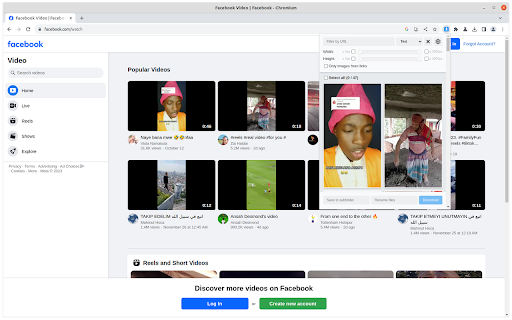


Discover, explore, and retrieve all images from a webpage. Additionally, perform bulk downloads based on specified image filters. --- Features --- - Filter based on pixel width and height - Filter based on URL - Bulk download all images at once - Select which images you want to download - Check the size of each image - Copy the URL of the original image - Choose between various layout options - Support all major websites - Perform a reverse image search The Image Downloader is a utility designed to locate images featured on a webpage. It's crucial to recognize that these images might be safeguarded by copyright, and it's advisable to presume that they are. Prior to utilizing any image, it's essential to verify its license and the precise conditions for reuse. Always conduct thorough research on the copyright status of an image, illustration, or photograph before using it.

Bulk Image Downloader
Bulk download images from multiple tabs in one click. Supports AVIF, WebP & AI-generated images. Filter by resolution and file type. The fastest way to bulk download images from any website. Save photos from one page or multiple tabs at once — with powerful filters for resolution, file type, and more. Perfect for designers, photographers, researchers, and AI artists who need to save images quickly and efficiently. 🔥 **NEW: AI-Friendly Image Support** — Seamlessly download AI-generated images (data:image/jpeg, data:image/png, data:image/webp) from tools like Midjourney, DALL·E, Stable Diffusion, and more. 🔥 **Modern Format Support** — Full support for next-gen image formats including AVIF, WebP, SVG, and all traditional formats (JPEG, PNG, GIF, BMP). Key Features: ✔ Bulk download images from multiple tabs — choose from: all tabs, current tab, left of current tab, or right of current tab ✔ Preview all images found on the page, including linked images ✔ Filter images by width, height, and file type ✔ Sort images by resolution or tab index ✔ Download selected images to your local folder with one click ✔ Right-click context menu to save any image directly to Downloads, just like Safari ✔ Clean, modern UI for a smooth browsing and downloading experience Simply press the "Download" button, and all selected images are saved to your default Chrome download directory. No extra configuration needed. Versions: 1.1.0 1. Added support for modern image formats: AVIF, WebP, and more 2. Added support for data URI images (data:image/jpeg, data:image/png, etc.) — great for saving AI-generated images 3. Improved UI with a cleaner, more intuitive design 4. Fixed a bug in the "Save Image to Downloads" context menu feature 1.0.3 1. The picture is selected by default 2. Image filtering rules are automatically saved

Bulk Image downloader - Image Duke
Chrome image downloader extension, bulk image downloader, enlarge and display images/videos on mouse-over for downloading. Are you looking to quickly and easily download all the images from your favorite website? Look no further than our Image Downloader browser extension! With our powerful tool, you can search, view, and download every image on a web page with just a few clicks. Our extension offers a range of features to help you find and download the images you need, including: The ability to find the original image by thumbnail The ability to find more relevant images via links The option to filter based on pixel width and height The option to filter based on URL Bulk download all images at once Choose the images you want to download Check the size of each image Copy the URL of the original image Support for all major websites (Twitter, Facebook, Instagram, and more!) Experience the convenience and power of our Image Downloader for yourself. Download our extension today and start enjoying hassle-free image downloading on all your favorite websites.

Quick Image Downloader
Browse and download all images from the page in one click Quick Image downloader is a powerful tool that enables you to download all images from any Website, Google Images, Instagram, Pinterest and Facebook in one click. ⭐Select what images you want to download ⭐Bulk download all images in once ⭐Filter the images by width and height ⭐Save to a subfolder ⭐Rename downloaded files ⭐Supports all formats (PNG, JPEG, SVG, WEBP) ⭐Use dedicated buttons to download or open individual images in new tabs

Batch Image Download Wizard
One-click download all images from page, easy to filter and select satisfactory image sequences and customisable download filenames. Many people in the use of batch image download extension plug-ins, can not freely define the file name after download, which gives the later use of images and processing has brought difficulties, this plug-in has a self-defined download file name function, while using the image size filter can be easily filtered out the unwanted images, while providing a manual selection function, the do not want to download the images from the list out. The usage is as follows: When the web page is loaded, click the icon of this extension, all the pictures will be shown in the popup window, drag and drop the size selector to filter the picture list, meanwhile click the picture to cancel or confirm whether some pictures need to be downloaded or not, fill in the name of the downloaded file in the custom picture file name control, if keep it empty, the picture will be downloaded with the current file name. If the file name is left empty, the picture will be downloaded with the current file name. Click the Download button and the selected picture will be downloaded to the default download folder. Because this is a batch image download, the downloaded image will be saved locally with a custom filename plus a serial number.
