
egmopflbpgdjmmkeabegohajillnebco


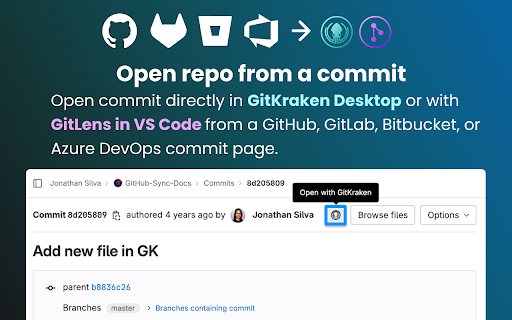

The GitKraken Browser Extension bridges your hosted git repositories to GitKraken Desktop and with GitLens in VS Code. Quickly identify which pull requests need your attention, and open repositories, commits, and comparisons with ease. The GitKraken Browser Extension boosts your GitHub, GitLab, Bitbucket, and Azure DevOps workflows allowing you to access, triage, and review your teams pull requests more easily from the web. ➤ Track Your PRs SEE PRS BY STATUS: Keep track of your PRs from your browser with Launchpad. The GitKraken Browser Extension organizes your pull requests by status, and identifies which pull requests need your attention. ACCESS CODE SUGGESTIONS: There’s an easier way to recommend changes. View PR code suggestions created by you or other GitKraken users. ➤ Work More Effectively With GitHub, GitLab, Azure DevOps, and BitBucket With this browser extension enabled, you get options inside github.com, gitlab.com, bitbucket.org, and dev.azure.com to open repositories and commits in VS Code with GitLens or with the GitKraken Desktop. 🖥 OPEN WITH GITKRAKEN: Enjoy the convenience of quick access to GitKraken Desktop or GitLens in VS Code right from GitHub's Code and GitLab’s Clone dropdowns. With a single click, you can open a repository directly in GitKraken Desktop’s robust UI or with GitLens in VS Code. ⤴️ OPEN COMPARISON IN VS CODE: Say goodbye to manual navigation. When viewing pull requests on GitHub, GitLab, Bitbucket, or Azure DevOps, the extension adds a "Open Comparison in VS Code" option to the Code dropdowns for an easy transition into GitLens in VS Code. 📄 OPEN WITH GITKRAKEN button on commit pages: Keeping track of your commits is now more accessible than ever. The GitKraken Browser extension adds a dedicated "Open with GitKraken" button to GitHub's, GitLab’s, Bitbucket's, or Azure DevOp's commit pages. “All our developers are using GitKraken Desktop and it became a standard in our R&D organization. The UX is just awesome! Every action can be done in just a few clicks. The interface works so fast and intuitive that even our most experienced coders prefer this tool over the git command line.” ⸺ Lansweeper “GitKraken is the best multi platform GUI client. Our developers save 1-2 hours a week using the client.” ⸺ Stratio Automotive “When I'm setting up my development environment on a new machine GitLens is a must install. Worktrees enabled by GitLens+ allow me to easily work in multiple branches, improving my ability to collaborate with developers on my team when the work is spread out across multiple pull requests and branches.” ⸺ iSight ➤ Download GitKraken Desktop for Free Ready to try the legendary Git GUI for Windows, Mac and Linux? Download it today: https://www.gitkraken.com/git-client/try-free ➤ Install GitLens on VS Code for Free Learn why GitLens is the #1 Git extension on the VS Code marketplace. Install it today: https://www.gitkraken.com/gitlens/try-free NOTE: The GitKraken Browser Extension requires the GitKraken Desktop or GitLens on VS Code to be installed on your machine for complete functionality.

Octotree - GitHub code tree
Browser extension that enhances GitHub code review and exploration. Features * Fast IDE-like code tree * Quick search in tree format * Bookmark repos, issues, PRs, files * Support GitHub themes * Support private repositories * High performance, working with repositories of any size NO BS POLICY: Octotree doesn't track you or share/care about your data at all. GitHub tokens are only needed when you want to access private repositories or exceed GitHub API rate limit. Octotree stores tokens in your browser storage and only uses them to authenticate with GitHub.

Windsurf Plugin: AI Code Autocompletion on all IDEs
Your modern coding superpower. Get code completions in Colab and more. Windsurf (formerly Codeium) is the modern coding superpower, a free code acceleration toolkit built on cutting edge AI technology. Windsurf provides code completion tool in over 70+ languages, with lightning fast speeds and state-of-the-art suggestion quality. With the Windsurf Chrome extension, you get: - Unlimited single and multi-line code completions forever - Support for 70+ programming languages - Integration into all popular IDEs + web editors such as Colab and Jupyter Notebooks - Support through our Discord Community Join thousands of other developers who are using Windsurf for free to accelerate their software iteration process, improve their code quality and consistency, reduce the number of code review iterations, accelerate developer onboarding, and keep them in their flow state. Want to learn more? Check out our FAQ (https://www.windsurf.com/faq). Also try out the Windsurf Editor, a standalone AI-powered VS Code fork for access to Cascade, Windsurf Tab, and more. Your New Superpowers - Use Natural Language: Need to make changes in an unfamiliar language or codebase? Instead of spending hours learning all of the syntactical and stylistic details, type out comments in natural language and let Windsurf get the job done. - Minimize Boilerplate Coding: Sometimes feel like a code monkey copy-pasting and modifying boilerplate code over and over again? Let Windsurf handle writing the repetitive work so that you can stay in the coding flow state, generating code faster than you can type. - Find and Use APIs: Spend too much time searching for API endpoints for a task or their signatures to properly interact with them? Windsurf has seen thousands of different API calls and can insert them properly to match your needs, without ever leaving the IDE. - Unit Test Generation: Know that unit tests are important but find writing them mindnumbing? Let Windsurf autogenerate test cases for you, making sure you never miss a pesky edge case. Test-driven development just got a whole lot easier. Support, Feedback, and Community We are actively working on improving the quality of the extension. Please feel free to report any issues, suggestions, or exciting / interesting suggestions in our active Discord community! We hope you enjoy Windsurf, your modern coding superpower!

daily.dev | Developer News Done Right, in Every New Tab
Developer news, personalized to your stack, in every new tab. Join 400,000+ developers. Free and open source. Open a new tab and your personalized developer feed is already there. Curated from 2,000+ trusted blogs and publications, including GitHub Blog, Hacker News, Dev.to, freeCodeCamp, and hundreds more. Personalized to your interests and tech stack. The more you read, the smarter it gets, because it learns from you and from what over a million other developers find worth reading. 🏆 Product Hunt, Product of the Year ⭐ 18,000+ GitHub stars, fully open source at github.com/dailydotdev WHAT HAPPENS WHEN YOU INSTALL 1️⃣ Open any new tab. Your personalized reading experience is there. Technical articles, tutorials, and community discussions from 2,000+ sources, matched to your stack. 2️⃣ It gets smarter every day. AI personalizes it, and over a million developers help surface what matters. When they upvote, discuss, and share articles, the best content rises and the noise disappears. 3️⃣ Read, upvote, discuss. Every article has a conversation. You're not reading alone. See what others think, add your take, learn from the discussion. 4️⃣ Build a reading streak. Come back tomorrow and the next day. Track your streak, unlock achievements, climb leaderboards, and build a profile that grows over time. 5️⃣ Find your people. Join a Squad around React, DevOps, AI, cloud, mobile, open source, or whatever you care about. Share links, start discussions, learn together. Public or private. Most tools in this space are glorified RSS readers or algorithm-only experiences. daily.dev is different because the community is built in. Developers upvote articles, which teaches the system what actually matters. Not just what's new, but what's good. Discussions add context you can't get from reading alone. The real insight is often in the comments. Squads create focused curation around every topic and language. And AI personalizes on top of all of this, matching content to your specific stack and interests. Think of it as a feed curated by a senior engineer who shares your exact interests. • Personalized reading from 2,000+ sources, powered by AI + community signals • Multiple views: Popular, Upvoted, Discussed, Following • Custom feeds for different interests and stacks • Squads, communities around any topic • Reading streaks, achievements, and leaderboards • DevCard, a shareable developer identity card • Bookmarks with folders • Search across millions of posts • Dark mode and light mode • Available on Chrome, Edge, web app, iOS, and Android 🎯 WHO IS THIS FOR? • Developers who want to stay current without opening 10 sites every morning • Engineers who learn better when they can see what peers think is worth reading • Anyone who wants a daily reading habit that builds over time • Teams that share and discuss technical articles together in private Squads ⚡ YOUR WORKFLOW STAYS INTACT • Open a blank tab anytime, one click, always available • Browse without signing up. Register when you're ready to upvote, comment, or join Squads • Uninstall in 10 seconds if it's not for you • Your data stays yours. Open source, no data selling, ever 🔒 PERMISSIONS AND TRANSPARENCY This extension only replaces your New Tab page. It does: • DON'T track your browsing on other websites • DON'T read or modify content on other pages • DON'T access your browsing history • DON'T inject scripts into any website We only request what's needed to show your reading experience. Fully open source. Verify the code yourself at github.com/dailydotdev Unlock premium features: • Presidential Briefing: a personal agent scans the landscape daily, analyzes 100+ posts, and delivers a concise briefing • Smart Titles: improves clickbait headlines so you know what you're clicking • Clickbait Shield: detects and replaces misleading titles automatically 🌐 OPEN SOURCE AND PRIVACY daily.dev requests only the permissions it needs and never sells your data. GitHub: github.com/dailydotdev Privacy: daily.dev/privacy

File Icons for GitHub and GitLab
A simple browser tool changes file's icon on GitHub, GitLab, gitea and gogs. On GitHub, no matter what kind of file is, their icons are all same. However, in your fancy editor, there are some packages which give every filetype an unique icon. Therefore, I build a simple extension to replace original file icon with filetype-specific icons. This improves visual recognition on GitHub, GitLab, etc. Hope you like it! **This extension is not a project of GitHub or any company**
