
egmennebgadmncfjafcemlecimkepcle

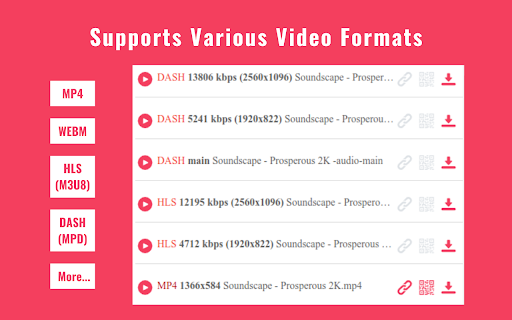

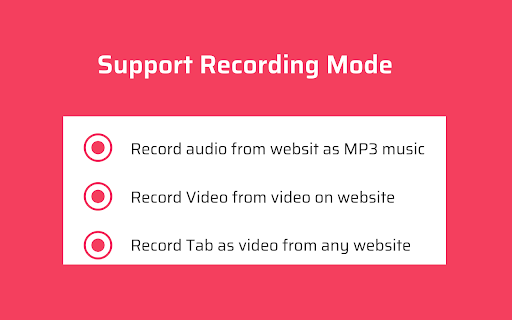
Download any video or audio from any website with just one click. Introducing VidHelper, a robust Video Download Helper that empowers you to effortlessly download videos from a vast array of platforms—over 1000 sites, including prominent social media platforms. VidHelper supports an extensive range of video formats. Notably, it seamlessly handles HLS and DASH streams, simplifying the downloading process for even the most intricate video formats. Enjoy the flexibility of accessing your favorite videos offline at your convenience, without the need for an internet connection. Share these videos with friends and family or store them for future viewing—VidHelper is your all-in-one solution for capturing and relishing online content. Key Features: - Compatibility with 1000+ video sites, making it easy for users to download and enjoy their favorite content from a wide range of online platforms. - Support for a variety of video formats. - Capabilities for downloading HLS (m3u8) and DASH (mpd) streams. - Built-in media player for Video Preview, streamlining your viewing experience. - QRCode links for effortless video sharing to your mobile phone. - Batch Download feature, enabling one-click download for all detected videos. - Supports recording mode to record video, audio and tabs. - Free, unlimited usage of our Video Download Helper with no registration requirements. How to Use Our Video Download Helper: 1. Visit the video site and click on our extension icon. 2. Videos will be listed on the popup page. 3. Choose the video you want to download. Enjoy! Note: Some web pages may require you to initiate video playback to assist the video downloader in locating the content. We sincerely hope you find our Video Download Helper valuable! Your feedback, ratings, and suggestions for enhancing functionality are highly appreciated. Disclaimer: VidHelper is not a Youtube Downloader. Due to restrictions outlined in the Google Web Store Policies and Developer Program Policies, downloading Youtube Videos is not supported. We appreciate your understanding.

GetVid - Video Downloader
A HLS, DASH and more formats video downloader with advanced features. Download videos from Vimeo, Telegram, Facebook, Instagram and more than 1000+ websites with this powerful Video Downloader. Save adaptive streaming formats like HLS and DASH with ease. GetVid is a professional video downloader that helps you download, record, and manage videos from popular websites and streaming platforms. It supports downloading private videos where you have permission to view. ✅ Story & Reels Saver Perfect for saving social media content. Supports downloading: - Private and public Instagram, Facebook, Tiktok Reels, Videos and Photos. - Providing high resolution video download with audio included. ✅ HLS (m3u8) & DASH Support Detects and downloads adaptive streaming formats like HLS (.m3u8) and DASH (.mpd). Ideal for saving live stream playbacks. ✅ Video Recorder Record live streams or videos directly from the page if a download link isn't available. ✅ Picture downloading and frame extraction Easily download images and extract frames from videos on websites instantly to your local folders with just one click. ✅ Custom Download Folder Choose and save your preferred local folders. Downloads will be saved directly to the selected location for faster and better file management. ✅ Private & Secure We respect your privacy. We never track or store your browsing historyy. 1. Add the extension to Chrome. 2. Pin the extension icon. 3. Enter into guest mode or sign in with an account. 4. Play any video and click the download button! 🚫 Important Note: - YouTube video downloads are not supported due to Chrome Web Store policy restrictions. - Please respect copyright laws and only download videos for personal use. - DRM protected videos are not supported. ✨ Start saving your favorite videos today — from Instagram stories to Facebook lives. Fast. Safe. Powerful.

Video downloader that works! Save online videos
Download video now, watch it later. Fast, light and reliable video downloader Video Downloader is a free video downloader browser extension that lets you save videos from Facebook, Instagram, Twitter, and hundreds of other websites directly to your device. Free Video Downloader – Download videos from Facebook, Instagram, Twitter, and more at no cost. Fast Downloads – Consistent and reliable download speeds across all supported websites. One-Click Download – Detect and download any video with a single click directly from your browser. Multiple Formats – Save videos in MP4 and other popular formats compatible with any device. Auto Video Detection – Automatically detects downloadable videos on Facebook, Instagram, Twitter, and any webpage you visit. Unlimited Downloads – No caps on the number of videos you can save from any website. Lightweight – Designed to be resource-efficient so it doesn't slow down your browser. Easy to Use – Simple, clean design that's easy for anyone to use. Quick Support – Friendly and responsive support team available anytime. Save Facebook Videos – Download any public Facebook video directly to your device for offline viewing. Download Instagram Videos – Save Instagram videos, reels, and stories before they disappear. Download Twitter Videos – Capture and save Twitter videos and GIFs instantly with one click. Download Videos from Any Website – Save streaming videos, tutorials, and clips from hundreds of websites. Offline Viewing – Keep your favourite videos saved locally so you can watch them anywhere without internet.

Video Downloader professional
Download online videos in various formats from any websites. Video Downloader save video and watch it later. Video Downloader professional for fast downloading online videos from any webpages. The popular Chrome extension supports many video formats. Watch favorite moments with friends or show useful guides to business partners even if you aren't online. Save interested video files to review them later on your PC. You can try Video Downloader professional and notice the difference! Use extension for free without any registration. Save in different available formats and qualities according to your needs. How video downloader works? - After installing the extension, go to a website that contains video resources. - All available video files that are on the page will be detected by the extension. Once found, an number mark is shown on the extension icon indicating that media file is available for download. - A green Download button will appear on the video itself, along with all the available video file sizes. - You just have to choose the size of the video you want to download. - Nothing complicated! You do not need to register an account to use this video saver. You can download any video or audio without register. Download using popup icon: Available for downloading video files are shown after clicking popup icon of the extension. Number shown on popup icon of the extension corresponds to q-ty of video available for downloading on page. Note: Video Downloader is not a Youtube Downloader. Due to restrictions of the Google Web Store Policies and Developer Program Policies we can not download Youtube Videos. Thank you for understanding. We really hope that our extension will be useful to you! We look forward to your feedback and ratings! Also write your suggestions for improving the functionality.

免费在线视频下载器Plus
Video download. YouTube video download. TikTok video download Video Downloader Plus, a powerful media utility designed to enhance your online experience and allow you to save videos from popular video platforms. Video Downloader Plus is the ultimate solution you've been waiting for. It offers the easiest and fastest way to download online videos from mainstream websites. With its advanced features, you can effortlessly download online videos and save them for future viewing. Whether you want to enjoy your favorite moments offline with friends or share useful guides with business partners, Video Downloader Plus can meet your needs. Save interesting video files to view on your PC later. Use Video Downloader Plus to save your favorite live streams! Now you can use this m3u8 downloader to download real-time streams to your hard drive. You can preview m3u8 files before downloading, check their size and format, and select the desired quality on the download page. No registration is required to use Video Downloader Plus. You can download any m3u8 files or audio files without any restrictions. This m3u8 downloader is completely free to use. When visiting web pages that contain m3u8 files, Video Downloader Plus will automatically detect available m3u8 files for download. Simply click on the Video Downloader Plus extension icon in the top right corner of Chrome to start downloading. Video Downloader Plus is free, fast, secure, and has been officially evaluated by the Chrome team. You can safely install this extension. It also supports recording mode, which allows you to download m3u8 files that are difficult to obtain through regular means. Enjoy the convenience of HLS and m3u8 real-time downloads with Video Downloader Plus. Please note that this extension is not responsible for the content you download. We recommend checking the copyright and permissions of the content before downloading.
