
efhmejgmpncbkkofodbkcgmmflmjbmbo
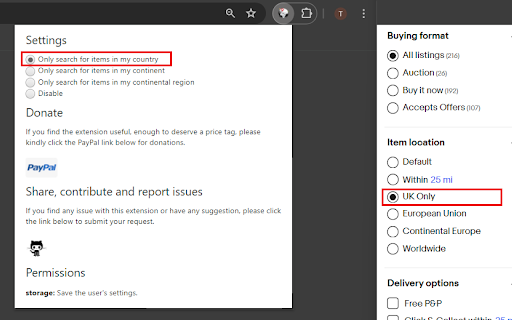
Always start your eBay search for items in your country location only. As a frequent eBay user, I often found myself setting the filter to items in my location only. Despite the long running feedback from many users on the need for the stickiness of item location preference, eBay has yet to provide a solution. To facilitate a more efficient search, I wrote this extension that defaults my eBay searches to only items in my location. It has saved me a lot of time so I'm publishing the extension for everyone's use.

Sales Sort for eBay™ Advanced Search
An eBay™ Chrome extension that sorts search results by number of items sold. Sales Sort for eBay™ Advanced Search is an eBay™ Chrome extension that sorts search results by sales. Are you bored with eBay's inability to sort by sales, so that you can't find hot items in a quicker way? All you have to do is install the Sales Sort for eBay™ Advanced Search quickly. If you encounter an issue, please report it via the customer support flag icon on the capture page, so we can improve the extension for you and everyone else who uses it. HOW to USE? This extension will automatically embed a sort filter into the original filter area on the eBay™ site. You can use it to sort results by sales in one click. FAQ -Q: Does the plugin work on all eBay sites? -A: Yes, this plugin is adapted to each country site of eBay.

ebay Sold History, Offer History - Average High Mid Low Price - eBextractor
Displays Highest, Lowest, Median, Average Price per search result + hide items, hide sellers, sold analytics, and sold-history-page button v3.0.12---------------(3.11.26) | Fix Errors - Fix blank data (the html structure changes) v3.0.10---------------(2.13.26) | Minor Style Change and logic - Move all options to Quick Options - Hoverable to make it clean and not consume too much space - Hidden items are not included in exported/downloaded csv (Thanks to ROBERT for suggesting to add this) v3.0.9---------------(12.24.25) | Minor fix - Fix the display of sold history in the Analyze pop-up v3.0.7----------------(8.31.25) | New Features and improve speed - add hide items, hide sellers and analyze button for sold insights - faster display of price analytics using local code instead of api - instead of going instantly to amazon or ebay when you click amazon or ebay button it will first go to my website and from their you can click to ebay or amazon v3.0.6----------------(7.1.25) | Minor update - remove affliate tag checker for ebay and amazon (no more redirects 😁) v3.0.5----------------(7.1.25) - fixed issue on amazon, ebextractor, sold history button on ebay search result - fixed issue in broken exported csv data - minor UI changes on amazon to ebay buttons - popular prize on ebay search result is now clickable - added ebay-tag-checker for accurate checking if the traffic is from us v3.0.4----------------(12.29.24) - minor changes on product page on amazon the ebay and ebextractor button is placed below the title - fix checking the srt (source of redirection traffic) on url for my associate program on amazon v3.0.3-----------------(12.26.24) - new ui using react template - https://github.com/Jonghakseo/chrome-extension-boilerplate-react-vite - more option on the popup to enable/disable specific feature (Thanks tiva for the suggestion) Note: Enabling the Show Sold Quantity on Search Result can result to ebay temporarlity blocks you. The extension is fetching to the item url and scrape the quantity sold, ebay sometimes see it as bot and not good so they block it. v3.0.2-----------------(11.19.24) - added watcher counter, quantity sold, brand, return and delivery - refactor the code for better maintainability In Progress (ebay and amazon) for upcoming VERSION 3.0.3: - Ability to filter every time you search such as: - always check sold listings - (will be on paid version) - specific location using zip code or just US only, north america and such (will be on paid version) - show BSR rating, and more filters (full access for feature will be available on paid version) v3.0.01---------------------- (10.09.24) -- added search on ebay and search on ebextractor on amazon sites -- current issue (not yet resolved) - saving and deleting searches on other site is not updating the UI immediately v3.0.0 ---------------------- (09.30.24) Minor fixes and feature - added ebextractor search in each image - added tag checking - search on amazon now supports - United States - Canada - France - Germany - Italy - Netherlands - Poland - Spain - Sweden - United Kingdom v2.0.15 -------------------- (09.23.24) Minor fixes and ebextractor.com is integrated - remove tag checker - added "search on ebextractor" v2.0.13 -------------------- (08.07.24) Minor feature, UI changes and fixes - Added popular price in price analytics - added tagChecker for my affliate (thank you) - added youtube button - fix discord link - added other tools link - change minimize button text to "Hide" v2.0.12 -------------------- (07.23.24) Minor feature and fixes - In search result each item has now search on amazon button located at the bottom right of each item image - fix margin when you open sidebar in item page v2.0.11 -------------------- (07.08.24) New Features and minor changes - Ability to save searches and view them (I only added the url and keywords used so you can go back to it and load it) - I will be considering adding the data itself so you can download it - You can now see the total amount of sold history v2.0.10 -------------------- (05.30.24) Minor changes - NO ADDED FEATURE JUST FIXED SOME ISSUES - Fix sold history data(if you are logged you wont see the "log in to ebay" when you go to the SOLD HISTORY PAGE P.S - Thank you for Tiva for reporting the issue and for the donation 🎉 v2.0.9 ---------------------- (05.8.24) Minor Changes and coding refactors - Adjusted the code in 'Days' period filter New feature - Added 'Facebook Marketplace' for the 'Search it on' feature, using only a few words to increase the likelihood of finding similar items.) v2.0.8 ---------------------- (04.29.24) New features - Search on amazon, walmart and google shopping (you see it on each item page https://www.ebay.com/itm/285705547610) - Prices in price counter can now be clicked and it will highlight the price and will scroll into it - Each listings on search result has now "SOLD-OFFER HISTORY PAGE" button v2.0.7 ---------------------- (04.22.24) New features - Sold & Offer History up to 90 days period - You can now click Highest Price, Lowest Price, Middle Price and it will highlight the items v2.0.6 Minor changes: - keyword and price counter is now below Price analytics - Google, Walmart, Amazon Clickable Link FIXED 🔍 The eBay Search Data Extraction Extension offers comprehensive data analysis capabilities for single-page search results, providing valuable insights through the following features: - 💰 Highest Price: Obtain the maximum price observed in the search results. - 💵 Lowest Price: Identify the minimum price found among the listings. - 📊 Average Price: Calculate the mean price across the search results. - 🎯 Middle Price: Determine the median price, offering a representative value. - 🔑 Keyword Occurrence: Track and quantify the frequency of each keyword throughout the listings. - 💲 Price Occurrence: Gain an understanding of how often different price points appear in the search results. -1 click search, if you go to listing page you will see on the top right of the listing section an option to search your item via google, wallmart, amazon or search it all - Sold/Purchase and offer History: For a max period of 90 days you can now see the history of that item (offer and sold history). Some of the item price may show Sold as special offer. 💾 In addition to these powerful features, the extension allows users to conveniently download the extracted data in CSV format. This empowers users to further analyze the data, perform custom calculations, and seamlessly integrate it into their preferred tools and workflows. 🔁 Moreover, the extension offers a unique capability to extract identical items directly from the search results. This means that the extracted data precisely matches the items displayed in the search. 🔄 If you like or dislike the item please leave a feedback. Thank You!!!! : You can support me via buy me a coffee: https://buymeacoffee.com/wcawasa or via paypal: https://www.paypal.com/paypalme/walidcawasa

Myibidder Auction Bid Sniper for eBay
This extension places a 'Snipe it' link on eBay listings for easy access to Myibidder.com Auction Bid Sniper. Myibidder (originally was Myibay) Auction bid sniper for eBay allows you to have "Snipe It" link on every eBay auction page for easy access to your Myibidder.com sniping account. Requirements: Create your own sniper's account if you don't have one yet at https://www.myibidder.com/login/signup How to use: ========= 1. Click "Snipe it" link usually located on the right side of the page (under seller's info). 2. Fill out the form with your snipe amount. 3. Once added you can manage your items using http://www.myibidder.com/ You can also manage your contact information, e-mail notifications, groups and other features. All transactions are done using secured network protocols so your information is protected. We do our best to provide the best and the most reliable Auction Bid Sniper for eBay. If you like the service, please post your feedback here: https://www.trustpilot.com/review/myibidder.com The more users we get, the better service we provide. This code is a copyrighted material. Modifying and reselling of this code is not permitted without prior written approval from authors. Support forums: http://www.myibidder.com/forums/ FAQ & Contact form: http://www.myibidder.com/login/faq Terms and conditions: http://www.myibidder.com/login/terms

Hide Collection-Only Button for eBay
Now supports eBay results lists that can be found via the category or browse sections, rather than strictly search results. This is a simple extension that adds a 'Hide Collection-Only' button to eBay search results. This toggle persists through page loads and can be dynamically turned on and off.
