
effglkmjhdncefimefjdpicomdkoonjh
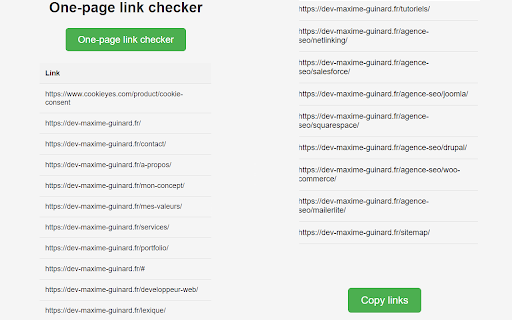
404 Link Checker is a powerful extension that allows you to quickly check links on a web page. Découvrez l'Extension Incontournable pour Vérifier les Liens Brisés : 404 Link Checker Élevez la qualité de vos sites web à un niveau supérieur avec l'extension 404 Link Checker, un outil indispensable pour les développeurs web, les professionnels du SEO, et quiconque souhaite maintenir l’intégrité et la performance de ses sites. Ce puissant et pratique outil vous permet de vérifier rapidement les liens sur une page web et d'identifier ceux qui retournent une erreur 404. ➡️ Analyse Instantanée : Grâce à la fonctionnalité de vérification des liens, vous pouvez analyser facilement tous les liens présents sur une page spécifique. Il vous suffit de cliquer sur le bouton “Check Links” et l'extension se chargera de scanner la page pour repérer tous les liens. ➡️ Détection des Erreurs 404 : L'extension vérifie chaque lien pour s'assurer qu'il est valide et fonctionnel. Les liens qui retournent une erreur 404 seront clairement indiqués dans le tableau de résultats, facilitant ainsi leur identification et correction. ➡️ Tableau de Résultats Détaillé : Le tableau de résultats affiche tous les liens trouvés sur la page, avec leurs URLs respectives. Vous pouvez facilement copier les liens en un seul clic grâce au bouton “Copy Links”, ce qui simplifie leur partage ou leur utilisation dans d'autres applications. ➡️ Outil Pratique pour les Développeurs : Assurez-vous que tous les liens sur votre site sont valides et fonctionnent correctement. L'extension est idéale pour vérifier et maintenir la qualité de vos liens. ➡️ Optimisation SEO : Pour les professionnels du SEO, éviter les liens brisés est crucial pour optimiser le SEO de votre site. L'extension vous aide à éviter les liens morts, contribuant ainsi à améliorer la performance de votre référencement. Thanks you ! ❤️

Check My Links
Check My Links is a link checker that crawls through your webpage and looks for broken links. Check My Links is a powerful link checker that scans any webpage, Google Sheet, Docs and instantly identifies broken or invalid links. Whether you're editing a webpage, auditing content, or managing SEO, Check My Links helps you verify every link on the page with a single click. New Feature: Now it can detect the link from Google Doc and Excel sheet too and verify them. ✅ How it works 1. Open the webpage you want to validate. 2. Click the Check My Links icon in your toolbar. 3. The extension will scan all links on the page, highlight the valid ones, and clearly mark any broken or problematic links. 4. View results instantly on the page. 🎁 Features * One-click scan for all webpage links * Highlights valid, broken, and redirected links * Download or view detailed reports for broken and invalid links * Customize highlight colors * Option to disable color highlighting * Faster, accurate link validation - perfect for developers, content editors, and SEO teams 🔐 Advanced Features After a fresh install, the extension will not show product information or tutorials. After a few days, it may display helpful product tips as info. If you prefer a clean interface, you can hide these info using the Advanced Feature Key available here: https://selectorshub.com/how-to-get-check-my-links-advanced-features-key/ 🚫 Default Excluded URLs To prevent unnecessary noise during scanning, the following URLs are excluded by default. If needed, you can remove these exclusions from the extension’s settings: 1. doubleclick.net 2. appliedsemantics.com 🔗 More Details Learn more about the tool here: https://selectorshub.com/checkmylinks/ 💬 Need Help? If you face any issues or have questions, reach out anytime at support@selectorshub.com

LinkChecker.pro SEO Extension
The LinkChecker Extension is a powerful tool designed to simplify backlink monitoring and SEO analysis. The LinkChecker Extension is a powerful tool designed to simplify backlink monitoring and SEO analysis. With just a few clicks, you can effortlessly check and monitor backlinks, keeping your link-building efforts organized and efficient. Backlink Management Features: - Add your project and highlight all your backlinks on the page - Check if your backlink is dofollow or nofollow - View href and anchor text - Determine if the page is blocked by robots.txt, meta tag, or X-Robot-Tag header - Export all internal or external links from the current page SEO Features: - View Meta Title and Description - Perform canonical check - Review page information (word count, language tag, author, last updated date) - Copy headings structure - Analyze redirect chains Whether you’re managing a few links or a large network, LinkChecker makes backlink management and SEO analysis easy and effective.

Check Broken Links
Use check broken links app to run url check on your website. Quick highlight urls with an easy-to-use broken link checker. 🚀 Keep your website healthy with the app Are you tired of dead urls on your website? They not only create a bad user experience, they can also impact your SEO ranking. That’s why it’s good to have broken link checker on your site 🚀 How does check broken links work? Here's how it works: Scan your webpage– the app is running to find any bad link. It also works as 404 checker Scanning – the program will show a report of all urls found across your website Fix the issue – after check broken links you can fix hrefs by updating or removing them With our tool, you can easily scan on your website and ensure all your “a” tags are well 🚀 Features of check broken links ⚙️ Comprehensive scanning: the extension scans your page to see which urls are inactive ⚙️ Multiple urls detection: the app can detect internal and external urls ⚙️ Reports: get reports showing how many inactive urls in the site ⚙️ Friendly interface: click on the icon, and you’re good to go ⚙️ Colors: check broken links app paints the targets so you can address them fast ⚙️ Updates: the tool stays updated with to keep your hrefs working well ⚙️ Find everything: the tool will find hidden “a” tags even in small images 🚀 Why use the check broken links? ⭐️ Improved SEO: when you look after urls, you improve SEO performance ⭐️ User experience: url issues frustrate users, leading to high bounce rates ⭐️ Time: searching for non-working “a” tags can be tedious ⭐️ Trust: if a site contains invalid adresses, it appears outdated and unreliable This powerful extension helps to find dead links website. This tool saves you time and effort. 🚀 Key benefits of the check broken links tool Here are some of the key benefits of using this app: Efficient: the broke link checker scans in a fraction of the time it would take manually Find hidden: it works even in the smallest details Platforms: the app is browser extension so it can work on every os properly If you don’t have a good broken link checker tool - it can low ui experience and search engine rankings. That is why using a linkchecker is crucial 🚀 How to use the check broken links Start the scan: click on the extension, and you are ready to go Color: during the scan all hrefs will be colored so you can test hyperlink Report: after the app is done you will get an full detailed report Fix the issues: now you can quickly fix them Whether you have a blog, an e-commerce platform, or a corporate page, using broken links checker will help you keep your site free of hrefs which is not working, so your visitors can have a seamless experience 🚀 Find issues and fix them across your site The problem is “a” tags on your page. From blog posts to product pages, by using our check webpage for errors app, you can go across your site. The tool looks for external and internal href data. The site link checker functionality ensures that all hyperlinks lead to the right pages, preventing 404 errors 🚀 The importance of regular testing With the check broken links you are scanning for hrefs regularly which is crucial for website maintenance. You can periodically run tests to catch any new dead url’s data that may have appeared in the link anaylzer reports. The check broken links saves you from letting minor issues snowball into bigger problems. In the other hand, simple caring about your site's data can show that your content is actively maintained and earns user's trust. Whether you’re a beginner or an experienced web developer, using a broken link checker helps keep your site running optimally 🚀 Frequently asked questions ❓ Why is it important to run to use web url checker on website? 💡 Scanning is essential for user experience. Avoiding damaging your SEO. Inactive hrefs can lead to high bounce rates and make your website appear outdated ❓ How does the tool work? 💡 The check broken links scans your website, detects internal and external “a” tags, images, and resources, and generates a report showing which urls are broken ❓ What features does the tool have? 💡 The tool offers comprehensive search for broken links, multiple detection, real-time reports, a user-friendly interface, and regular updates ❓ Why is using this important for my website? 💡 It helps to site’s SEO, provide a better experience and save time ❓ How do I use the check broken links tool? 💡 Click on the icon, and it will scan website. Once it's done, a report'll show with all urls. Now you can update or remove them ❓ What types of urls the tool detect? 💡 The tool can see internal, external and images ❓ Why is regular testing important for my website? 💡 Testing using check broken links helps to see new hyperlinks appearing. Prevent emerging issues

Link Previewer
Quickly preview the content of a link by just hovering it. This extension will help you preview the content of a link by just hovering it. This will save you more time on browsing some sites when looking for something in the web. New Version: 2.8 - Fixed the issue where the link previewer box gets obscured or appears outside the browser window when the link being previewed is located on the bottom or corner side of the browser. - Added new size option for the link previewer box: "Responsive Size". The size will automatically adjust based on browser's current size. - Added an option to save or not to save the previewed links to browser history. - Improved the "Trigger Mode" feature. You can now assign a key button to trigger the link previewer box when using the "Manual" option. If not set, then the "SHIFT" button will be the default button. Previous Version: 2.7 - Added "Autosave" feature in settings. All changes will now automatically be saved without the need of the "Save" button. - Added "Instant" and "0.25 seconds" options in buffer time. You can now preview the link much quicker. - Added "Trigger Mode" feature. You can now select if the link previewer box will appear by hover or pressing a key. - Added "Pin on Preview" feature. The link previewer box will automatically pinned when previewing. - Added "Disable Scroll on Preview" feature. You have the option to temporarily disable the browser scrolling feature when the link previewer box appears. - Added "Screenshot on Preview" feature. The link previewer box will automatically screenshot it's content when previewing. - Added "Blocklist" feature. You can now disable the extension on specific websites. - Added "Search Link" feature. You can now easily switch website to preview by just typing it's URL. - Added "Shortcut Key" for closing the link previewer box. Just Press "ESC" button to close the link previewer box. - Minor improvements in link previewer box UI. - Minor fixes and improvements. Features: > Automatic or Manual (Pressing a Key, Customizable) Opening of Preview Window > Website Security Detection (HTTPS/HTTP Connection Detection) > Draggable Preview Window (No Limit Dragging) > Resizable Preview Window (Flexible Sizes) > Pinnable Preview Window (Automatic or Manual Pinning) > Optionally Disable Browser Scroll While Previewing > Easy-to-Close Preview Window (Default Hover Out, Press 'ESC' key, or Click 'Close' button) > Preview Window Buffer Time (From 'Instant' up to '5' seconds delay) > Easy-to-Activate/Deactivate (Easy Toggling) > Mobile/Desktop/Large Desktop/Extra Large Desktop/Flexible Sizes > Simple/Flat/Modern Styles > Show/Hide Website URL > Website Searching > Website Content/URL Copier > Website Content Refresher > Website Content Screenshot (Automatic or Manual Screenshot) > Website Blocklisting (Disable the Extension on Certain Websites) > Control Common Website Security Settings More features to be implemented and improved to provide you with better functionality.
