
eepeblbmpkloajddpjlibamomldfhdga

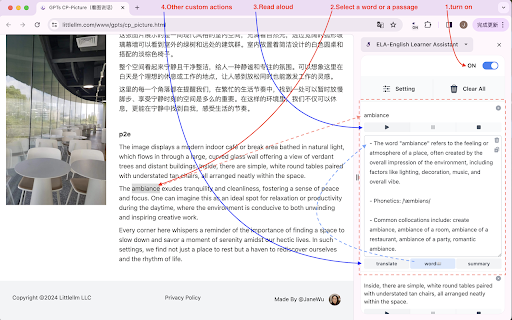

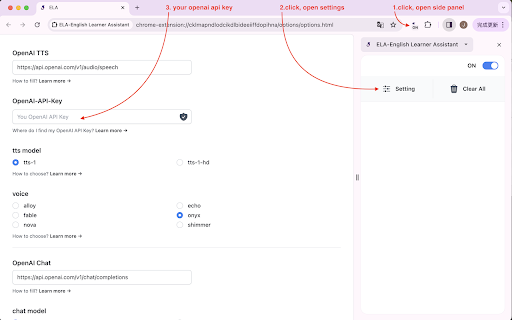
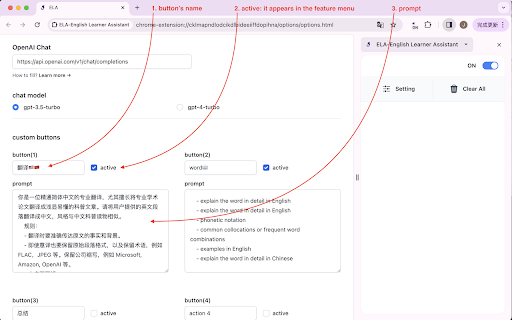
AI reading companion for language learners: text-to-speech, translation, word lookup, and fully customizable AI actions. Struggling to read articles in a foreign language? ELA uses AI (GPT-4o) to help you translate, look up words, and read text aloud — all in a clean side panel. Works with English, German, French, Japanese, Spanish, and any language you're learning. Customize your own AI prompts for a personalized learning experience. Simply select any text and the side panel instantly captures it, ready for you to listen to, translate, or explore. Whether you're an English learner tackling unfamiliar vocabulary, a German learner reading news articles, a professional working through technical documents, or a researcher navigating academic papers, ELA keeps you in your reading flow without switching tabs or apps. ## Key Features - Text-to-Speech: Hear any selected text read aloud in natural-sounding voices powered by OpenAI TTS. - Pre-configured AI buttons: Comes with default buttons for Chinese translation and word lookup, ready to use out of the box. - Fully customizable buttons: Replace or extend the default buttons with your own prompt-based actions — tailor ELA to any language, subject, or workflow. - Multi-language support: Not limited to English. Use ELA to listen to and study content in any language — German, French, Japanese, and more. Custom buttons can be configured for any language pair or learning task. - Flexible voice settings: Choose your preferred OpenAI TTS voice model in Settings. ## How to Set Up 1. Open the extension's Settings page. 2. Enter your OpenAI API key. 3. Select a voice model. 4. Optionally, add custom AI buttons with your own prompts. ## How to Use 1. Open the side panel and turn on the toggle in the top-right corner. 2. Select any text on a webpage — it will automatically appear in the side panel. 3. Click [Play] to have the text read aloud. 4. Use the pre-configured [Translate] and [Word Lookup] buttons, or any custom buttons you've set up in Settings. ## Button Reference - On/Off toggle: Enables or disables automatic text capture from the webpage. - Settings: Opens the configuration page for API key, voice model, and custom buttons. - Clear All: Removes all content from the side panel. - Play: Plays, resumes, or replays the audio. - Pause: Pauses playback. - Stop: Stops playback. The next time you press Play, the audio will be regenerated. - Translate / Word Lookup: Pre-configured default buttons — translate text to Chinese and look up words out of the box. These can be modified or replaced in Settings. - Download: Downloads the generated audio as an MP3 file. Only enabled after audio has been successfully generated. - Custom buttons: Your own AI-powered actions, defined in Settings. Add as many as you need for any language or task. ## Privacy & Permissions • All your settings — including your API key and custom prompts — are stored locally in Chrome Storage. Nothing is sent to any server operated by ELA. • Your API key is used solely to make requests to the AI provider you've configured (e.g. OpenAI). It is never shared with or accessible by the extension developer. • The extension is only activated when you explicitly interact with it — it does not run in the background or monitor your browsing. • storage permission: saves your API key, voice model preference, and custom button prompts locally on your device. ELA is fully open source. You can inspect the code at any time on GitHub: https://github.com/janewu77/ela-extension ## Keyboard Shortcut to Open/Close the Side Panel - Windows / ChromeOS / Linux: Ctrl+Shift+S - Mac: Command+Shift+S Note: Closing the side panel will clear all content currently displayed in it. No account required. No data collected. ### Updated - **AI Model Upgrade** - Updated default chat model from `gpt-4.1-mini` to `gpt-5.4-mini` - Replaced invalid model IDs with the correct GPT-5.4 series: - `gpt-5-nano` → `gpt-5.4-nano` - `gpt-5-mini` → `gpt-5.4-mini` - `gpt-5.2` → `gpt-5.4` - Removed non-existent TTS model `gpt-4o-mini-tts-2025-12-15` - Retained `gpt-4.1-nano`, `gpt-4.1-mini`, `gpt-4.1`, and `gpt-4o-mini` for backward compatibility

Clearly Reader - Your AI Reading Assistant
A browser extension with reader mode for optimal experience. Features copy, translate, speech, and PDF and Markdown export. Clearly Reader - Redefine Your Web Reading Experience 【Key Features】 ✦ One-Click Reader Mode (Shortcut: Alt/Option + R) ✦ AI Article Assistant: Summarize/Translate/Chat With Article ✦ TTS: Read any article text to speech ✦ Cross-Device Sync & Cloud Storage ✦ Export Article to PDF, Word, and Markdown, etc. ✦ Add Article to: Pocket/Craft/Raindrop/Instapaper/Obsidian etc. 1️⃣ Ultimate Reading Experience • Remove ads, popups and distractions intelligently • Support dark mode & custom themes • Adjustable font, line height & page width • System fonts & custom CSS support • Unique book layout mode

SolvelyAI - AI Homework Tutor & Study Helper
SolvelyAI is your AI Homework Helper—instant screenshot solving, step-by-step AI Answers, AI Summary, and Study Helper tools. Capture, Solve, Summarize, and Learn Anytime, Anywhere 🚀 Solvely.ai is the AI learning assistant for solving problems and understanding content faster. Our revolutionary One-Click Solve now gets you answers to an entire page of questions at once. 💬 👉 Your AI Homework Solver Stuck on a tough assignment? Whether it's one question or a whole page, get instant clarity. 🆕 One-Click Solve All : Solve all problems on your screen at once with one click. Press the magic button for instant answers, no screenshots required. ✔️ Take a Screenshot to Get Instant Answers: Quickly capture your homework questions and receive immediate solutions from AI. ✔️ Step-by-Step Solutions: Understand complex problems with detailed, step-by-step explanations that guide you to mastery. ✔️ Save Problems for Later Review: Keep a record of your questions and solutions for future reference and revision. ✔️ Solutions in Various Formats and Languages: Access solutions in different formats and languages to suit your learning preferences. 👉Your AI Content Summarizer Overwhelmed by long videos and articles? Get the key ideas in seconds. ✔️ Real-Time YouTube Summaries: Get AI-generated summaries, key points, and time-stamped chapters while you watch. Instantly grasp the core concepts of any video and jump directly to the most important parts. ✔️ Summarize Any Webpage in Seconds: Instantly distill any article, academic paper, or online report into a concise summary and key talking points. Absorb complex information at a glance and accelerate your research. 📌Pro tip: Use our quick capture shortcuts for faster question solving: 👉Learn Smarter, Not Harder Get the Solvely.ai extension now and embark on an extraordinary journey of knowledge and success. Unlock the power of AI and make every study session count! 💪📚🌟

Sila – All-in-One AI English: Chat, Dictionary & Translator
Instant dictionary, translations, grammar fixes, TTS, and AI chat—learn English on any website without switching tabs. Sila is the ultimate browser extension for English language learners, turning every webpage into an interactive learning opportunity. Whether you're reading news, browsing social media, or studying online, Sila provides instant language support right where you need it. ✨ Key Features 🔍 Instant Translation & Definitions - Select any text and instantly get translations in any language - English definitions with parts of speech and usage examples - AI-enhanced explanations that make complex words easier to understand - AI translation provides contextual meaning—see translations adjusted for the surrounding content and real usage, not just word-by-word substitution 🤖 Advanced AI Learning Assistant Chat With AI Agent - Your personal English tutor powered by advanced AI reasoning - Interactive Learning Conversations: Engage in natural dialogue to practice English in real-world contexts - Reasoning Support: Get detailed explanations for grammar rules, word choices, and language patterns with step-by-step logic - Text-to-Speech Integration: Hear perfect pronunciation for any word, sentence, or conversation - Real-time Translation: Seamlessly switch between languages during conversations - Grammar Correction & Analysis: Receive instant feedback on your writing with detailed correction points and explanations - Contextual Learning: Ask questions about any text you encounter online and get personalized explanations - Adaptive Teaching: AI adjusts its teaching style based on your learning progress and preferences 🧠 Smart Vocabulary Building - Save words with visual associations for better memory retention - Create and manage personalized word lists - Export your vocabulary as CSV files for external study tools 📱 Seamless Integration & Web Dashboard - Clean, intuitive popup interface with dark mode support - Works on any website without disrupting your browsing experience - Enhanced Chat Interface: Full-screen AI conversation mode for immersive learning sessions - Comprehensive web application at app.silaflow.com for advanced vocabulary management - Organize and edit your saved words and sentences with detailed categorization - Export your learning data in multiple formats for offline study 🎯 Perfect For - Students learning English as a second language - Professionals working in English-speaking environments - Anyone looking to expand their English vocabulary while browsing 💡 How It Works Quick Learning (Traditional Mode) 1. Select - Highlight any text on any webpage 2. Click - Tap the Sila icon that appears 3. Learn - Get instant translations, definitions, and explanations 4. Save - Add new words to your personal vocabulary collection 5. Manage - Access your complete word library and usage stats via the web dashboard 🚀 Why Choose Sila? - Contextual Learning: Learn vocabulary and grammar in the context of real content you're already reading - AI-Powered Reasoning: Not just answers, but explanations that help you understand language patterns - Multi-Modal Learning: Combine visual, auditory, and interactive learning methods - Personalized Experience: AI adapts to your learning style and pace - Comprehensive Feedback: Grammar correction with detailed points and suggestions for improvement - Seamless Workflow: Never leave your current webpage to get language help Transform your browsing into a powerful English learning experience with Sila's intelligent AI assistant by your side. Unlock the best AI-powered English learning experience in your browser—get unlimited translation, grammar correction, and vocabulary management with Sila’s all-in-one Chrome extension. Install Sila today and join thousands of successful language learners worldwide.

Paraphrase Tool
Meet Paraphrase Tool as your AI writing assistant for instant rewording. Simplify, enhance, and paraphrase text easily! Introducing our cutting-edge paraphraser, designed specifically to empower writers, students, and professionals alike. In today's fast-paced digital world, crafting unique content is more important than ever. Our paraphrasing tool makes it easy to transform existing text into original content that reflects your voice. The Paraphrase Tool serves various purposes. It can help you: ✏️ Whether you're an essay writer, a content creator, or a student, you can benefit substantially from integrating our Paraphrase Tool into your workflow. The efficiency and effectiveness of this rewording tool will change the way you write and research. With advanced AI technology at its core, our Paraphrase Tool operates seamlessly to give you precise results. The sentence rephraser feature aids in writing better sentences and improving your overall content. It provides easy-to-use functionalities that make writing a breeze. Each time you utilize our AI writing assistant, you're embracing the future of content creation. The versatility of our Paraphrase Tool is unmatched. Let's explore some of the key features: 1️⃣ AI writing: Harness AI intelligence effectively. 2️⃣ Grammar check: Enhance your grammar, fix spelling and structure. 3️⃣ Paraphrase: Refine your sentences to improve readability. 4️⃣ Rewrite sentences: Easily transform complex sentences into simpler forms. 5️⃣ Tone and style options: Adjust your text to suit its purpose. 💯 One standout feature of this Paraphrase Tool is its user-friendly interface. You simply input your text, and the app does the rest! It assigns context and rewrites the content effortlessly while maintaining its original meaning. Your written work will appear fresh and new. Students particularly appreciate the benefits of our Paraphrase Tool. When tasked with essays, this essay writer AI provides an essential resource. You can simply enter your draft, and the paraphraser helps to enhance your arguments and articulate your thoughts clearly. This is particularly useful during the hectic exam season. For those who engage in frequent content creation, our paraphrasing tool can generate numerous alternatives to existing sentences. It gives you the ability to express ideas in various ways without erasing your original thoughts. This leads to unique content that captivates your audience. Use the Paraphrasing Tool for: ➤ Writing essays, ➤ Crafting blog posts, ➤ Producing social media updates, ➤ Enhancing business presentations, ➤ Drafting emails. 🚀 In a world flooded with information, standing out requires creating compelling and engaging content. Our Paraphrase Tool ensures you have the flexibility required to generate impactful ideas tailored to your needs. Investing in an AI-assisted writing solution like this Paraphrasing Tool equips you with the skills and techniques to succeed. Improve your writing habits, maximize your productivity, and refine your output with little effort. ❓ Have you ever struggled with rewording text from references? Our reword tool alleviates this challenge significantly. You can easily rewrite sentences or entire paragraphs using the advanced features of this innovative app. In the era of AI for writing, the rephrasing process can be daunting without the right tools. Fortunately, using our Paraphrase Generator, you can unveil a wealth of synonyms and rephrased content, reducing the hassle of developing original materials. With the assistance of our AI Paraphraser, you’re guaranteed to: 1. Improve clarity, 2. Avoid redundant familiarity, 3. Foster creativity. Plus, our rewrite sentences functionality ensures your text flows naturally and cohesively. The rewording process through our app is also incredibly efficient, streamlining your idea iteration phase. In conclusion, whether you’re an essay writer looking to improve your work or a professional needing clear communication, the Paraphrase App can enhance your writing experience. Try it today to discover how this technology can transform the way you produce content. With reliable features such as the AI writing generator, your tasks will see a significant boost in productivity. Make your writing journey more enjoyable and effective with our Paraphrase Tool.🌟
