
eepbhjeldlodgnndnjofcnnoampciipg
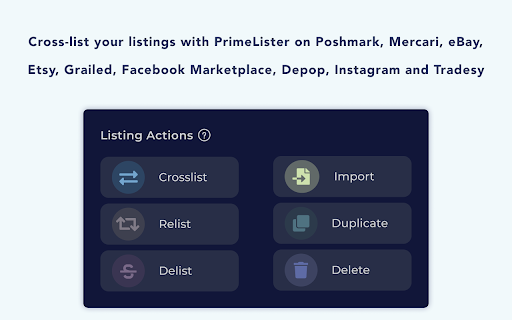

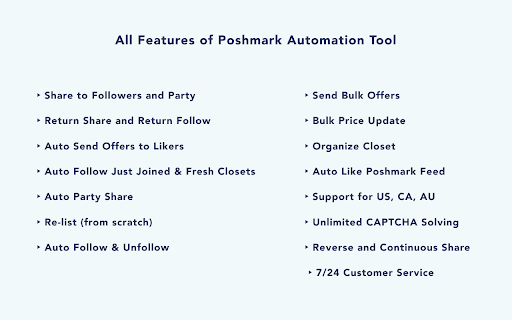
Cross-listing and Poshmark Automation Tool. Crosslist, relist, delist items on multiple marketplaces and automate Poshmark workflow. PrimeLister is a software tool that helps e-commerce sellers and re-sellers manage their inventory, list items onto various marketplaces, cross-list from one marketplace to another, re-list stale listings, and automate everyday tasks on the marketplaces. Sell More, Faster, and Easier 💰 PrimeLister is the right tool for you if you own an online selling business that targets people on various marketplaces for selling. Use PrimeLister to put less effort into inventory management, save time when publishing listings on various marketplaces, and make more sales from day one. PrimeLister provides two main tools for online sellers: ↗️ Cross-lister Tool - You can manage your inventory and easily perform listing operations across multiple marketplaces using the Cross-lister Tool of PrimeLister. 🤖 Poshmark Automation Tool (aka Poshmark Bot) - You can automate your entire reselling workflow and maximize the potential of your closet using the Automation Tool of PrimeLister. Supported Marketplaces 🧩 The Cross-lister Tool of PrimeLister supports the following marketplaces: Poshmark, Mercari, eBay, Etsy, Depop. The US, CA, AU countries of these platforms are supported. The list of all supported marketplaces: https://www.primelister.com/cross-listing-marketplaces The Poshmark Automation Tool of PrimeLister supports all countries: 🇺🇸 🇨🇦 🇦🇺 Start Using PrimeLister for Free 🆓 The PrimeLister Chrome Extension is free to install and has a 7-day free trial. You can start using PrimeLister today without entering any credit card info. Why Use Cross-lister Tool 🧶 Get Organized: Import your listings into one place and organize your complete inventory with tags and groups. 🌱 Stay Up-to-date: Make important changes to your listings in one place and keep your listed inventory fresh. 🤑 Drive Sales: Distribute your items to multiple marketplaces from one place and make more money. ⌛️ Save Time: Organize, publish, and update listings faster than ever in one place and save yourself time. Why Use Poshmark Automation Tool 🧑✈️Put time-consuming reselling tasks on autopilot: It is a piece of cake to increase your sales and make money on your closet if you integrate our solution into your reselling flow. 🧰 Everything You Need to Replace Your Virtual Assistant: You will not need any other virtual assistant service or software to manage your closet, interactions, and sales once you have PrimeLister's industry-leading toolkit. 🤑 Increase Sales: Increase your sales and selling speed with the help of extensive automation. 🦾 Automate Your Work: Spend less time on your closet with automated shares, offers, likes, and reactions. 💟 Grow Your Audience: Interact with other Poshers with automated follows, and reactions in order to have a strong brand. 👍 Use Safely: Stay indistinguishable from a real user and use the tool without disclosing your credentials. Cross-lister Tool Features 🚀 ➡️ Import your listings: Import your listings into the inventory. Once you are done, your listings will be paired with their published copies on different marketplaces and will be managed easily within this inclusive inventory. ➡️ Organize your inventory: Organize your inventory with tags and groups. Once you are done, you will use tags to search for items by details like price, size, gender, shipping type, etc. As well, you will use the groups to post listings in bulk in an instant or at a scheduled time. ➡️ Cross-list your listings: Cross-post your listings with one click. Once you are done, you will not have to copy/paste information manually, the detail fields of the new listing will be auto-filled and the images will be uploaded automatically to the listing. ➡️ Cross-list your items from/to all supported marketplaces. ➡️ Re-list and delist your listings. Re-list and delist your listing with one click. Once you are done, re-listing will refresh your stale listings, and delisting will help to sync your listings on different platforms when your items get sold. You can both re-list and delist your listings in bulk. ➡️ Re-list your listings automatically on all supported marketplaces of the Re-lister Tool. ➡️ Schedule to post later: Schedule to post your listings later. Once you are done, the scheduled crossposting, re-listing, and delisting tasks get done automatically at a pre-selected time. Automation Tool Features 🚀 ➡️ Share Your Closet: Share your closet with one click. You can share your closet or specific items with your followers, and on the feed and party pages. Sharing increases your exposure and chances of making a sale. ➡️ Relist Your Closet: Relist your closet with one click. You can relist your closet or specific items. Relisting helps your items appear in the search results and on the feed page more frequently by publishing a fresh copy of your list from scratch. ➡️ Send Bulk Offers: Send bulk offers with one click. You can send offers for your closet or specific items through an easy-to-use interface for managing your offer settings and filters. Sending bulk offers attracts your potential buyers and boosts quick sales. ➡️ Auto Send Offers to Likers: Send offers to likers automatically whenever somebody likes your items. You can activate the automation for sending offers to likers through an easy-to-use interface for managing your offer settings and filters. Sending offers automatically attracts potential buyers and increases the likelihood of a quick sale. ➡️ Bulk Price Update: Update the price of multiple listings at once with one click. You can update the prices of your closet or specific items through an easy-to-use interface for managing your price updating settings and filters. Updating the prices keeps listing prices up to date for various marketing strategies including seasonal campaigns. ➡️ Follow/Unfollow People: Follow or unfollow people with one click. You can expand or narrow your audience. Following other people draws more shoppers into your closet page and increases your sales with the help of word of mouth. ➡️ Auto Activity Returner: Follow people back and share items back automatically whenever a new follower or share arrives. You can activate the automation for sharing back and following back through an easy-to-use interface for managing your automation settings. Auto reactions keep the relationship with your followers warm. ➡️ Organize Your Closet: Organize your closet with one click. You can change the order in which your items are sorted on your closet page. Organizing your closet keeps your inventory in a certain order and pins the most interesting items to the top of your listings. ➡️ Auto Captcha Solving: Solve captchas automatically. You do not need to intervene manually to solve the CAPTCHAs while you use the tool. The extension works continuously without interruption thanks to auto CAPTCHA solving. ➡️ Activity Monitor: Track your activity history with one click. You can view the history of your manual activity (including instant and scheduled tasks) and automated activity from the activity monitoring screen in the tool. Monitoring your activity provides useful information about your reselling activity. ➡️ Human Behavior: Enjoy the human-likeliness of the automation tool. You do not need to be concerned while using it. It is designed to mimic human behavior while performing all types of tasks and works with time intervals between each task. ➡️ 7/24 Customer Service: Get instant customer service with one click. The friendly customer success team at PrimeLister is ready to back you whenever you get question marks in your mind or technical support inquiries regarding the use of the automation tool. Cross-lister Tool - All Features: ➡️ Import listings to the inventory ➡️ Cross-list listings ➡️ Re-list listings ➡️ Delist listing ➡️ Bulk listing ➡️ Scheduled listing Automation Tool - All Features: ➡️ Share your closet to Feed ➡️ Share your closet to Party ➡️ Relist your items from scratch ➡️ Send bulk offers ➡️ Auto Send Offers to Likers ➡️ Bulk Price Update ➡️ Follow/Unfollow People ➡️ Auto Activity Returner ➡️ Organize Your Closet ➡️ Auto Captcha Solving ➡️ Activity Monitor: ➡️ Human Behavior ➡️ 7/24 Customer Service Step-by-step Onboarding Video Tutorial 👉 https://www.youtube.com/watch?v=OhCCMVapFTA&t=12s PrimeLister Homepage 👉 https://www.primelister.com/ Cross-lister Tool Website 👉 https://www.primelister.com/cross-listing Cross-lister Tool Demo 👉 https://vimeo.com/483709422 Automation Tool Demo 👉 https://www.youtube.com/watch?v=kF_dRFKX20c&t=29s PrimeLister Blog 👉 https://www.primelister.com/blog PrimeLister Knowledge Base 👉 https://docs.primelister.com/ Privacy Policy 👉 https://www.primelister.com/privacy-policy Terms of Service 👉 https://www.primelister.com/terms-of-service Submit your feedback 👉 https://roadmap.primelister.com/b/feedback Contact Us 👉 support@primelister.com PrimeLister on Youtube 👉 https://www.youtube.com/channel/UC7Xu1iZ4Gy0dhLaAUb5ZXLw PrimeLister on Instagram 👉 https://www.instagram.com/primelister/ PrimeLister on Facebook 👉 https://www.facebook.com/primelister/ PrimeLister on Twitter 👉 https://twitter.com/PrimeLister

Listelf - formerly Crosslist Magic
Cross-list between Depop, eBay, Mercari, Poshmark, Vinted and more! Free for 7 days (no credit card required), then $9.99/month. This extension puts a little "copy" icon in the top left corner of your Depop, eBay, Mercari, Poshmark and Vinted listings (check FAQ for full list of supported platforms). Clicking on this creates a draft listing on the other platforms that you can review and submit. Also supports relisting on the same platform. Currently, the following fields are copied over to the draft: 1. Title 2. Description 3. Photos 4. Price 5. Category 6. Brand 7. Color Support for Australian, Canadian and UK versions of above platforms is also available. If you have discovered a possible bug, please send me an email with a link to the specific listing you are having trouble with. Screenshots are also welcome as they usually simplify finding the error.

ClosetWitch | Poshmark Magic
Relist from scratch, share in bulk. Just In: your day back! Poshmark sellers, rejoice! The search is over: ClosetWitch… -RELISTS your Poshmark closet from scratch (so you can finally get into those 'Just In' searches, even if you listed less than 60 days ago) -SENDS AUTOMATIC OFFERS, or sends them in bulk -SHARES your closet in minutes, and, for Pro users, -Helps you LIST FASTER, SOLVE CAPTCHAS, track items in your inventory, and organize your to-do list. - AUTOMATIC SHARING, based on a schedule Feeling overwhelmed by information and decisions? We can help with that. ClosetWitch has the friendliest interface you’ve ever worked with, or your money back. Work quickly and precisely with design features that just make sense: -PREVIEWS (with pictures) to show you exactly what you’re about to do, and what your earnings will be when you do it -GLOBAL SETTINGS for offers and and price adjustments so you can work quickly -EASY EDITS for those individual items that need extra attention -LOCKING to make sure special items get excluded from bulk actions -FILTERING to help you target offers just to likes from the last 24 hours -SORTING by oldest or least liked items for relisting It's the smartest, simplest-to-use tool on the market for Poshmark sellers. Current offers: Try ProLite free for 7 days and keep unlimited sharing forever. Install extension and create an account via this link to redeem: closetwitch.com/signup?access_code=BLACKMAGIC622 [NOTE: What’s "hard reset" relisting? Other bots and extensions just click the “copy listing” button for you to relist. This will not reset the “Just In” date that Poshmark hard codes into each new listing unless listings are at least 60 days old. ClosetWitch automatically creates a brand new listing from scratch, and gets your listing in front of users exclusively searching for brand new posts. Just select which items you want to relist, adjust prices if desired, and hit “Start.” Our carefully throttled process runs only slightly faster than the speediest human relist, but is completely hands off. Watch the demo video above to see it in action.] Forever Free, Free with Account, ProLite, and Pro features available: Forever Free features: Share your entire closet in minutes, for free. -Unlimited, with randomization and speed selections available. -No account required: install the extension, open Poshmark, and go. Free-with-an-account features: -Comping with dates: check prices for items sold on Poshmark with actual sell dates; check available listings to see the competition in your size and colorway. -Sharing -Free account required: install the extension, open Poshmark, log in with a user name and password, and go. ProLite features ($9/month): -Relist items in bulk as brand new listings (to show up in “Just In” searches) -Lower or raise prices in bulk -Send offers in bulk with filters like “liked in the last 24 hours” to target your most interested buyers. -Pin offers so you only decide on a discount once. -Lock items you don't to take bulk actions on. -Newsfeed filtering: hide the junk and see only your comments, offers, and sales. -Sharing and comping. -Create a paid account ($9/month) via closetwitch.com/signup and sign into the extension to use. Pro features ($19/month): -Automatic offer sending. -Track inventory and list directly from the system. -Tag items by category or “to-do” to stay organized. -All free and ProLite features. -Create a paid account ($19/month) via closetwitch.com/signup and sign into the extension to use. Navigate to Closetwitch.com to add your inventory. The Details: Sharing (Free): -There’s no limit to the number of items you can share -“Magic” vs. “Mortal” sharing speeds give you the flexibility to share more items in less time, or go at a slower pace to avoid triggering ReCaptcha windows -Randomization allows you to seamlessly blend old and new items, pricey and inexpensive ones -Share others’ closet items to feed Poshmark’s activity algorithm and help earn Ambassador status Offers, Price Adjustment and Relisting (ProLite, $9/month): -Relist items completely from scratch. (This feature tends to pay for the ProLite membership by moving old items quickly). -Filter, bulk-select, and use global settings on items to work quickly -Edit item prices individually to work precisely without clicking into an item -Target your most recent likers for offers, relist only your items with no likes--our tool is flexible enough to work the way you do Inventory Management (Pro, $19/month) -Add items to your inventory using our quick-fill fields — then list directly from the system so you only have to type things once. -Tag items with style keywords, fabric content, or even season to sort and filter through your inventory with ease. -Turn those tags into bullet points right in your listing copy to easily describe your item and optimize for search engines. -Create templates with reusable copy like your store policies, bundle discount info, and more to automatically drop them into every single new listing. -Flag items in your inventory that need repairs, measurements, or special attention. -Add SKUs and cost information to stay organized and make smart business decisions. 1. Download and install the extension. Once installed, click the puzzle piece icon at the top of your browser to find and “pin” ClosetWitch’s purple witch hat icon by clicking the gray thumbtack icon. Note: The icon will turn blue when successfully pinned, and you’ll also see the purple witch hat appear at the top of your browser window. 2. Navigate to your Poshmark closet in your browser (make sure you’re in “My Closet”) 3. Click the ClosetWitch Extension — purple witch hat — to open the extension 4. ProLite and Pro users: enter payment details and create a username and password by hitting “upgrade” in your account via the extension. 5. Reload the extension and sign in with your account details to rock and roll. 6. Still stuck? Drop us a line at contact@closetwitch.com and we’ll get you moving. How do you use the extension? Follow instructions for downloading and installing the ClosetWitch extension on our “Get Started” page. Then find demo videos here: closetwitch.com/demos Can I use ClosetWitch on my mobile device? ClosetWitch is currently a Google Chrome extension tool only, which means we exclusively work on desktop computers. But stay tuned for updates. Does pricing go up or down with my closet size? Nope! Sharing is free, Relisting/Offers/Price Adjustments, and more are features offered at a flat monthly rate for everyone, regardless of closet size. Why are you so cheap? What’s the catch? We’re small, but growing. Our pricing may grow too at some point, but for now we’re trying to stay competitive and win folks over with our outstanding customer service. Take advantage! Which marketplaces does ClosetWitch support? ClosetWitch is a tool for Poshmark only, at this time. But we’re working on cross-listing support for Ebay, coming very soon, so stay tuned. Can I use ClosetWitch outside of the United States? We’re currently supporting the US, Canada, and Australia. Please reach out if you’re working from a different location and we’ll advise on whether we can support you: contact@closetwitch.com. Kidding! But still no: software is considered a “bot” if your machine is programmed to complete a repetitive action without the help of a human. Think auto-following other Poshmark users 24/7 whether or not you’re on your computer, or sending immediate offers to likers without your knowledge. ClosetWitch’s bulk functions and poshmark automations are initiated by the user, who is fully in control of the process. You'll get the magic wand, but you'll still have to wave it. Is the ClosetWitch website and extension secure? Yes. We take privacy and security very seriously. Check out our policy in the "Privacy Practices" tab. How much does ClosetWitch cost? ClosetWitch is a free tool for unlimited sharing. It charges a flat monthly fee for services like relisting, sending offers, adjusting prices, and more. See current pricing here: closetwitch.com/plans. What is the refund policy? We want you to be thrilled with ClosetWitch. Cancel any time if the service isn’t working for you. ClosetWitch may be a tool, but the people who work here are humans, and happy to assist you. Reach out at contact@closetwitch.com with any issues. And welcome to the coven!

Poshmark Sidekick
Poshmark Sidekick creates an easy way to view your closet and share items quickly. Poshmark Sidekick converts your ordinary Poshmark closet into an optimized sharing experience by making it easy to share items effortlessly to organize your closet. Poshmark Sidekick is unique, as it creates a pleasant item sharing experience without the use of automation. Automated bots are prohibited on the Poshmark platform, making this option applicable for all Poshers! Share more, while following Poshmark terms of service, Subscribe Now!

Cross Listing Tool - CrossLister
CrossLister is a Multi-channel Lister which helps you crosslist your items to multiple marketplaces. It is also your all-in-one inventory management tool. Forget all the repetitive and boring tasks! Just focus on your products and make more sales. Currently, we support cross-listing to 8 marketplaces. You could visit our website to see all of our supported platforms. Link: * 1.4.23 [Enhancement] Open CrossLister Guide after extension installed. * 1.4.22 [Enhancement] Support on ASOS. * 1.4.21 [Enhancement] Support multiple format size on Vinted. * 1.4.20 [BugFix] Fix eBay V2 issue. * 1.4.19 [Enhancement] Update Vinted script. * 1.4.18 [Enhancement] Adapt to eBay's new page layout. * 1.4.16 [BugFix] Update the auto-fill method of Shopify SKU field. * 1.4.12 [Enhancement] Support SKU in the new eBay listing tool. * 1.4.10 [Enhancement] Support in the new eBay listing tool. * 1.4.8 [Enhancement] eBay: show more specifics for an item. * 1.4.6 [Enhancement] Refine the simulation of eBay description and size. * 1.4.4 [Feature] NEW eBay integration. * 1.4.1 [Feature] Import listings from Woocommerce. * 1.4.0 [Feature] Add Mercari integration. * 1.3.5 [BugFix] Update the auto-fill method of Shopify product type. * 1.3.4 [Enhancement] Add support to save draft on Depop. * 1.3.3 [Enhancement] Use session storage. * 1.3.2 [BugFix] Fix the Shopify second load issue. * 1.3.0 [Feature] Add ASOS integration. * 1.2.6 [BugFix] Fix issue: stuck on the Etsy listing page. * 1.2.5 [Enhancement] Support on Shopify. * 1.2.4 [Enhancement] Support eBay Shipping / Payment / Return Policy. * 1.2.2 [Enhancement] Add to eBay UK integration. * 1.2.1 [Enhancement] Add to eBay integration. * 1.2.0 [Feature] Add Etsy integration. * 1.1.2 [Enhancement] Handle free shipping when listing to Depop. * 1.1.1 [Feature] Add Vinted CA, Poshmark CA/AU. * 1.1.0 [Feature] Support more eBay site(US/UK/CA/AU). * 1.0.10 [Enhancement] Open CrossLister dashboard after extension installed. * 1.0.9 [Feature] Import listings from Shopify. * 1.0.8 [Feature] Delist from eBay. * 1.0.7 [Enhancement] Handle error: extension context invalidated. * 1.0.6 [Feature] Import listings from Depop.
