
eenlbhplcfobincllbjgddcgiehcgjgj
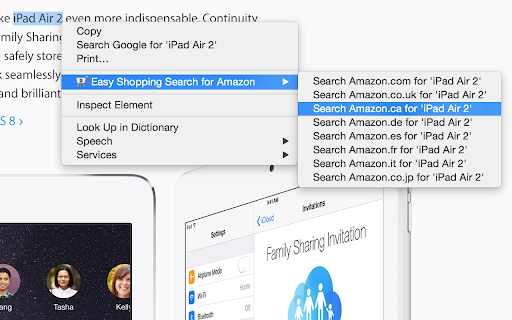
Search for an item on Amazon using the right click context menu from any website. Install the Shopping Easy Search for Amazon and search for selected text on Amazon using the right click context menu from any website(i.e. amazon.com, amazon.co.uk, amazon.de, amazon.es, amazon.fr, amazon.ca, amazon.co.jp).

Search eBay - Find Stuff Fast
Highlight text, right-click, and search eBay instantly. Supports 30+ international sites with powerful filters. No tracking, no ads. Search eBay Canada, UK, USA and 27 more countries instantly from anywhere on the web. HOW IT WORKS Highlight any text on a webpage, right-click, and select "Search eBay" - that's it. Your search opens immediately with all your saved preferences applied. No copy-pasting, no switching tabs, no typing. THREE WAYS TO SEARCH • Right-click any selected text • Click the extension icon and type your search • Type "ebay" in the address bar, press Tab, then enter your search POWERFUL SEARCH OPTIONS Set your preferences once, use them every time: • Choose from 30+ international eBay sites • Filter by Auction, Buy It Now, or Best Offer • Set price ranges and free shipping filters • Search completed/sold listings for price research • Sort by price, ending time, newly listed, and more KEYBOARD SHORTCUT Press Alt+Shift+E to instantly search your selected text. Customize this shortcut in your browser settings. PRIVACY FOCUSED No tracking, no ads, no data collection. Your search preferences are stored locally in your browser and synced only to your own account. We don't see or store any of your searches. DARK MODE Full dark theme support that follows your system preference, or set it manually to light or dark. FEATURES ✓ 30+ international eBay sites ✓ Search history with autocomplete ✓ Export/import your settings ✓ Title & description search ✓ Price range filters ✓ Free shipping filter ✓ Buying format filters ✓ Multiple sort options ✓ List or gallery view ✓ Open in new tab, window, or same tab Perfect for eBay sellers researching prices, collectors hunting for deals, or anyone who shops eBay regularly.Search eBay instantly from anywhere on the web. Bug Fixes - Fixed completed/sold listings filter - Searches no longer include completed listings when the option is unchecked Search Options • Title & Description Search - Search in listing descriptions, not just titles • Buying Format Filters - Filter by Auction, Buy It Now, or Accepts Offers • Price Range - Set minimum and maximum price filters • Free Shipping Only - Filter to show only free shipping listings • Display Mode - Choose Default, List View, or Gallery View User Experience • Dark Mode - Full dark theme support with Light/Dark/Auto options • Keyboard Shortcut - Press Alt+Shift+E to search selected text instantly • Omnibox Search - Type "ebay" in address bar, press Tab, then type your search • Search Autocomplete - Previous searches appear as you type • Configurable History - Set history limit from 5-20 items • Export/Import Settings - Backup and restore your preferences Technical • Complete codebase rewrite with ES Modules • Removed Milligram CSS dependency • Improved error handling • Cleaner, more maintainable codebase

Amazon Warehouse Deals Finder
Visualizza i prezzi usati/ricondizionati di Amazon (Seconda Mano, Warehouse, Occasions…) su tutti gli store europei. Visualizza istantaneamente i prezzi scontati di Amazon Warehouse Deals su qualsiasi pagina dei prodotti Amazon.it

Trusty Search Assistant for Amazon
The best way to find what you're looking for on Amazon * Infinite scroll up to 50 pages of search results. * Trim down results by rating, review count, and price with the Trusty filter sliders and input boxes. * Sort and reverse sort results by rating, review count, or price and see changes instantly. No more hunting through page after page. Find the very best products Amazon has to offer in seconds. Search better with Trusty Search Assistant for Amazon. Works with: amazon.com amazon.co.uk amazon.ca amazon.com.au amazon.eg amazon.de amazon.it amazon.es amazon.fr amazon.com.br amazon.in amazon.com.tr amazon.com.mx amazon.ae v2.0.0 - App rewritten in modern Svelte framework - 90%+ package size reduction - Improved performance - Back to top and clear filters buttons added - Persistent filter settings - Manifest v3 compliant - Added support for Amazon Mexico - amazon.com.mx v1.0.14 - Added support for Australia and Egypt amazon.com.au amazon.eg v1.0.7 - Fixed rating and price bugs for UK and DE. v1.0.6 - Fixed UK display bug and added fallback support. v1.0.5 - Fixed missing Trusty bar bug. Updated to work with new Amazon layout. v1.0.2 - Added international support! Now works on: amazon.com amazon.co.uk amazon.ca amazon.de amazon.it amazon.es amazon.fr amazon.com.br amazon.in

THunt - Product Analysis Tool
👋 👋 Product data analysis tool. It helps you quickly analyze hot-selling products and make smarter decisions. You can use this plug-in to quickly compare prices and evaluate seller reputation quickly to maximize your profit margin! You can also get a better understanding of the competitive landscape and make more competitive decisions. 👋 👋 What are the main functions? 💰 1.Product research With this plugin, you can simply search by image to find similar products with lower prices and higher sales. For each product, this plugin provides: ➡️ Product overview: Includes basic information such as sales, sales volume, and listing time. ➡️ Bulk download of product images: Includes main images, specifications, and descriptions. ➡️ Product review analysis: Includes information such as rating, bad rating, and review content. ➡️ List of competitors: Includes information such as seller name, sales volume, and other competitors. ➡️ Image search for sources: Finds sources for products on platforms such as AliExpress, Taobao, and 1688 based on product images. ➡️ Ranking pages/category pages: Provides statistical charts, statistical panels, and product list data preview and export functions. 👋 👋 How to use it? ———————————————————————————————— Just install it on your Chrome browser, The extension will do it all for you automatically! 1. Install the Data analysis extension on your Chrome browser. 2. Visit website. 3. You will find the most popular charts on the home page, category page, and search results page. 4. An additional extension information panel will appear under each result you search. 5. Click on the floating icon on the product image to quickly view other source channels for the same product. ———————————————————————————————— 👋 👋 👋 👋 👋 👋 👋 👋 👋 👋 A must-have tool for your wholesale business! Download for free now and take your wholesale business to the next level!
