
eenilhbheldklhbmjeigcibmklghflao
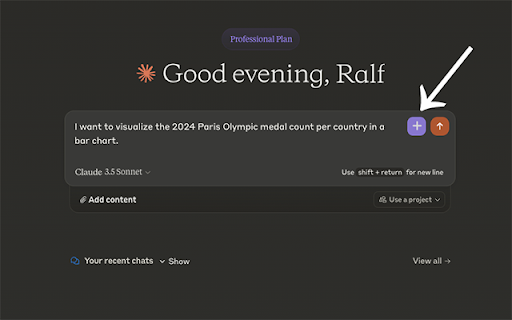

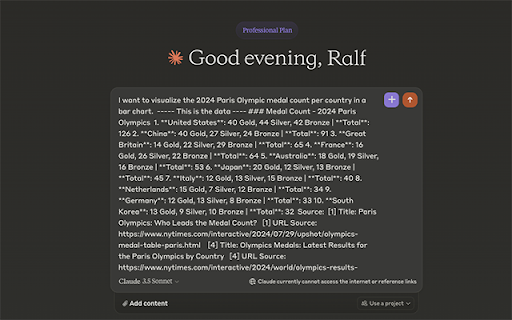
Enhance your Claude AI Chat experience by giving it access to search and browse information on the Internet. Claude Data Fetcher integrates with the Claude AI chat interface, allowing you to retrieve up-to-date information from the web without leaving your Claude conversation. This powerful extension bridges the gap between Claude's knowledge cutoff and current events, making your AI interactions more informative and context-rich. Key Features: 🖱️ One-Click Information Retrieval: Add a custom button to Claude's interface for instant data fetching. 🔍 Intelligent Search: Utilizes OpenAI's GPT-4o-mini to optimize search queries based on your conversation context. 🕸️ Efficient Web Scraping: Leverages Jina AI's Reader API to quickly gather relevant information from across the internet. 🧠 Smart Data Processing: Refines and summarizes search results to provide concise, relevant information to Claude without bloating your prompts. 🔒 Secure: Safely store and manage your OpenAI API key with local encryption 🧰 User-Friendly Side Panel: Easily access settings, or perform searches outside of the Claude Chat UI Perfect for researchers, students, professionals, and anyone who wants to supercharge their Claude AI experience with the latest information available online. Claude Data Fetcher ensures that your Claude Chat always has access to up-to-date knowledge Note: This extension requires an OpenAI API key for optimal functionality. Users are responsible for any associated API usage costs of GPT-4o-mini.

Thunderbit: AI Web Scraper & Web Automation Agent
The AI Web Scraping Chrome Extension. Use ChatGPT, Claude & DeepSeek to scrape and extract data to Excel in just 2 clicks! Thunderbit turns any website into structured data in 2 clicks — no code, no CSS selectors, no Python scripts, no configuration. Just click and scrape. Trusted by 100,000+ users worldwide, Thunderbit is powered by leading AI models (ChatGPT, Gemini & Claude) that read web pages like a human — automatically detecting what to extract and how to structure your data. It was voted as Product of the Week and Product of the Month on the platform of Product Hunt. Whether you need lead lists for sales, price tracking for e-commerce, or data collection for research, Thunderbit handles it. Free web scraper with free data export — to Excel, Google Sheets, Airtable, and Notion. Plus free Email Extractor, Phone Number Extractor, and Image Downloader forever. Free trial available for premium features. 🚀 AI Data Extractor — 2-Click Web Scraping - Zero learning curve. AI suggests columns and structures your output automatically — so you never copy-paste again. - Pull structured data from websites, PDFs, and images instantly. - No-code solution — no complex scripts or browser automation setup needed. 🔗 Subpage Scraping & Deep Data Enrichment - Data extraction doesn't stop on the main page. AI visits each subpage link and enriches your table with additional details. - Perfect for product details, company profiles, or any multi-page data collection. 📄 Pagination & Infinite Scroll Automation - Navigate through thousands of pages automatically — pagination, bulk pages, and infinite scroll all handled. - No manual clicking, no scripts, no browser automation setup. ⏰ Scheduled Scraper & Web Monitor - Set up automated scraping to monitor pricing changes, inventory levels, or any website content on a schedule. - Ideal for e-commerce teams tracking competitor prices. 🔄 PDF to Table & Extract Text from Image - Convert PDFs to structured tables and extract text from images using OCR. - Built for data extraction workflows — not just viewing or converting. 📧 Email Extractor (Free Forever) - Extract email addresses from any website, PDF, or image using AI. - Pulls contact info from Google search results too — ideal for lead generation. 📞 Phone Number Extractor (Free Forever) - Extract phone numbers from any website instantly using AI. - Build prospect lists faster for sales outreach. 🖼️ Image Downloader (Free Forever) - Download images from any website with 1 click. - Bulk download product photos, screenshots, and media assets. 💼 Sales & Lead Generation - Scrape leads from company directories, LinkedIn, and business listings. - Enrich prospect data with AI-powered subpage scraping. - Build targeted sales lists without manual copy-paste. 🛒 E-Commerce & Competitive Intelligence - Scrape product details, prices, and reviews from Amazon, Shopify, and any e-commerce site. - Monitor competitor pricing and inventory with scheduled scraping. 🏠 Real Estate - Scrape listings from Zillow, Redfin, or any property website. - Extract property details, prices, and agent contact info automatically. 📈 Data Import & Automation - Import web data directly into your analytics tools or automate workflows with Zapier. - Export clean, structured data ready for analysis. ✅ 2-click simplicity — no technical skills required ✅ AI-powered accuracy — leading models detect and structure data automatically ✅ Free forever tier — Email, Phone, and Image extractors always free ✅ Free data export — Excel, Google Sheets, Notion, Airtable at no cost ✅ Subpage enrichment — automatically pull details from linked pages Thunderbit is a modern alternative to traditional scraping and data tools: Thunderbit is an AI web scraper Chrome extension that replaces tedious copy-paste work for GTM, Sales, and E-commerce teams. It is recognized as Product of the Week and Product of the Month on Product Hunt in September 2024. Your data stays yours — we don't store your scraped content on our servers. Free tier is free forever. Free trial available for premium features. More about pricing: https://thunderbit.com/pricing If Thunderbit saves you time, we'd love a quick ⭐⭐⭐⭐⭐ review — it helps others discover the tool too. Built by the Thunderbit team. All rights reserved.

MetaPrompt - AI Prompt Engineer & Optimizer for ChatGPT & Claude
Transform unclear questions into expert prompts. Get better AI responses from ChatGPT and Claude with one click. Metaprompt: Your AI Whisperer Transform how you interact with AI MetaPrompt transforms your ChatGPT and Claude experience by intelligently enhancing your prompts. Powered by advanced GPT 4.1 models, our Chrome extension analyzes your questions and refines them to generate clearer, more precise AI responses - saving you time and frustration. Simple, Powerful Workflow 1. Type your question as you normally would 2. Click the MetaPrompt button to apply expert prompt engineering 3. Watch as your request transform into an optimized prompt that gets real results What Sets MetaPrompt Apart - Instant Optimization: Turn unclear questions into structured prompts that deliver exactly what you need - Seamless Integration: Works naturally within ChatGPT's and Claude's interface with zero learning curve - Universal Compatibility: Use our popup anywhere you interact with AI tools Choose Your Perfect Plan MetaPrompt Pro ($5.99/month) - 5000 monthly prompt enhancements - Access to larger, more powerful models for even better results Who Needs MetaPrompt? - Students seeking deeper explanations and research assistance - Professionals requiring accurate information for critical tasks - Writers looking for better creative input - Developers needing precise code solutions - Researchers formulating complex queries - Anyone tired of wasting time on unhelpful AI responses Stop struggling with AI miscommunications. Download MetaPrompt today and start getting the quality responses you deserve.

AI Sidebar with Deepseek, ChatGPT, Claude and more.
Chat with Deepseek AI, ChatGPT, Claude, and more. Boost creativity and productivity using this powerful AI-powered browser tool. Welcome to AI Sidebar – your personal AI assistant embedded directly in your Chrome browser. With support for the latest AI models like ChatGPT (GPT-4o, o3 Mini), Claude 4.5, Gemini 3 Pro Preview, DeepSeek R1, and Meta’s LLaMA 3.3, AI Sidebar helps you write, code, search, summarize, and brainstorm—without switching tabs or apps. ✅ Enhance Your Browsing Experience AI Sidebar transforms your everyday browsing into a smart, interactive workspace. Whether you're studying, working, writing, or exploring ideas, your AI co-pilot is just one click away—available on any site, in any tab, at any time. 🔍 What You Can Do with AI Sidebar 🧠 Chat & Ask Questions Get instant answers, explanations, and summaries using advanced LLMs—right inside your browser. 📚 Summarize Anything Highlight text on websites, PDFs, or emails and let the AI give you quick, clear summaries. 🌐 Multilingual Support Translate text and chat in multiple languages with natural fluency. ⚙️ How It Works 1. Install the AI Sidebar extension. 2. Click the Sidebar icon in your browser. 3. Type your question or highlight content. 4. Get smart, instant answers—no need to open new tabs. 🧬 Powered by Advanced AI Models AI Sidebar seamlessly integrates with powerful large language models (LLMs), including: * OpenAI: GPT-4o, o1 Mini, o3 Mini * Anthropic: Claude 3.5 & 4.5 (Haiku, Sonnet, Opus) * Google: Gemini 1.5 Pro, Gemini 2.0 Flash, Gemini 3 Pro Preview * Meta: Llama 3.3 70B, Llama 3.1 405B * DeepSeek: DeepSeek R1 – built for advanced research and reasoning These models are dynamically selected based on your task to give you optimal performance, speed, and accuracy. 🧑💼 Who Is AI Sidebar For? * Students – Summarize lessons, understand concepts, and improve your writing. * Professionals – Automate repetitive tasks, write emails, and generate reports. * Developers – Ask coding questions, analyze code, and build faster with AI. * Researchers – Get deep insights and contextual answers without searching manually. * Everyone – Enjoy a smarter, faster, and more productive browsing experience. 💡 Example Use Cases * Draft a professional email in seconds. * Summarize long articles or YouTube transcripts. * Translate content from any language. * Create blog posts, outlines, or social media captions. * Debug Python, JavaScript, or any other code instantly. * Ask follow-up questions and get conversational answers. 🖼️ Clean UI, No Clutter AI Sidebar is designed for a distraction-free, elegant experience. With a lightweight interface, fast loading time, and minimal resource usage, it blends smoothly into your workflow without getting in your way. 🛠️ For Developers and Power Users Built-in support for tools like deepseek-coder means you can: * Ask how code works and get clean, documented responses * Refactor or optimize functions * Get step-by-step debugging suggestions * Learn new libraries or frameworks on the fly * Perfect for developers, AI tinkerers, and power users. 📌 Note AI Sidebar is an independent product and is not affiliated with, sponsored by, or endorsed by DeepSeek, OpenAI, Anthropic, Google, or Meta. Powered by Aitopia. 🚀 Try AI Sidebar Today Install now and explore a new era of smarter browsing, learning, and productivity. Whether you’re a student, developer, writer, or just curious, AI Sidebar is your new AI-powered co-pilot always by your side.

Chat4Data: AI Web Scraper & Data Extractor
Your smartest AI web scraper for effortless web scraping 🎯 Powered by Gemini, Claude, and other leading LLMs, Chat4Data Agent runs entirely in your Chrome browser. Just ask for any web data you need— it navigates the page, finds the right fields, handles pagination, and delivers structured data in Excel, CSV or Json. You don't open the page. You don't click anywhere. You don't write a single XPath. Just ask, and it does the rest. 🏆 #1 Product of the Day & #1 Product of the Week on Product Hunt 🌐 Official Website: https://chat4data.ai 1. Ask Type what you want in plain English. Be as specific as you'd be with a colleague: "Open Amazon, search for 'Lego', sort by best sellers, and scrape product name, brand, rating, number of ratings, and price from the first 3 pages." 2. Check the plan The agent doesn't just nod and disappear. It lays out exactly what it's going to do, step by step: 1. Open Amazon homepage 2. Search for 'Lego' in the search box 3. Sort results by Best Sellers 4. Scroll to bottom of the product list, collect brand, name, rating, ratings count, and price 5. Click next page, repeat for 3 pages total 3. Confirm & Run Need tweaks? Just say so. Happy with it? Hit start. Your second-to-none web scraping assistant. All it asks is your ask— No setup, no site hunting, no flow configuration. Just describe what you need, and Chat4Data handles the rest. Scrapes the whole page in one task—No more splitting tasks or merging CSVs by hand. Want to add a field mid-scrape? Just say so. Adapts when things get tricky — Handles pagination, infinite scroll, detail pages, and one-level-deeper extraction. A dual-XPath locator with field validation ensures it delivers the right data even on complex, dynamic pages. Human-in-the-loop — Hit a login wall or CAPTCHA? It pauses so you can step in, then picks up where it left off. Low cost — Configure once, rerun anytime at a fraction of the cost of cloud-based scrapers Privacy-first by design — All scraping runs locally in your browser; No data uploaded or stored on our end. Lead generation & B2B sales — Extract email addresses, phone numbers, and contact info from directories and listing sites to build high-intent outreach lists 🛒 E-commerce price monitoring — Scrape product titles, prices, discounts, stock status, and reviews from competitor or marketplace pages to optimize pricing and promotions 🏠 Real estate research — Collect property listings, prices, photos, attributes, and agent contacts from housing portals to analyze market trends and generate leads 🌐 Local business prospecting — Scrape local directories for addresses, phone numbers, and ratings to build geo-targeted lead lists 💬 Competitor analysis — Monitor competitor pages for content, pricing, and positioning changes 👤 Recruitment — Scrape job boards and professional directories to source candidates or track hiring trends Pricing Free to start. Premium plans for heavier use. More: https://chat4data.ai/pricing 1. Works on publicly accessible web pages only 2. Supports list pages with one level of linked detail pages — deeper sub-page navigation is not currently supported 3. Please ensure your use complies with the target website's Terms of Service 4. For pages behind a login, the agent will pause and ask you to sign in. 5. Privacy Policy: https://chat4data.ai/privacy-policy Help Center: https://chat4data.ai/docs/tutorials Email: support@chat4data.ai If you encounter a website that doesn't extract correctly, we typically respond within 24 hours.
