
eenibcgdpolkdophaaiikdcofgkjlllm
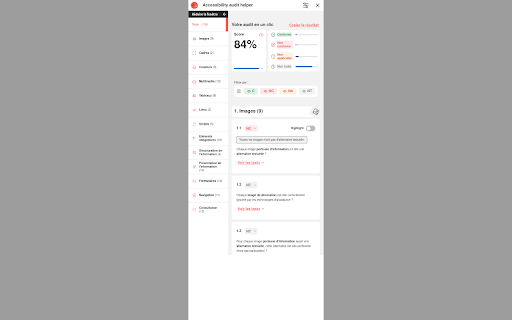
A browser extension to check compliance with the RGAA standard Accelerate and simplify your RGAA accessibility audits directly in your browser! Designed for auditors, developers and all web stakeholders concerned about accessibility, this extension available for Chrome and Firefox browsers automates the verification of RGAA accessibility criteria, offering you significant time savings and precise analysis. The RGAA, aligned with WCAG standards, aims to ensure digital accessibility for people with disabilities, targeting public services and large companies in France with a turnover greater than 250 million euros, for a more inclusive internet. For more details, please visit the official RGAA website.

OWL - RGAA
OWL - RGAA propose une approche de l'audit d'accessibilité RGAA en se basant sur la granularité des composants plutôt que sur la page. Cela permet d'avoir une meilleure évaluation des pages en prenant en compte les éléments transverses et un meilleur suivi des corrections. OWL - RGAA propose les fonctionnalités suivantes : - évaluation automatique d'un certain nombre de critères qui permet de rendre non applicable, valider ou d'invalider certains critères ; - aides contextuelles permettant d'identifier les éléments à auditer au sein d'une page sur les critères ; - gestion de l'audit (déclaration de l'échantillon, suivi des critères, calcul du taux de conformité) ; - génération du rapport d'accessibilité ; - génération de la déclaration d'accessibilité. version 1.6 - Améliorations de la page Rapport (visualisation markdown) ; - Ajout du calcul de priorisation des critères dans le rapport par étapes (3) de correction ; - Amélioration des exports CSV pour une meilleure gestion des accents ; - Prise en charge des selector CSS multiples sur les composants ; - Ajout d'un autocheck sur le critère 13.1 (NA si aucun élement interactif) ; - Ajout d'un lien vers les patterns WAI ARIA sur les critères 7.1 et 7.3 ; - Mise en visibilité du périmètre du composant courant dans la page auditée ; - Corrections et optimisations mineures version 1.3 - Ajout d'une fonctionnalité d'export du rapport d'accessibilité au format DOC - Ajout de la possibilité de télécharger la déclaration d'accessibilité au format HTML - Ajout d'une fonctionnalité d'export au format CSV de la synthèse des critères par page - Ajout d'un lien entre le statut NA de certains critères - Ajout de la notion de composant "spécifique" pour différencier les composants partagés entre les pages et ceux spécifiques à une page en particulier afin de permettre un import de composant plus simple et une validation automatique plus pertinente sur certains critères - Ajout des axes de priorisation (impact / complexité) sur les non conformités - Ajout d'un référentiel d'impacts utilisateurs par critères - Ajout d'un fil d'Ariane pour une meilleur navigabilité entre les écrans - Amélioration des aides contextuelles sur les critères 6.1, 7.2, 8.2, 8.3, 8.4, 8.7, 8.9, 9.2, 9.3 - Amélioration de la validation automatique sur les critères 8.8, 8.9, 10.1 - Modification du système de stockage local (pour plus d'espace) - Amélioration des données affichées dans l'aide contextuelle et de la coloration syntaxique - Ajustements d'interfaces - Correction du problème bloquant qui survenait suite à la modification des informations d'un audit, d'une page ou d'un composant - Correction de bugs mineurs version 1.2 - Mise en place du système de dérogations - Amélioration du Rapport en ajoutant un synthèse graphique par page et amélioration de la génération du template de déclaration d'accessibilité

Accessibility by Fruggr
Tool for supervising and improving the accessibility of your digital services

Silktide Accessibility Checker
Test your website against over 200 website accessibility checks with Silktide’s easy to understand accessibility checker. ✅ Test your webpages for over 200 website WCAG accessibility checks ✅ See highlighted accessibility concerns directly on the webpage ✅ Use our straightforward, step-by-step guidance to fix the issues ✅ Check WCAG color contrast of any on-page elements ✅ Check alt text of any on-page images ✅ Listen to your website with our screen reader simulator 🔥 Check accessibility against 200 WCAG standards including 2.0, 2.1 and 2.2 🔥 Discover color contrast errors with our handy color picker 🔥 Understand which images on the page have alt text, missing alt text, or decorative alt text 🔥 Understand how your site appears to users with visual impairments. We aim for our accessibility checker to be the most user-friendly on the market. We'll help you test against the WCAG accessibility standards, up to the latest 2.2 release. Our tool can also help you find ADA website accessibility violations. We’re the comprehensive web governance platform that helps Fortune 500 companies, governments, healthcare providers, and higher education institutions monitor and improve their websites. We’re passionate about accessibility and offer a range of free tools and resources help you make the web more accessible. Visit https://silktide.com/ for more details. When you update the extension, your browser (Chrome, Edge, or whichever you use) may ask for a new permission. We know that sounds intimidating, but rest assured: • We do not collect or send data about every site you visit. • We only gather info when you specifically choose to test a page or if that page is already in your Silktide account. • We take security and privacy seriously. This permission simply lets us display the instant results you love, plus any new features coming soon. By installing the Silktide Accessibility Checker browser extension, you are agreeing to our Silktide Accessibility Checker Extension Terms of Use https://silktide.com/company/legal/accessibility-checker-extension-terms/ and Privacy Policy https://silktide.com/company/legal/free-accessibility-extension-privacy-policy/.

WAVE Evaluation Tool
Evaluate web accessibility within your browser. WAVE is a web accessibility evaluation tool developed by WebAIM.org. It provides visual feedback about the accessibility of your web content by injecting icons and indicators into your page. No automated tool can tell you if your page is accessible, but WAVE facilitates human evaluation and educates about accessibility issues. All analysis is done entirely within the Chrome browser allowing secure valuation of intranet, local, password protected, and other sensitive web pages. To run a WAVE report, simply click on the WAVE icon to the right of your browser address bar, or select "WAVE this page" from the context menu. WAVE errors align with WCAG 2.2 failures. The WAVE interface facilitates human evaluation of many other aspects of accessibility and Web Content Accessibility Guidelines, ADA, and Section 508 compliance. Version 3.3.1.0 (May 2026) - Various bug fixes and performance enhancements. Update AIM score to align with 2026 WebAIM Million. Version 3.3.0.4 (December 2025) - Bug fix for scripting exception with some pages with small text. Minor interface improvements. Version 3.3.0.3 (November 2025) provides performance, interface, and testing improvements. Improved support for ARIA headings and prefers-reduced-motion user settings. Version 3.3.0.0 (October 2025) adds numerous new features, enhancements, and bug fixes. Resetting the extension no longer refreshes the page, thus supporting better testing of dynamic content. The Summary and Details panel are now combined. The AIM Score is presented. Viewing the Order, Structure, or Contrast tabs now filters to only relevant page icons. The WAVE sidebar can now be collapsed out of view. Version 3.2.7.2 (September 2024) fixes a bug that disallowed checking of local files and suppresses errors in some cases where role="presentation" is present. Version 3.2.7.0 (August 2024) adds compatibility with Manifest v3. Inputs with aria-disabled=true are no longer considered for contrast checking. Version 3.2.6.0 (August 2024) adds support for contrast checking when foreground alpha/opacity is defined. The Contrast sidebar tools are updated to support foreground alpha. Also numerous minor bug fixes and improvements. Version 3.2.5.3 (February 2024) fixes numerous minor bugs and adds testing refinements. Some hidden inputs are no longer incorrectly flagged as not labeled. Version 3.2.4.4 (October 2023) fixes a few minor bugs with testing hidden content and with the sidebar contrast tools. Version 3.2.3.9 (June 2023) removes the warning message on UserWay pages due to them removing code that changes page content when the WAVE extension is activated. Version 3.2.3.8 (June 2023) includes numerous accessibility test enhancements, several minor bug fixes, and simplification of the contrast checking tools. Users are informed that WAVE results may be manipulated on pages that utilize UserWay or accessiBe overlays. Version 3.2.3 (March 2023) includes several minor bug fixes. A previous update to test for contrast errors in hidden elements has been reverted. While this was useful for finding contrast errors in drop-down menus, tab panels, dialog windows, etc., identification of errors in hidden elements caused user confusion and, in some rare cases, false positives. Version 3.2 (December 2022) includes over 100 bug fixes and performance enhancements. The extension no longer utilizes jQuery, resulting in faster testing and better compatibility with a variety of pages. A new Navigation Order panel is available that shows the navigation order, element roles, and accessible names (what is read by a screen reader) for all navigable elements. Version 3.1.6 (October 2021) includes numerous bug fixes and test rule enhancements for better testing contrast (filters, background images, and other complex color definitions are better handled), document language (IANA-defined language values are now tested), empty links and buttons (better ARIA support for accessible name computations), broken ARIA references, etc., etc. Performance and accessibility has been improved. Version 3.1.3 (November 2020) includes performance enhancements and fixes several minor bugs, including fixes for multiple alerts for some pseudo-lists and disabled controls being incorrectly flagged for contrast failures. Version 3.1.2 (October 2020) fixes several minor bugs, including with the Structure tab sometimes incorrectly showing no structure, and improves performance and accessibility testing reliability. Version 3.1 (September 2020) includes new accessibility tests (region, figure, possible list, select element missing label, and image with title), improved contrast checking, expanded lang attribute value checking, and numerous other bug fixes and improvements. Version 3.0.9 (July 2020) includes numerous bug fixes, improved accessibility, and improved color contrast checking including fewer false positives and expanded contrast checking for form inputs.
